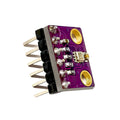
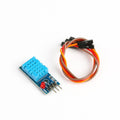
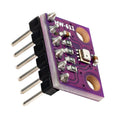
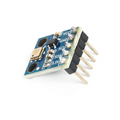
Overview
The DHT22 (also known as AM2302) is a calibrated digital temperature and humidity sensor that combines a capacitive humidity element with a thermistor in a single 3-pin module. It outputs both readings on a single data line using a custom one-wire-like protocol, making it easy to use with virtually any microcontroller.
Compared to the older DHT11, the DHT22 offers a wider temperature range (-40°C to +80°C), better humidity accuracy (±2% RH), and finer resolution (0.1°C / 0.1% RH). The pre-soldered breakout board includes a 10k pull-up resistor on the data line and a stabilizing capacitor, so you can wire it directly to Arduino, ESP32, Raspberry Pi, or Pico without any external components.
At a Glance
Specifications
| Parameter | Value |
| Operating Voltage | 3.3V - 5.5V DC |
| Operating Current | 1.0 - 1.5 mA (measuring), 40 µA (standby) |
| Temperature Range | -40°C to +80°C |
| Temperature Accuracy | ±0.5°C |
| Humidity Range | 0 - 100% RH |
| Humidity Accuracy | ±2% RH (typical) |
| Resolution | 0.1°C / 0.1% RH |
| Sampling Rate | 0.5 Hz (one reading every 2 seconds) |
| Communication Protocol | Single-wire digital (proprietary) |
| Onboard Pull-up | 10kΩ on DATA line |
| Module Dimensions | Approx. 22 x 28 mm |
Pinout Diagram

Wiring Guide
Arduino Wiring
The DHT22 connects directly to any Arduino digital pin. The onboard 10k pull-up resistor handles signal idle-high, so no external components are needed.
| DHT22 Pin | Arduino Pin |
|---|---|
| VCC (+) | 5V |
| DATA | Digital Pin 2 |
| GND | GND |
DHT sensor library for the easiest setup. Install it via the Arduino Library Manager (Sketch > Include Library > Manage Libraries).
ESP32 Wiring
ESP32 GPIO operates at 3.3V, and the DHT22 also works at 3.3V — no level shifting required. Power the module from the ESP32's 3V3 pin for cleanest signaling.
| DHT22 Pin | ESP32 Pin |
|---|---|
| VCC (+) | 3V3 |
| DATA | GPIO 4 |
| GND | GND |
Raspberry Pi Wiring
The DHT22 works directly with Raspberry Pi 3.3V GPIO. Use any free GPIO pin for DATA. Software timing on Linux can occasionally miss frames, so consider using the Adafruit_DHT library which uses kernel-level timing.
| DHT22 Pin | Raspberry Pi Pin |
|---|---|
| VCC (+) | Pin 1 (3.3V) |
| DATA | Pin 7 (GPIO 4) |
| GND | Pin 6 (GND) |
Raspberry Pi Pico Wiring
The Pico's 3.3V GPIO works perfectly with the DHT22. MicroPython has built-in DHT support via the dht module, so no external libraries are needed.
| DHT22 Pin | Pico Pin |
|---|---|
| VCC (+) | 3V3 (OUT) |
| DATA | GP15 |
| GND | GND |
Code Examples
Arduino
// DHT22 Temperature & Humidity Sensor - Arduino Example
// Requires Adafruit DHT sensor library

#include <DHT.h>

#define DHTPIN 2          // DATA pin connected to digital 2
#define DHTTYPE DHT22     // DHT 22 (AM2302)

DHT dht(DHTPIN, DHTTYPE);

void setup() {
  Serial.begin(9600);
  Serial.println("DHT22 starting...");
  dht.begin();
}

void loop() {
  delay(2000);  // DHT22 needs ~2s between readings

  float h = dht.readHumidity();
  float t = dht.readTemperature();

  if (isnan(h) || isnan(t)) {
    Serial.println("Failed to read from DHT sensor!");
    return;
  }

  Serial.print("Humidity: ");
  Serial.print(h);
  Serial.print(" %\t");
  Serial.print("Temperature: ");
  Serial.print(t);
  Serial.println(" *C");
}
Raspberry Pi (Python)
#!/usr/bin/env python3
# DHT22 - Raspberry Pi Example
# Install: pip install adafruit-circuitpython-dht
# Also: sudo apt install libgpiod2

import time
import board
import adafruit_dht

# DATA pin connected to GPIO 4 (physical pin 7)
dht = adafruit_dht.DHT22(board.D4)

while True:
    try:
        temp = dht.temperature
        humid = dht.humidity
        print(f"Temp: {temp:.1f} C  Humidity: {humid:.1f}%")
    except RuntimeError as e:
        # Reading failed (timing issue), just retry
        print("Read error:", e.args[0])
    time.sleep(2.0)
Raspberry Pi Pico (MicroPython)
# DHT22 - Pico MicroPython Example
# Uses built-in dht module (no install needed)

from machine import Pin
import dht
import time

sensor = dht.DHT22(Pin(15))

while True:
    try:
        sensor.measure()
        t = sensor.temperature()
        h = sensor.humidity()
        print("Temp: {:.1f} C  Humidity: {:.1f}%".format(t, h))
    except OSError as e:
        print("Failed to read sensor:", e)
    time.sleep(2)
ESP32 (Arduino)
// DHT22 - ESP32 Arduino Example
// Requires Adafruit DHT sensor library

#include <DHT.h>

#define DHTPIN 4          // DATA pin connected to GPIO 4
#define DHTTYPE DHT22

DHT dht(DHTPIN, DHTTYPE);

void setup() {
  Serial.begin(115200);
  dht.begin();
}

void loop() {
  delay(2000);
  float h = dht.readHumidity();
  float t = dht.readTemperature();
  if (isnan(h) || isnan(t)) {
    Serial.println("DHT22 read failed");
    return;
  }
  Serial.printf("Temp: %.1f C  Humidity: %.1f%%\n", t, h);
}
Frequently Asked Questions
DHT11 to DHT22 in the library.delay(2000) between reads and check that VCC is solid 3.3V or 5V.DHT object per pin. ESP32 and Pico work the same way — just instantiate one sensor object per GPIO.DHT sensor library is the standard. Raspberry Pi: use adafruit-circuitpython-dht with libgpiod for reliable timing. Pico: MicroPython has a built-in dht module — no install needed.