Overview
The BMP180 is the classic digital atmospheric pressure and temperature sensor from Bosch — the predecessor to the BMP280 and BME280. It uses I2C, runs on 3.3V or 5V (with on-board level shifting), and delivers ±0.5 hPa pressure accuracy and ±1°C temperature accuracy in a tiny 5-pin breakout.
The BMP180 is most commonly used for altimetry — drones, weather stations, and altitude-aware projects. With 0.06 hPa resolution, you can detect altitude changes as small as half a meter — enough for detecting which floor you're on indoors, drone height-hold, or simple barometric weather forecasting.
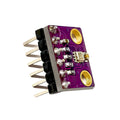
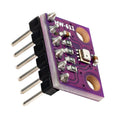
This pre-soldered breakout exposes VCC, GND, SCL, SDA, and 3.3V (already-regulated 3.3V output for chaining sensors). Default I2C address is 0x77. Drop-in compatible with the original Adafruit_BMP085 library, which despite the name supports the BMP180 too.
At a Glance
Specifications
| Parameter | Value |
| Sensor IC | Bosch BMP180 |
| Operating Voltage | 3.3V or 5V (on-board regulator) |
| Operating Current | 5 µA @ 1 Hz, 12 µA @ ultra-low-power mode |
| Pressure Range | 300 - 1100 hPa (≈ +9000 m to -500 m altitude) |
| Pressure Resolution | 0.01 hPa (≈ 0.17 m altitude) |
| Pressure Accuracy | ± 0.5 hPa (relative), ± 2 hPa (absolute) |
| Temperature Range | -40°C to +85°C |
| Temperature Accuracy | ± 1.0°C |
| Communication | I2C (up to 3.4 MHz) |
| I2C Address | 0x77 (fixed) |
| Pin Count | 5 (VCC, GND, SCL, SDA, 3.3V output) |
| Module Dimensions | ~14 × 12 mm |
Pinout Diagram

Wiring Guide
Arduino Wiring (I2C)
Standard I2C wiring. The breakout has on-board pull-ups, so no external resistors needed.
| BMP180 Pin | Arduino Pin |
|---|---|
| VCC | 5V |
| GND | GND |
| SCL | A5 (SCL) |
| SDA | A4 (SDA) |
| 3.3V | Not connected (regulator output) |
ESP32 Wiring (I2C)
ESP32 default I2C is on GPIO 21 (SDA) and GPIO 22 (SCL).
| BMP180 Pin | ESP32 Pin |
|---|---|
| VCC | 3.3V |
| GND | GND |
| SCL | GPIO 22 |
| SDA | GPIO 21 |
Raspberry Pi Wiring (I2C)
Enable I2C in raspi-config. Default I2C is BCM 2 (SDA) and BCM 3 (SCL).
| BMP180 Pin | Raspberry Pi Pin |
|---|---|
| VCC | Pin 1 (3.3V) |
| GND | Pin 6 (GND) |
| SCL | Pin 5 (BCM 3) |
| SDA | Pin 3 (BCM 2) |
i2cdetect -y 1. You should see 0x77.
Raspberry Pi Pico Wiring (I2C)
Default I2C0 on Pico: SDA on GP4, SCL on GP5.
| BMP180 Pin | Pico Pin |
|---|---|
| VCC | 3V3 |
| GND | GND |
| SCL | GP5 |
| SDA | GP4 |
Code Examples
Arduino — Adafruit BMP085/BMP180 Library
// BMP180 - Arduino Example
// Library: Adafruit BMP085 Unified library (works for BMP085 and BMP180)

#include <Wire.h>
#include <Adafruit_Sensor.h>
#include <Adafruit_BMP085_U.h>

Adafruit_BMP085_Unified bmp = Adafruit_BMP085_Unified(10085);

void setup() {
  Serial.begin(9600);
  if (!bmp.begin()) {
    Serial.println("BMP180 not found!");
    while (1) {}
  }
}

void loop() {
  sensors_event_t event;
  bmp.getEvent(&event);

  if (event.pressure) {
    Serial.print("Pressure: "); Serial.print(event.pressure); Serial.println(" hPa");

    float temperature;
    bmp.getTemperature(&temperature);
    Serial.print("Temp: "); Serial.print(temperature); Serial.println(" C");

    float seaLevelPressure = 1013.25;
    Serial.print("Altitude: ");
    Serial.print(bmp.pressureToAltitude(seaLevelPressure, event.pressure));
    Serial.println(" m");
  }
  Serial.println();
  delay(1000);
}
Raspberry Pi (Python)
#!/usr/bin/env python3
# BMP180 - Raspberry Pi Python Example
# Install: sudo pip3 install adafruit-circuitpython-bmp085

import time
import board
import adafruit_bmp085

i2c = board.I2C()
bmp = adafruit_bmp085.Adafruit_BMP085(i2c)

while True:
    print(f"Temp:     {bmp.temperature:.2f} C")
    print(f"Pressure: {bmp.pressure:.2f} hPa")
    print(f"Altitude: {bmp.altitude:.2f} m\n")
    time.sleep(1)
Raspberry Pi Pico (MicroPython)
# BMP180 - Pico MicroPython
# Library: bmp180.py from Sebastian Wallkoetter (search GitHub).

from machine import Pin, I2C
from bmp180 import BMP180
import time

i2c = I2C(0, scl=Pin(5), sda=Pin(4), freq=400_000)
bmp = BMP180(i2c)
bmp.oversample_sett = 2
bmp.baseline = 101325   # sea-level pressure in Pa

while True:
    print("Temp:     {:.2f} C".format(bmp.temperature))
    print("Pressure: {:.2f} hPa".format(bmp.pressure / 100))
    print("Altitude: {:.2f} m\n".format(bmp.altitude))
    time.sleep(1)