Overview
The ADXL345 is a small, ultra-low-power 3-axis accelerometer from Analog Devices that has become the de facto standard for measuring tilt, motion, vibration, and orientation. With a ±16g range, 13-bit resolution, and both I2C and SPI interfaces, it fits everywhere from quadcopters and Klipper-tuned 3D printers to motion-activated alarms and DIY pedometers.
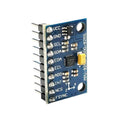
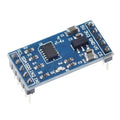
This pre-soldered breakout exposes all 8 pins (GND, VCC, CS, INT1, INT2, SDO, SDA, SCL), tying CS and SDO appropriately for I2C operation. Power it with anything from 3V to 5V — the on-board regulator and level shifter handle either. Default I2C address is 0x53.
Beyond raw acceleration data, the ADXL345 has built-in tap detection (single and double tap), free-fall detection, and activity/inactivity interrupts — meaning you can offload motion-event detection from your microcontroller. Use it with Arduino, ESP32, Raspberry Pi, Pico, and Klipper for resonance compensation tuning.
At a Glance
Specifications
| Parameter | Value |
| Sensor IC | Analog Devices ADXL345 |
| Operating Voltage | 3V to 5V (on-board regulator) |
| Operating Current | 40 µA (measurement mode), 0.1 µA (standby) |
| Acceleration Range | ±2g, ±4g, ±8g, ±16g (selectable) |
| Resolution | 13-bit (10-bit fixed at ±2g) |
| Sensitivity | 3.9 mg/LSB (full resolution) |
| Output Data Rate | 0.1 Hz to 3200 Hz |
| Communication | I2C (up to 400 kHz) or SPI (up to 5 MHz, 3 or 4-wire) |
| I2C Address | 0x53 (SDO=GND), 0x1D (SDO=VCC) |
| Interrupts | Tap, double-tap, free-fall, activity, inactivity |
| Pin Count | 8 (VCC, GND, CS, INT1, INT2, SDO, SDA, SCL) |
| Dimensions | ~22 × 18 mm |
Pinout Diagram

Wiring Guide
Arduino Wiring (I2C)
I2C uses just 4 wires. Tie CS to VCC to enable I2C mode. SDO selects address: tie to GND for 0x53 (default), or VCC for 0x1D.
| ADXL345 Pin | Arduino Pin |
|---|---|
| VCC | 5V |
| GND | GND |
| SCL | A5 (SCL) |
| SDA | A4 (SDA) |
| CS | VCC (enables I2C mode) |
| SDO | GND (address 0x53) |
| INT1, INT2 | Optional — connect to digital pin if using interrupts |
ESP32 Wiring (I2C)
ESP32 default I2C is on GPIO 21 (SDA) and GPIO 22 (SCL).
| ADXL345 Pin | ESP32 Pin |
|---|---|
| VCC | 3.3V |
| GND | GND |
| SCL | GPIO 22 |
| SDA | GPIO 21 |
| CS | 3.3V |
| SDO | GND |
Raspberry Pi Wiring (I2C)
Enable I2C with raspi-config. Default I2C is BCM 2 (SDA) and BCM 3 (SCL). For Klipper resonance tuning, the same wiring applies — Klipper's klippy_extras.adxl345 module reads it over I2C.
| ADXL345 Pin | Raspberry Pi Pin |
|---|---|
| VCC | Pin 1 (3.3V) |
| GND | Pin 6 (GND) |
| SCL | Pin 5 (BCM 3) |
| SDA | Pin 3 (BCM 2) |
| CS | 3.3V |
| SDO | GND |
Raspberry Pi Pico Wiring (I2C)
Default I2C0 on Pico: SDA on GP4, SCL on GP5.
| ADXL345 Pin | Pico Pin |
|---|---|
| VCC | 3V3 |
| GND | GND |
| SCL | GP5 |
| SDA | GP4 |
| CS | 3V3 |
| SDO | GND |
Code Examples
Arduino — Adafruit ADXL345 Library
// ADXL345 - Read X/Y/Z acceleration
// Library: Adafruit ADXL345 (Library Manager) — pulls in Adafruit Unified Sensor

#include <Wire.h>
#include <Adafruit_Sensor.h>
#include <Adafruit_ADXL345_U.h>

Adafruit_ADXL345_Unified accel = Adafruit_ADXL345_Unified(12345);

void setup() {
  Serial.begin(9600);
  if (!accel.begin()) {
    Serial.println("ADXL345 not detected!");
    while (1) {}
  }
  accel.setRange(ADXL345_RANGE_16_G);
}

void loop() {
  sensors_event_t event;
  accel.getEvent(&event);
  Serial.print("X: "); Serial.print(event.acceleration.x); Serial.print(" m/s^2  ");
  Serial.print("Y: "); Serial.print(event.acceleration.y); Serial.print(" m/s^2  ");
  Serial.print("Z: "); Serial.print(event.acceleration.z); Serial.println(" m/s^2");
  delay(100);
}
Raspberry Pi (Python)
#!/usr/bin/env python3
# ADXL345 - Raspberry Pi Python Example
# Install: sudo pip3 install adafruit-circuitpython-adxl34x

import time
import board
import adafruit_adxl34x

i2c = board.I2C()
accel = adafruit_adxl34x.ADXL345(i2c)

while True:
    x, y, z = accel.acceleration
    print(f"X: {x:6.2f}  Y: {y:6.2f}  Z: {z:6.2f}  m/s^2")
    time.sleep(0.1)
Raspberry Pi Pico (MicroPython)
# ADXL345 - Pico MicroPython
# Library: micropython-adxl345 from PyPI or copy adxl345.py manually.

from machine import Pin, I2C
import adxl345
import time

i2c = I2C(0, scl=Pin(5), sda=Pin(4), freq=400_000)
accel = adxl345.ADXL345(i2c)

while True:
    x, y, z = accel.x, accel.y, accel.z
    print("X={:6.2f}  Y={:6.2f}  Z={:6.2f}".format(x, y, z))
    time.sleep_ms(100)