Raspberry Pi Pico 2 W + MPU6050 6-Axis IMU Breadboard Starter Kit
$29.99 USD
Shipping
& tax calculated at checkout
In stock· Order by 3pm ET and it ships today
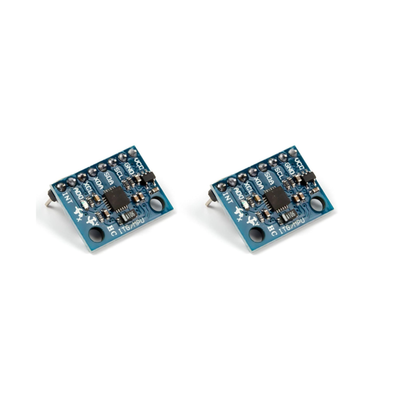
Raspberry Pi Pico 2 W bundle with MPU6050 6-axis IMU (accel + gyro), solderless breadboard, and jumper wires—wire I2C for motion, tilt, and orientation projects on Pico.
- Free Ground Shipping U.S. orders $35+
- Ships from USA Domestic fulfillment
- 30-day returns Free defect replacement
- 7-day support Fast email replies
Frequently bought together
Raspberry Pi Pico 2 W + MPU6050 6-Axis IMU Breadboard Starter KitNo reviews yet
$29.99
This item
Total for 4 items
$48.36
Products related to this item

★★★★★
(45)
MPU6050 Pre-Soldered IMU Accelerometer Sensor 2-Pack for Arduino
$10.99

★★★★★
(9)
MPU9250 GY-9250 Pre-Soldered 9-DOF IMU Sensor for Arduino, Raspberry Pi & ESP32
$19.99

★★★★★
(62)
ADXL345 Pre-Soldered Accelerometer Sensor for Arduino, Raspberry Pi & Klipper
$9.00

No reviews yetRaspberry Pi Pico 2W with Pre-Soldered Headers
$14.99

No reviews yetXIAO RP2040 Pre-Soldered Microcontroller for Arduino & MicroPython
$14.98

★★★★★
(1)
Raspberry Pi Pico 2 with Pre-Soldered Headers
$11.99
Overview
Product Overview
What you get: Raspberry Pi Pico 2 W, MPU6050 (2pcs) module, breadboard, and jumper wire set as bundled in this listing. You will still need a compatible USB cable and your usual Pico setup (firmware tools or MicroPython) to program the board; follow standard 3.3 V I2C wiring (power, ground, SDA, SCL) for the MPU6050.
Questions & answers
Frequently asked questions
Yes. The included Pico 2 W can be programmed using your normal Pico workflow, such as MicroPython or standard firmware tools. The MPU6050 connects separately over I2C using the Pico’s 3.3 V logic.
The bundle is intended for quick breadboard use and includes a Pico 2 W, two MPU6050 modules, a breadboard, and jumper wires. ShillehTek’s pre-soldered format reduces setup work, but you still need to wire the circuit.
Use standard 3.3 V I2C wiring: power, ground, SDA, and SCL between the Pico 2 W and the MPU6050. Do not treat it as a plug-in sensor; the pins must be connected correctly on the breadboard.
The MPU6050 is a 6-axis IMU for reading acceleration and rotational motion. Common Pico projects include tilt detection, gesture input, motion logging, balancing robots, and basic orientation experiments using MicroPython or other Pico firmware.
No USB cable is specified in the listed contents. You will need a compatible USB cable for the Pico 2 W, plus your usual Pico programming environment before uploading code or running MicroPython examples.
Have other questions?
Chat with our US-based team — we usually reply fast.
What's included
Features & Specs
Reference
Documents
Full Product Manual ShillehTek Raspberry Pi Pico 2 Presoldered Headers | ShillehTek Product Manual In-depth setup guide with wiring, code examples, and troubleshooting.Learn
Related Tutorials

MPU6050 MEMS Sensor: How Accel and Gyro Work
Learn how the MPU6050 MEMS sensor converts motion into capacitance changes for linear acceleration and gyroscope read...

Raspberry Pi MPU6050: Smooth Sensor Data in MicroPython
Build a Raspberry Pi MPU6050 low-pass filter in MicroPython to smooth noisy accelerometer readings and keep stable, u...

Arduino Uno MPU6050: Get I2C motion readings
Connect an Arduino Uno to an MPU6050 over I2C and stream accelerometer and gyroscope readings in the Arduino IDE usin...

ESP32 MPU6050: Accurate angle readings with i2cdevlib
Build an ESP32 + MPU6050 project that outputs accurate yaw, pitch, and roll using the i2cdevlib DMP example in Platfo...

MPU6050 ToxicLibs: Fix Processing Teapot Imports
Fix legacy ToxicLibs setup in Processing so the MPU6050Teapot example compiles cleanly and resolves missing “toxi” im...

Raspberry Pi AWS S3: Upload files with Python
Build a Raspberry Pi Python uploader to push images, videos, and other files into an AWS S3 bucket using boto3 for re...

Raspberry Pi Pico W MPU6050: Install libraries in VSCode
Learn how to add third-party MicroPython libraries in VSCode for Raspberry Pi Pico W using an MPU6050 example, so imp...

Raspberry Pi Pico W MPU6050: Send data to DynamoDB
Build a Raspberry Pi Pico W to AWS DynamoDB pipeline using MPU6050 data over MQTT via IoT Core and Lambda, for scalab...

Raspberry Pi Pico BH1750: Measure Ambient Light in Lux
Build a Raspberry Pi Pico/Pico W BH1750 lux meter in MicroPython to measure ambient light for smart lighting and ligh...

Raspberry Pi Pico W MPU6050: Read IMU Data in C++
Build a Raspberry Pi Pico W + MPU6050 IMU reader in C++ using I2C, then print accelerometer, gyroscope, and temperatu...

Raspberry Pi Pico Wokwi: Simulate projects without hardware
Simulate Raspberry Pi Pico/Pico W projects in Wokwi, run a MicroPython LED blink, and explore peripherals without buy...
Pico W NEO-6M GPS: Reverse geocode your location
Build a Raspberry Pi Pico W + NEO-6M GPS reverse geolocator that prints coordinates and a city/country lookup using O...

Raspberry Pi Pico W HC-SR04: Obstacle Detection LEDs
Build Raspberry Pi Pico W obstacle detection with an HC-SR04 ultrasonic sensor and Neopixel LED proximity colors in M...

Raspberry Pi Pico W Ultrasonic Sensor: Remote Robot Drive
Build a Raspberry Pi Pico W Wi-Fi robot control page with ultrasonic emergency stop and NeoPixel feedback, using an a...

Raspberry Pi Pico W BME280: Stream data to Azure IoT
Build a Raspberry Pi Pico W + BME280 pipeline that streams real-time sensor data to Azure IoT Hub and Azure Data Expl...
Arduino NEO-6M GPS: Read Lat/Long in Serial
Build an Arduino Nano + NEO-6M GPS reader that streams live latitude, longitude, satellites, and UTC time to Serial f...
Arduino vs Raspberry Pi GPIO: Choose the Right Board
Learn how Arduino microcontrollers and Raspberry Pi Linux boards differ, when to use each (or both), and avoid GPIO v...
Arduino TM1637, SSD1306, E-Paper: Pick a Display
Compare TM1637, SSD1306 OLED, and 2.13-inch e-paper to pick the right Arduino display based on power, refresh rate, r...
Watch
Related Videos
Verified buyers
Customer Reviews
Raspberry Pi Pico 2 W + MPU6050 6-Axis IMU Breadboard Starter Kit