

Project Overview

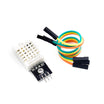
Arduino vs Raspberry Pi: This beginner guide explains how Arduino microcontrollers and Raspberry Pi Linux computers handle common electronics work like reading sensors (for example a DHT22) and controlling motors, so you can choose the right board and avoid buying hardware you do not need.
"Should I get an Arduino or a Raspberry Pi?" is the single most asked question in maker electronics. The honest answer: they arent the same kind of thing. An Arduino is a microcontroller, a chip that runs one program directly on bare metal. A Raspberry Pi is a tiny full Linux computer. Confusing the two is why so many beginners spend $80 on hardware they did not need.
This guide explains the difference in language a beginner can use, lists exactly which project fits which board, and shows how to combine them (because the best builds usually do).
- Time: 10 to 15 minutes
- Skill level: Beginner
- What you will build: A clear decision framework for picking Arduino, Raspberry Pi, or both for your project
Parts List
From ShillehTek
- Arduino Nano V3.0 (USB-C) UNO-equivalent in a small footprint.
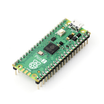
- Raspberry Pi Pico 2 with Pre-Soldered Headers if you want to try a Pi-branded microcontroller.
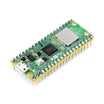
- Raspberry Pi Pico 2W with onboard WiFi.
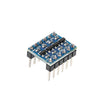
- IC Logic Level Converter required when bridging a 5 V Arduino to a 3.3 V Pi.
External
- A Raspberry Pi 4 or 5 single-board computer if you want the Linux side.
- microSD card (Linux Pi) or USB cable (microcontroller).
- Power supply 5 V/3 A USB-C for a Pi 4/5; USB-A is fine for an Arduino.
Note: Arduino UNO/Nano GPIO is typically 5 V logic, while Raspberry Pi GPIO (Linux Pis and Picos) is 3.3 V logic. Use a level shifter for any Arduino Pi signal lines.
Step-by-Step Guide
Step 1 - Understand the fundamental difference
Goal: Know what each platform is (microcontroller vs Linux computer) and what that implies for timing, boot, and power.

What to do: Use these practical definitions.
Arduino: an 8- or 32-bit microcontroller. Runs one program (your sketch) directly. Boots in milliseconds. No operating system. Reads sensors and toggles GPIO with microsecond precision. Power draw measured in milliamps.
Raspberry Pi (Pi 4/5): a full Linux computer with a quad-core 64-bit CPU, gigabytes of RAM, HDMI, USB, networking, and an SD card with a real filesystem. Runs many programs at once. Boots in about a minute. GPIO timing is non-deterministic (Linux can swap your process out at any moment). Power draw measured in watts.
Expected result: You can explain why Arduino is better for hard real-time GPIO, while Raspberry Pi is better for applications that need Linux, storage, and networking.
Step 2 - Pick Arduino for real-time control and low power
Goal: Identify Arduino-style projects that benefit from deterministic timing and simple firmware.
What to do: Choose an Arduino (or Arduino-class microcontroller) for these use cases.
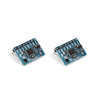
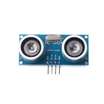
- Reading sensors (DHT22, MPU6050, HC-SR04, IR remote, and other timing-sensitive protocols).
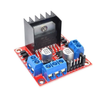
- Driving motors, servos, steppers, LEDs, and other projects where exact timing matters.
- Battery-powered or solar-powered projects (microamp sleep modes are easy).
- "Plug in power, do thing forever" appliances like a temperature controller, a doorbell, or a sign.
- Anything where the firmware must work the first time, every time, in 5 years.
Expected result: You can quickly recognize when a microcontroller is the right tool.
Step 3 - Pick Raspberry Pi for Linux apps, UI, and networking
Goal: Identify projects that need a full OS, multiple processes, filesystems, and rich I/O.
What to do: Choose a Raspberry Pi (Pi 4/5) for these use cases.
- Camera/vision projects (camera connector and CPU power for OpenCV).
- Anything that needs a screen, keyboard, or web browser.
- Web servers, MQTT brokers, and Node-RED dashboards.
- Machine learning inference (TensorFlow Lite, Coral USB).
- Audio playback, streaming, Spotify Connect, and AirPlay.
- Network-attached storage, Pi-hole, and Home Assistant.
Expected result: You can map "computer-like" requirements to a Linux Pi.
Step 4 - Combine both boards when you need real-time plus a brain
Goal: Split responsibilities between an Arduino-class microcontroller and a Linux Raspberry Pi.
- A robot car: Arduino runs the motor PID loop; Pi runs the camera and Wi-Fi remote.
- A weather station: Arduino reads the DHT22 and rain bucket; Pi logs to a database and serves the dashboard.
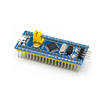
- A 3D printer: an STM32-based control board (Marlin/Klipper firmware) runs the motors; a Pi runs OctoPrint.
Expected result: You can design a system where each board does what it is best at.
Step 5 - Understand the Raspberry Pi Pico option
Goal: Avoid confusing the Raspberry Pi Pico with a Linux Raspberry Pi.
What to do: Treat the Pico as a microcontroller, like an Arduino. It is a dual-core 32-bit ARM Cortex-M0+ on a low-cost board, with 264 KB SRAM, 2 MB flash, and MicroPython or C/C++ support. It is a direct Arduino competitor with much more memory.
- Pick the Pico 2 if you need an Arduino-class board with much more SRAM.
- Pick the Pico 2W if you also need WiFi/BLE without an extra module.
Expected result: You can choose between a Linux Pi and a Pico without mixing up their capabilities.
Step 6 - Avoid the voltage gotcha when wiring boards together
Goal: Prevent damage when connecting 5 V Arduino logic to 3.3 V Raspberry Pi logic.
What to do: Remember that Arduino UNO/Nano GPIO is 5 V. Raspberry Pi GPIO (both Linux Pis and Picos) is 3.3 V and 5 V on a Pi GPIO pin can permanently damage it. If you wire an Arduino to a Pi directly, use a level shifter on every signal line going Arduino to Pi.
Expected result: You understand when and why you need a level shifter.
Conclusion
If your project is "read this sensor and blink that LED forever," buy an Arduino (or a Pi Pico if you need more memory). If your project is "show a dashboard in a browser and remember the last 30 days of data," buy a Raspberry Pi. If your project is non-trivial (a robot, a weather station, a smart-home appliance), buy both and split the work.
Want the exact parts used in this build? Grab them from ShillehTek.com. If you want help customizing this project or building something for your product, check out our IoT consulting services.
Source inspiration: Instructables "Arduino Vs Raspberry Pi". Images credited to the original author of the source tutorial.



.png?v=25000753014097803521791168436)

.png?v=68677308723310773341791168436)


