

Video Tutorial (Optional)
Watch first if you want to follow the full reverse geolocator build with the Raspberry Pi Pico W and NEO-6M GPS module in real time.
Project Overview
In this project, you build a reverse geolocator using a Raspberry Pi Pico W and a NEO-6M GPS module to turn live GPS coordinates into a human-readable location (city and country) using the OpenCage Geocoder API in MicroPython.
The Pico W reads NMEA GPS data over UART, extracts latitude and longitude from GPGGA sentences, connects to Wi-Fi, then queries OpenCage to reverse geocode the coordinates.
- Time: 30 to 60 minutes
- Skill level: Beginner to Intermediate
- What you will build: A Pico W GPS reader that prints coordinates, altitude, and a city/country lookup over serial

Parts List
From ShillehTek
- Breadboard - makes it easy to prototype the Pico W to GPS wiring
- Jumper wires - connects the Pico W UART pins to the GPS module pins
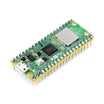
- Raspberry Pi Pico 2W - the WiFi microcontroller board used in this build
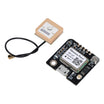
- ShillehTek NEO-6M GPS Module - provides NMEA sentences containing latitude, longitude, and altitude
External
- OpenCage Geocoder API key - used to convert coordinates into a human-readable address
Note: This build uses Pico W UART0 with GP0 (TX) and GP1 (RX) at 9600 baud. Power the GPS module from 3.3V and GND.
Step-by-Step Guide
Step 1 - Solder headers on the GPS module
Goal: Prepare the NEO-6M GPS module so it can be plugged into a breadboard and wired to the Pico W.
What to do: Solder header pins onto the GPS module carefully so the pins are straight and secure.
Expected result: The GPS module is ready to be wired using jumper wires.
Optionally, you can skip this step and just purchase the GPS module pre-soldered from ShillehTek
Step 2 - Wire the Pico W to the GPS module
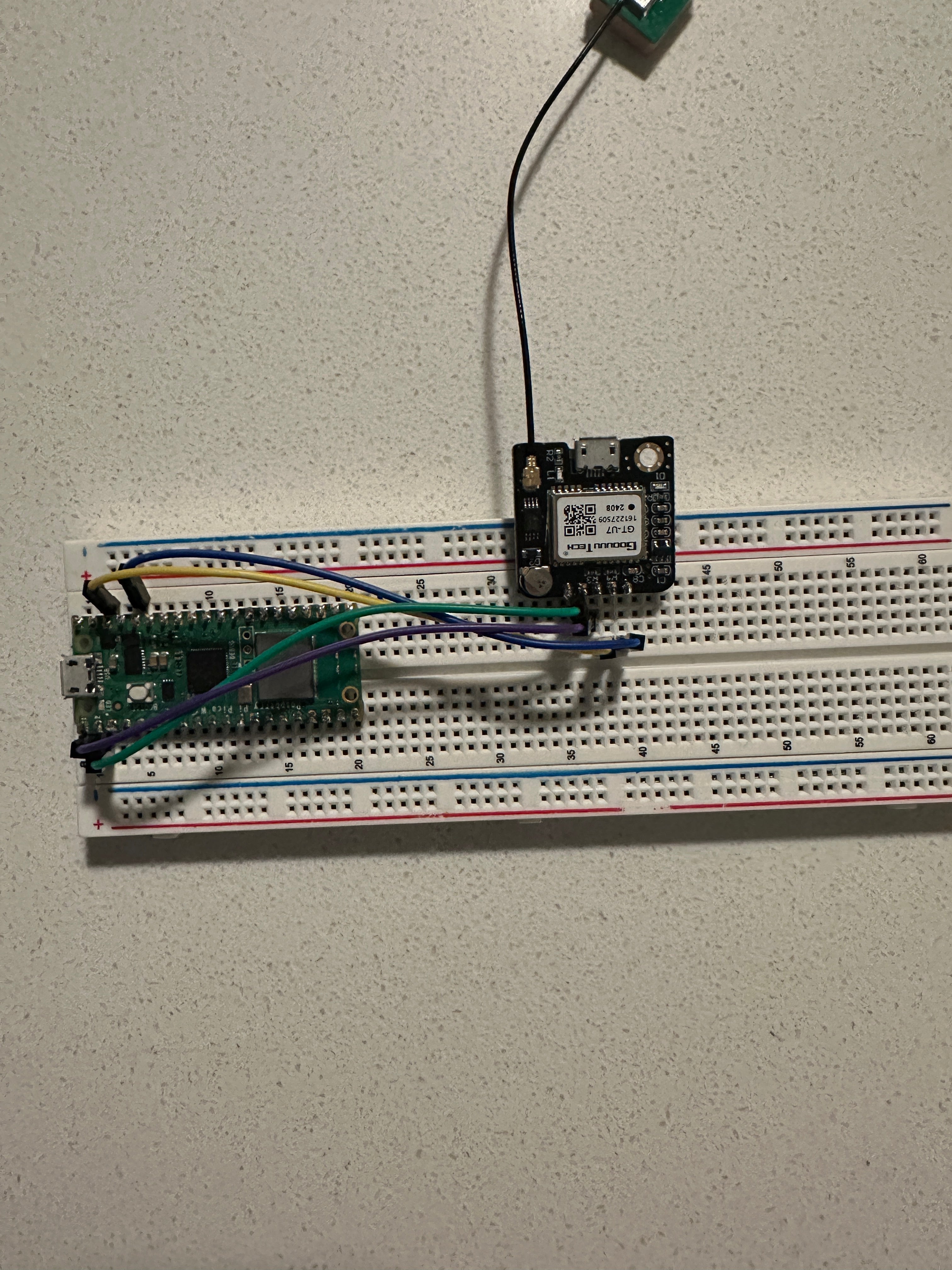
Goal: Connect the GPS module to the Pico W so the Pico can read NMEA data over UART.
What to do: Make the following connections:
- GPS Module TX to Pico W Pin 1 (RX)
- GPS Module RX to Pico W Pin 0 (TX)
- GPS Module VCC to Pico W 3.3V
- GPS Module GND to Pico W GND
Expected result: The Pico W and GPS module are powered and UART is connected (TX to RX, RX to TX).
Step 3 - Create your OpenCage API key
Goal: Get an API key so the Pico W can reverse geocode coordinates into a readable location.
What to do: Follow these steps:
- Visit the OpenCage Geocoder API website.
- Click Sign Up and create an account.
- Log in and go to the API Keys section.
- Create a key and copy it for the code.
Expected result: You have an OpenCage API key ready to paste into the MicroPython script.
Step 4 - Upload the MicroPython code to the Pico W
Goal: Run a script that reads GPS sentences, extracts coordinates, connects to Wi-Fi, and reverse geocodes the location.
What to do: Copy this code to your Pico W (for example as main.py). Update the Wi-Fi name, Wi-Fi password source, and OpenCage API key where indicated.
Code:
"""
NMEA (National Marine Electronics Association) is a standard for formatting data from GPS and other navigation devices.
NMEA sentences are ASCII text lines that provide specific types of navigation data. Common NMEA sentence types:
- GPGGA: Global Positioning System Fix Data, provides time, position, and fix-related data.
- GPGSA: GPS DOP and Active Satellites, gives satellite fix information and dilution of precision.
- GPGLL: Geographic Position, Latitude/Longitude, provides position data.
- GPRMC: Recommended Minimum Specific GNSS Data, gives time, date, position, and speed data.
- GPVTG: Track Made Good and Ground Speed, provides course and speed data.
"""

import machine
import time
import urequests
import network
import config

# Initialize UART for GPS communication
uart = machine.UART(0, baudrate=9600, tx=machine.Pin(0), rx=machine.Pin(1))

def connect_internet(name, password):
    try:
        sta_if = network.WLAN(network.STA_IF)
        sta_if.active(True)
        sta_if.connect(name, password)

        for i in range(0, 10):
            if not sta_if.isconnected():
                time.sleep(1)
        print("Connected to Wi-Fi")
    except Exception as e:
        print('There was an issue connecting to WIFI')
        print(e)

def reverse_geocode(latitude, longitude):
    """
    Convert latitude and longitude to a human-readable address using OpenCage API.
    """
    api_key = "Put your key here"  # Your provided API key
    # Manually construct the URL with query parameters
    full_url = f"https://api.opencagedata.com/geocode/v1/json?q={latitude}+{longitude}&key={api_key}"

    # Validate coordinates
    if not (-90 <= latitude <= 90) or not (-180 <= longitude <= 180):
        print("Invalid GPS coordinates.")
        return "Unknown", "Unknown"

    try:
        print(f"Requesting URL: {full_url}")  # Debugging log
        response = urequests.get(full_url, timeout=5)

        # Check if the request was successful
        if response.status_code == 200:
            data = response.json()

            if data.get('results'):
                components = data['results'][0].get('components', {})
                city = components.get('city') or components.get('town') or components.get('village') or "Unknown"
                country = components.get('country', "Unknown")
                return city, country
            else:
                print("No results found in API response.")
                return "Unknown", "Unknown"
        elif response.status_code == 403:
            print("Error: API key is invalid or blocked.")
            return "Unknown", "Unknown"
        elif response.status_code == 429:
            print("Error: Rate limit exceeded. Try again later.")
            return "Unknown", "Unknown"
        else:
            print(f"Unexpected API error: {response.status_code}, {response.text}")
            return "Unknown", "Unknown"
    except Exception as e:
        print(f"Error during API request: {e}")
        return "Unknown", "Unknown"


def validate_checksum(sentence):
    """
    Validates the checksum of an NMEA sentence.

    NMEA sentences include a checksum at the end, which is used to verify
    the integrity of the data. This function calculates the checksum by
    XORing all characters in the data portion of the sentence and compares
    it to the checksum provided in the sentence.

    Args:
        sentence (str): The NMEA sentence to validate, including the checksum.

    Returns:
        bool: True if the checksum is valid, False otherwise.
    """
    if '*' not in sentence:
        return False  # Invalid sentence format

    # Split the sentence into data and checksum parts
    data, checksum = sentence.split('*')

    if not checksum:
        return False

    # Calculate checksum by XORing all characters in the data part
    calculated_checksum = 0
    for char in data:
        calculated_checksum ^= ord(char)
    return calculated_checksum == int(checksum, 16)

def extract_coordinates(sentence):
    """
    Extract coordinates and altitude from GPGGA sentence.
    Returns a tuple: (latitude, longitude, altitude, city, country) or None if invalid.
    """
    # Split the sentence by commas
    print(sentence)
    parts = sentence.split(",")

    # Validate the sentence
    if parts[0] != "GPGGA":
        raise ValueError("Input is not a valid GPGGA sentence.")

    # Check GPS signal validity
    gps_quality = parts[6]
    if gps_quality != "1":
        return None

    # Extract latitude
    raw_lat = parts[2]
    lat_direction = parts[3]
    latitude = float(raw_lat[:2]) + float(raw_lat[2:]) / 60  # Convert to decimal degrees
    if lat_direction == "S":
        latitude = -latitude

    # Extract longitude
    raw_lon = parts[4]
    lon_direction = parts[5]
    longitude = float(raw_lon[:3]) + float(raw_lon[3:]) / 60  # Convert to decimal degrees
    if lon_direction == "W":
        longitude = -longitude

    # Extract altitude
    altitude = float(parts[9])
    city, country = reverse_geocode(latitude, longitude)
    return latitude, longitude, altitude, city, country


def read_gps(read_coordinates_only=False):
    buffer = b""
    while True:
        if uart.any():  # Check if there's data available in UART buffer
            data = uart.read()  # Read the data from UART
            if data:
                buffer += data  # Append data to buffer

                # Process complete NMEA sentences
                while b'\r\n' in buffer:  # Look for sentence endings
                    raw_line, buffer = buffer.split(b'\r\n', 1)  # Split buffer at sentence boundary
                    line = raw_line.decode('utf-8')  # Decode from bytes to string
                    if line.startswith('$'):
                        lines = line.split('$')
                        for line in lines:
                            if line == '' or not validate_checksum(line):
                                continue

                            if read_coordinates_only:
                                if line.startswith('GPGGA'):
                                    coordinates = extract_coordinates(line)
                                    if coordinates:
                                        latitude, longitude, altitude, city, country = coordinates
                                        print(f"Latitude: {latitude}, Longitude: {longitude}, Altitude: {altitude} m, City: {city}, Country: {country}")
                                    else:
                                        print("GPS signal not available")
                            else:
                                print(line)  # Print the full NMEA sentence

        time.sleep(1)  # Add a small delay to prevent CPU overuse

try:
    print("Reading GPS data...")
    # Pass `True` to only print coordinates and altitude, or `False` for all data
    connect_internet('SMA', config.password)
    read_gps(read_coordinates_only=False)
except KeyboardInterrupt:
    print("Stopped")
Expected result: The Pico W boots, connects to Wi-Fi, then begins printing GPS sentences (or extracted coordinates, depending on the flag).
Step 5 - Power up and view the serial output
Goal: Confirm you are receiving GPS data and getting reverse geocoding results back from OpenCage.
What to do: Power the Pico W, then open a serial console to watch logs. You should see latitude, longitude, altitude, plus city and country printed in real time.
Example output:
GPGGA,042820.00,4152.68463,N,08739.23793,W,1,05,2.68,308.3,M,-33.8,M,,*62
Requesting URL: https://api.opencagedata.com/geocode/v1/json?q=41.87808+-87.65397&key=5b9111b71c5f47e194c1d9b8c7d896a9

Latitude: 41.87808, Longitude: -87.65397, Altitude: 308.3 m, City: Chicago, Country: United States
GPGGA,042821.00,4152.68536,N,08739.23883,W,1,05,2.68,310.1,M,-33.8,M,,*67
Requesting URL: https://api.opencagedata.com/geocode/v1/json?q=41.87809+-87.65398&key=5b9111b71c5f47e194c1d9b8c7d896a9

Latitude: 41.87809, Longitude: -87.65398, Altitude: 310.1 m, City: Chicago, Country: United States
GPGGA,042824.00,4152.68823,N,08739.24100,W,1,05,2.68,318.9,M,-33.8,M,,*6E
Requesting URL: https://api.opencagedata.com/geocode/v1/json?q=41.87814+-87.65401&key=5b9111b71c5f47e194c1d9b8c7d896a9

Latitude: 41.87814, Longitude: -87.65401, Altitude: 318.9 m, City: Chicago, Country: United States
GPGGA,042827.00,4152.69062,N,08739.24131,W,1,05,2.68,323.1,M,-33.8,M,,*63
Requesting URL: https://api.opencagedata.com/geocode/v1/json?q=41.87818+-87.65402&key=5b9111b71c5f47e194c1d9b8c7d896a9

Latitude: 41.87818, Longitude: -87.65402, Altitude: 323.1 m, City: Chicago, Country: United States
Expected result: You see GPS data coming in and successful reverse geocoding calls returning a readable location.
Conclusion
You built a reverse geolocator with a Raspberry Pi Pico W and a NEO-6M GPS module that reads NMEA data, extracts coordinates, and converts them into a readable city and country using the OpenCage Geocoder API.
Want the parts used in this build? Grab prototyping essentials from ShillehTek.com. If you want help customizing this project or building something similar for your product, check out our consulting: https://shillehtek.com/pages/iot-consulting.
If you enjoyed this tutorial, subscribe to our YouTube channel. Interested in professional help? Hire us on Upwork through ShillehTek consulting.




.png?v=25000753014097803521790455663)

.png?v=68677308723310773341790455663)


