Overview
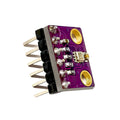
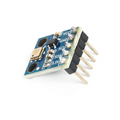
The BMP280 is a precision digital atmospheric pressure and temperature sensor from Bosch Sensortec. With a measurement range of 300-1100 hPa and ± 0.12 hPa relative pressure accuracy, it can detect altitude changes as small as a meter — making it perfect for weather stations, drone altimeters, indoor navigation, and any project that needs to read pressure or temperature with confidence.
This pre-soldered breakout exposes both I2C and SPI interfaces, runs on 3.3V or 5V (the on-board regulator handles both), and uses very little power — just 2.7 µA in low-power 1Hz humidity-disabled mode. It's a drop-in replacement for the older BMP180 with better accuracy and lower current draw.
The BMP280 works with Arduino, ESP32, ESP8266, Raspberry Pi, and Pico through the popular Adafruit_BMP280 library on Arduino, the bmp280 Python package on Pi, and BME280 MicroPython libraries on Pico (the BME280 library is backward compatible with the BMP280 — it just won't return humidity).
At a Glance
Specifications
| Parameter | Value |
| Sensor IC | Bosch BMP280 |
| Operating Voltage | 3.3V - 5V (on-board regulator) |
| Operating Current | 2.7 µA @ 1 Hz, 1100 µA @ 100 Hz |
| Pressure Range | 300 - 1100 hPa (≈ +9000 m to -500 m altitude) |
| Pressure Resolution | 0.0016 hPa (≈ 13 cm altitude) |
| Pressure Accuracy | ± 0.12 hPa (relative), ± 1 hPa (absolute) |
| Temperature Range | -40°C to +85°C |
| Temperature Accuracy | ± 1.0°C |
| Communication | I2C (up to 3.4 MHz) or SPI (up to 10 MHz) |
| I2C Address | 0x76 (SDO=GND) or 0x77 (SDO=VCC) |
| Pin Count | 6 (VCC, GND, SCL, SDA, CSB, SDO) |
| Dimensions | ~15 × 11 mm |
Pinout Diagram

Wiring Guide
Arduino Wiring (I2C)
The BMP280 supports both I2C and SPI, but I2C is the simplest and uses only 4 wires. Tie CSB to VCC to enable I2C mode (some boards do this on the back automatically — if your board has VCC and CSB pads bridged on the back, just use the 4 main pins).
| BMP280 Pin | Arduino Pin |
|---|---|
| VCC | 5V or 3.3V |
| GND | GND |
| SCL | A5 (SCL) |
| SDA | A4 (SDA) |
| CSB | VCC (or leave floating, internally pulled high) |
| SDO | GND for 0x76 address (default) |
ESP32 Wiring (I2C)
ESP32 default I2C is on GPIO 21 (SDA) and GPIO 22 (SCL). The BMP280 is fully 3.3V-compatible — no level shifter needed.
| BMP280 Pin | ESP32 Pin |
|---|---|
| VCC | 3.3V |
| GND | GND |
| SCL | GPIO 22 |
| SDA | GPIO 21 |
| CSB | 3.3V |
| SDO | GND |
Raspberry Pi Wiring (I2C)
Enable I2C in raspi-config first. Use BCM 2 (SDA) and BCM 3 (SCL) on the 40-pin header.
| BMP280 Pin | Raspberry Pi Pin |
|---|---|
| VCC | Pin 1 (3.3V) |
| GND | Pin 6 (GND) |
| SCL | Pin 5 (BCM 3) |
| SDA | Pin 3 (BCM 2) |
| CSB | 3.3V |
| SDO | GND |
i2cdetect -y 1. You should see 0x76 (or 0x77 if SDO is tied to VCC).
Raspberry Pi Pico Wiring (I2C)
The Pico has two I2C peripherals. Default I2C0 is on GP4 (SDA) and GP5 (SCL).
| BMP280 Pin | Pico Pin |
|---|---|
| VCC | 3V3 (Pin 36) |
| GND | GND |
| SCL | GP5 (Pin 7) |
| SDA | GP4 (Pin 6) |
| CSB | 3V3 |
| SDO | GND |
Code Examples
Arduino — Adafruit BMP280 Library
// BMP280 Pressure & Temperature Sensor - Arduino Example
// Library: Adafruit BMP280 Library (Library Manager)

#include <Wire.h>
#include <Adafruit_BMP280.h>

Adafruit_BMP280 bmp;

void setup() {
  Serial.begin(9600);
  if (!bmp.begin(0x76)) {   // Default address; try 0x77 if 0x76 fails
    Serial.println("BMP280 not found!");
    while (1) {}
  }

  bmp.setSampling(Adafruit_BMP280::MODE_NORMAL,
                  Adafruit_BMP280::SAMPLING_X2,    // temperature
                  Adafruit_BMP280::SAMPLING_X16,   // pressure
                  Adafruit_BMP280::FILTER_X16,
                  Adafruit_BMP280::STANDBY_MS_500);
}

void loop() {
  Serial.print("Temp: ");      Serial.print(bmp.readTemperature()); Serial.println(" C");
  Serial.print("Pressure: ");  Serial.print(bmp.readPressure() / 100.0F); Serial.println(" hPa");
  Serial.print("Altitude: ");  Serial.print(bmp.readAltitude(1013.25)); Serial.println(" m");
  Serial.println();
  delay(1000);
}
Raspberry Pi (Python)
#!/usr/bin/env python3
# BMP280 - Raspberry Pi Python Example
# Install: sudo pip3 install adafruit-circuitpython-bmp280

import time
import board
import adafruit_bmp280

i2c = board.I2C()
bmp = adafruit_bmp280.Adafruit_BMP280_I2C(i2c, address=0x76)
bmp.sea_level_pressure = 1013.25

while True:
    print(f"Temp: {bmp.temperature:.2f} C")
    print(f"Pressure: {bmp.pressure:.2f} hPa")
    print(f"Altitude: {bmp.altitude:.2f} m\n")
    time.sleep(1)
Raspberry Pi Pico (MicroPython)
# BMP280 - Pico MicroPython Example
# Requires bmp280.py from David Stenwall's micropython-bmp280 library.

from machine import Pin, I2C
from bmp280 import BMP280
import time

i2c = I2C(0, scl=Pin(5), sda=Pin(4), freq=400_000)
bmp = BMP280(i2c, addr=0x76)

while True:
    print("Temp:     {:.2f} C".format(bmp.temperature))
    print("Pressure: {:.2f} hPa".format(bmp.pressure / 100))
    print()
    time.sleep(1)