

Project Overview
Arduino Nano + TCS3200 color sensor color sorter: In this build, a TCS3200 reads the color of a candy (M&Ms, Skittles, or any small colored object) and an MG90S servo rotates a routing arm to drop it into the matching bin.
This project combines sensing, decision-making, and actuation in one fully automated sorting machine.
- Time: ~2 hours (mostly mechanical)
- Skill level: Intermediate
- What you will build: A motorised candy sorter that detects color and routes items to the matching bin.

Parts List
From ShillehTek
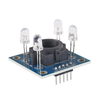
- GY-31 TCS3200 Color Sensor - reads the object color as RGB frequency outputs.
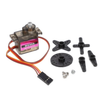
- MG90S Metal-Gear Servo - rotates the routing arm to direct items into bins.
- Arduino Nano V3.0 Pre-Soldered - runs the sensor reading and servo control logic.
- 120 PCS Dupont Jumper Wires - makes the sensor and servo connections easier during prototyping.
External
- Bag of M&Ms / Skittles for calibration and testing
- 3D-printed or laser-cut sorter chassis
Note: Calibration values depend on lighting and the specific TCS3200 module. Recalibrate if you change the light source, sensor height, or enclosure.
Step-by-Step Guide
Step 1 - Build the Mechanism
Goal: Create a path that presents one candy at a time to the sensor, then reliably drops it into the correct bin.
What to do: Build the chute and bin layout so the candy passes in front of the TCS3200 and then reaches a servo-driven routing arm. Make sure the arm can swing to multiple fixed angles without binding.

Expected result: A candy can drop through the chute, pause/align at the sensing area, and fall cleanly past the rotating arm into a selected bin position.
Step 2 - Wire It
Goal: Connect the TCS3200 sensor outputs and the servo signal to the Arduino Nano.
What to do: Wire the TCS3200 control pins S0 to S3 and the OUT pin to Arduino digital pins as shown. Connect the servo signal to D9.

Expected result: The Arduino can read pulses from the sensor OUT pin and command the servo on D9.
Step 3 - Calibrate the Sensor
Goal: Collect baseline RGB readings for your specific candy colors under your lighting conditions.
What to do: Run a calibration sketch that prints raw R/G/B values for each color. Record the values for each candy color you want to sort, then use those values to set thresholds in your main sorting logic.
Expected result: Each candy color produces a repeatable (R, G, B) triplet for your setup.
Step 4 - Upload the Main Sketch
Goal: Read the TCS3200 channels and move the servo to a bin angle based on the detected color.
What to do: Upload the sketch below to your Arduino. Update the logic and thresholds to match the calibration values you recorded.
Code:
#include <Servo.h>
const int S0=4,S1=5,S2=6,S3=7,OUT=8;
Servo arm;
int readCh(bool s2,bool s3){ digitalWrite(S2,s2);digitalWrite(S3,s3);delay(50);return pulseIn(OUT,LOW); }
void setup() {
  for (int p:{S0,S1,S2,S3}) pinMode(p,OUTPUT);
  pinMode(OUT,INPUT);
  digitalWrite(S0,HIGH); digitalWrite(S1,HIGH);
  arm.attach(9); arm.write(90);
}
void loop() {
  int r=readCh(LOW,LOW), g=readCh(HIGH,HIGH), b=readCh(LOW,HIGH);
  if (r < g && r < b)        arm.write(0);    // red bin
  else if (g < r && g < b)   arm.write(60);   // green bin
  else if (b < r && b < g)   arm.write(120);  // blue bin
  else                          arm.write(180);  // yellow / unknown
  delay(800);
  arm.write(90);
  delay(2000);
}
Expected result: The servo moves to different angles depending on the lowest channel reading and returns to center after each sort.
Step 5 - Run It
Goal: Verify that the sensor reads consistently and the servo routes candy to the correct bin.
What to do: Drop candy into the chute one at a time. Watch the servo rotate to the target position, then confirm the candy falls into the matching bin.

Expected result: Each candy is routed to the correct bin with minimal mis-sorts under steady lighting.
Step 6 - Where to Take It Next
Goal: Identify safe upgrades that build on the same sensor-and-actuator foundation.
What to do: If you want to expand the project, consider these directions:
- Add a queue/feeder mechanism so it sorts continuously without manual drops
- Use 6 bins instead of 4 and add a stepper instead of a servo for finer positioning
- Log color counts to a display for an "M&M census"
- Scale up to sort recycling (plastic colours), beads, or LEGO pieces
Expected result: A clear plan for your next iteration without changing the core wiring and code structure.
Conclusion
You built an Arduino Nano color-sorting machine using a TCS3200 sensor to detect color and a servo to route items into bins. With careful mechanical alignment and calibration, the sorter can automate a surprisingly reliable sense-decide-act loop.
Want the exact parts used in this build? Grab them from ShillehTek.com. If you want help customizing this project or building something for your product, check out our IoT consulting services.
Photo credit: Instructables.





.png?v=25000753014097803521791168436)

.png?v=68677308723310773341791168436)


