

Project Overview
Raspberry Pi + TP4056 + INA219 mini UPS: In this build, you create a 5V battery-backup supply that keeps a Raspberry Pi or router running during a power outage while monitoring battery voltage and load current.
A sudden outage can take a Pi offline mid-write and corrupt the SD card, or drop your router and internet when you need it most. This DIY UPS uses a TP4056 to charge 18650 cells, an MT3608 boost converter to provide regulated 5V, an INA219 to measure voltage and current, and a relay-based handoff so the load runs from the battery when mains power drops.
- Time: ~2 hours
- Skill level: Intermediate
- What you will build: A 5V USB UPS that powers a Pi or router for hours during a power outage and reports the state of charge.

Parts List
From ShillehTek
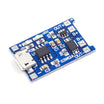
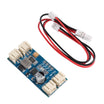
- TP4056 LiPo Charger - charges the 18650 cell pack from a 5V adapter.
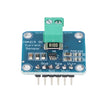
- INA219 Current/Voltage Monitor - measures battery/load voltage and current over I2C.
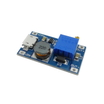
- MT3608 Boost Converter (3.7V to 5V) - boosts the battery voltage up to a stable 5V output.
- 1-Channel 5V Relay Module (handoff) - switches the load to battery power when mains drops.
- Arduino Nano V3.0 Pre-Soldered (monitoring) - reads INA219 data and outputs a low-battery shutdown signal.
- 120 PCS Dupont Jumper Wires - quick wiring between modules.
External
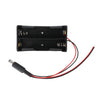
- 2x 18650 LiPo cells (in parallel for capacity)
- 5V/2A USB power adapter (for mains input)
- Small project enclosure
- USB-A female socket (for load output)
Note: This UPS targets 5V loads (Pi, router, modem). For 12V loads, replace the MT3608 with a 12V boost (for example XL6009) and adjust the wiring.
Step-by-Step Guide
Step 1 - Inspect the components
Goal: Confirm you have all modules and understand what each one does before wiring.
What to do: Lay out the TP4056 charger, 18650 cells, MT3608 boost converter, INA219 sensor, relay module, and Arduino Nano. Identify power input and output terminals on each board so you do not reverse polarity during assembly.

Expected result: You can point to each module and its role (charging, boosting, measuring, switching, monitoring).
Step 2 - Wire the power path
Goal: Build the 5V supply path from mains to battery charging and from battery to 5V USB output.
What to do: Make the following connections and double-check polarity before powering anything.

- 5V/2A adapter to TP4056 IN+/IN-
- TP4056 B+/B- to 2x 18650 in parallel
- 18650 + to MT3608 IN+; adjust MT3608 trim-pot to output exactly 5.0V
- MT3608 OUT+ to INA219 Vin+ to USB-A 5V pin
- USB-A GND to INA219 GND to MT3608 OUT-
Expected result: With mains power connected, the TP4056 charges the cells and the MT3608 provides a stable 5V at the USB output.
Step 3 - Wire the monitoring (Arduino + INA219)
Goal: Connect the INA219 to the Arduino so you can read battery/load voltage and current, and detect whether mains is present.
What to do: Wire I2C and the optional mains-presence sense input as listed below.
- INA219 SDA to A4, SCL to A5, VCC to 5V, GND to GND
- Mains-presence sense: a voltage divider from the TP4056 IN+ to Arduino A0 (so the Arduino knows if mains is up or down)
Expected result: The Arduino can communicate with the INA219 over I2C and has an analog signal that indicates mains presence.
Step 4 - Build the enclosure
Goal: Mount the modules securely so the UPS is compact and safe to handle.
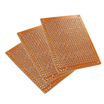
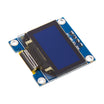
What to do: Mount components on perfboard or standoffs, then fit them into a small enclosure. Provide openings for mains input and USB output. If you add a display (for example an OLED), plan the cutout before final assembly.


Expected result: Everything is mechanically secure, with clearly accessible input and output connections.
Step 5 - Upload the monitoring sketch (optional)
Goal: Read INA219 measurements and generate a low-battery signal that can tell a Raspberry Pi to shut down cleanly.
What to do: Install the INA219 library used by your IDE (Adafruit_INA219), then upload this sketch to the Arduino Nano. Keep the wiring from Step 3 the same.
Code:
#include <Wire.h>
#include <Adafruit_INA219.h>
Adafruit_INA219 ina;
const int MAINS_SENSE = A0;
const int LOW_BATT_PIN = 8;   // signal Pi to shut down

void setup() {
  Serial.begin(9600);
  ina.begin();
  pinMode(LOW_BATT_PIN, OUTPUT);
}

void loop() {
  int mainsRaw = analogRead(MAINS_SENSE);
  float mainsV = mainsRaw * (5.0 / 1023.0) * 2;   // divider ratio
  float battV = ina.getBusVoltage_V();
  float loadMA = ina.getCurrent_mA();

  Serial.printf("Mains: %.1fV  Batt: %.2fV  Load: %.0fmA\n", mainsV, battV, loadMA);

  // Tell the Pi to shut down gracefully if battery drops below 3.3V
  digitalWrite(LOW_BATT_PIN, battV < 3.3 ? HIGH : LOW);

  delay(2000);
}
Expected result: You see periodic voltage and current readings on Serial, and LOW_BATT_PIN goes HIGH when battery voltage drops below 3.3V.
Step 6 - Hook up the Raspberry Pi or router
Goal: Power your device from the UPS and verify it stays up when mains is removed.
What to do: Connect the UPS USB-A output to the Raspberry Pi (or your router). Then unplug the wall adapter briefly to confirm the battery takes over without shutting the device off.

If you are using the shutdown signal, wire the Arduino's LOW_BATT_PIN to a Raspberry Pi GPIO and run a small Python script that watches for the HIGH signal and triggers sudo shutdown -h now. This allows a clean shutdown when the battery is nearly empty.
Expected result: The Pi or router stays powered during an outage, and the low-battery signal can be used to avoid SD card corruption.
Step 7 - Optional upgrades
Goal: Identify safe, compatible ways to extend the build without changing the core UPS design.
What to do: Consider the following enhancements.
- Add an SSD1306 OLED for an at-a-glance state-of-charge display
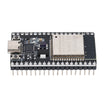
- ESP32 instead of Arduino to push UPS status to Home Assistant via MQTT
- Solar recharge using a 10W panel
- Scale up to 4x 18650 in parallel for longer router uptime
Expected result: You have a clear next step if you want more visibility or longer runtime.
Conclusion
You built a Raspberry Pi and router mini UPS using a TP4056 charger, MT3608 boost converter, INA219 monitor, and 18650 cells to keep a 5V load running through power outages. With the optional low-battery signal, you can also trigger a clean shutdown to reduce the risk of SD card corruption.
Want the exact parts used in this build? Grab them from ShillehTek.com. If you want help customizing this project or building something for your product, check out our IoT consulting services. Reference inspiration: Instructables.






.png?v=25000753014097803521791168436)

.png?v=68677308723310773341791168436)


