

Project Overview
ESP32 + DS18B20 Wi-Fi BBQ / smoker thermometer: A waterproof DS18B20 probe measures meat or smoker temperature while an ESP32 shows it on a small OLED and sends a Telegram alert when your target temperature is reached.
This build is designed for long cooks so you can step away and still get notified the moment the food is ready.
- Time: ~1.5 hours
- Skill level: Intermediate
- What you will build: A Wi-Fi-connected meat thermometer with OLED display and Telegram alerts.

Parts List
From ShillehTek
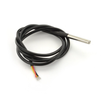
- DS18B20 Waterproof Probe (1m) - food-safe stainless probe for meat or smoker chamber temperature.
- ESP32-WROOM Dev Board - reads the sensor, drives the display, and connects to Wi-Fi.
- 0.96" I²C SSD1306 OLED - shows live temperature and status on the device.
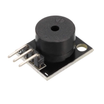
- KY-006 Buzzer (audible alarm) - local audible alert when target temperature is reached.
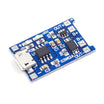
- TP4056 LiPo Charger - optional charging module for portable power.
- 120 PCS Dupont Jumper Wires - wiring for the probe, OLED, and buzzer.
External
- 4.7kΩ resistor - required 1-Wire pull-up resistor for the DS18B20 data line
- 18650 cell - optional battery for portability
- Telegram bot token + chat ID - required for Telegram notifications
Note: The DS18B20 probe is rated 0 to 125°C, which is suitable for meat and smoker chamber temperatures. The stainless steel sheath is food-safe, but wipe it with food-safe sanitizer before each use.
Step-by-Step Guide
Step 1 - Inspect the probe
Goal: Confirm you have a waterproof DS18B20 probe and understand its role in the build.
What to do: Check the cable jacket and stainless tip for damage. Identify the three probe wires used for power, ground, and data (your probe colors may vary).

Expected result: You are ready to wire the DS18B20 to the ESP32 using a 1-Wire pull-up resistor.
Step 2 - Wire the ESP32, DS18B20, OLED, and buzzer
Goal: Connect the temperature probe, OLED display (I2C), and buzzer to the ESP32.
What to do: Make the connections below. Add the 4.7kΩ pull-up resistor from the DS18B20 data line to 3.3V.

- Probe red to 3.3V, black to GND, yellow to GPIO 4 (with 4.7kΩ to 3.3V)
- OLED VCC to 3.3V, GND to GND, SDA to GPIO 21, SCL to GPIO 22
- Buzzer signal to GPIO 13, GND to GND
Expected result: All modules are powered from 3.3V and share a common ground, and the DS18B20 data line has a pull-up resistor.
Step 3 - Upload the sketch
Goal: Program the ESP32 to read the DS18B20, display the temperature on the OLED, and send a Telegram alert at the target temperature.
What to do: Install the required libraries in your Arduino IDE, then paste and upload the sketch. Replace SSID, PASS, TOKEN, and CHAT with your Wi-Fi and Telegram details.

Code:
#include <WiFi.h>
#include <WiFiClientSecure.h>
#include <UniversalTelegramBot.h>
#include <OneWire.h>
#include <DallasTemperature.h>
#include <Adafruit_GFX.h>
#include <Adafruit_SSD1306.h>

const char* SSID="WIFI", *PASS="PWD", *TOKEN="BOT", *CHAT="CHAT";
const float TARGET = 95.0;   // target meat temp (e.g. brisket)
const int BUZZ = 13;

OneWire bus(4); DallasTemperature ds(&bus);
Adafruit_SSD1306 oled(128, 64, &Wire, -1);
WiFiClientSecure client;
UniversalTelegramBot bot(TOKEN, client);
bool alerted = false;

void setup() {
  Serial.begin(115200); ds.begin();
  oled.begin(SSD1306_SWITCHCAPVCC, 0x3C);
  pinMode(BUZZ, OUTPUT);
  WiFi.begin(SSID, PASS);
  while (WiFi.status() != WL_CONNECTED) delay(500);
  client.setCACert(TELEGRAM_CERTIFICATE_ROOT);
}

void loop() {
  ds.requestTemperatures();
  float t = ds.getTempCByIndex(0);

  oled.clearDisplay(); oled.setTextSize(3); oled.setCursor(0, 8);
  oled.setTextColor(SSD1306_WHITE); oled.print(t, 1);
  oled.setTextSize(1); oled.setCursor(70, 50);
  oled.print(t >= TARGET ? "READY" : "...");
  oled.display();

  if (t >= TARGET && !alerted) {
    bot.sendMessage(CHAT, "🥩 Meat is ready! " + String(t,1) + "C");
    tone(BUZZ, 1500, 500); delay(700);
    tone(BUZZ, 1500, 500);
    alerted = true;
  }
  delay(1000);
}
Expected result: The OLED shows the current temperature, and when the reading reaches TARGET, the buzzer sounds and a Telegram message is sent once.
Step 4 - Build the enclosure
Goal: Package the electronics so they can sit outside the smoker while the probe stays inside.
What to do: Place the ESP32, OLED, and buzzer in a heat-resistant enclosure. Route the probe cable through a grommet or strain relief so the cable is protected.

Expected result: A portable controller you can place safely away from heat and moisture.
Step 5 - Use it during a cook
Goal: Monitor meat temperature in real time and receive an alert when it is ready.
What to do: Insert the DS18B20 probe into the meat (or position it where you want to measure chamber temperature). Keep the ESP32 enclosure outside the smoker. Power the device and connect it to your Wi-Fi network.

Expected result: You can read temperature on the OLED, and you receive a Telegram notification when the temperature crosses the target value.
Step 6 - Optional next improvements
Goal: Extend the project after the basic build is working.
What to do: Consider adding features such as a second probe, data logging, or active temperature control.
- Add a second probe to track meat and smoker chamber temperature
- Log data over time for low-and-slow cook curves
- Add a relay-controlled fan for active smoker temperature control
- Pair with a meat-doneness lookup table (brisket 93°C, pork shoulder 88°C, chicken 74°C)
Expected result: A clear path to expand the project while keeping the current build as the foundation.
Conclusion
You built an ESP32 and DS18B20 Wi-Fi BBQ / smoker thermometer that displays live temperature on an SSD1306 OLED and sends a Telegram alert at your target temperature. This makes long cooks easier because you can monitor the temperature without standing by the smoker.
Want the exact parts used in this build? Grab them from ShillehTek.com. If you want help customizing this project or building something for your product, check out our IoT consulting services. Reference inspiration: Instructables.






.png?v=25000753014097803521791168436)

.png?v=68677308723310773341791168436)


