

Project Overview
Arduino + PCF8574 I2C expander: This project shows how to use a PCF8574 I2C GPIO expander with an Arduino (UNO, Nano, or Pro Mini) to add 8 extra digital I/O pins over just two wires (SDA and SCL) and drive 8 LEDs.
You can stack up to 8 PCF8574 boards on one I2C bus for 64 extra pins total. The PCF8574 is also the common "backpack" chip used on many LCD1602 + I2C modules.
- Time: ~15 minutes
- Skill level: Beginner
- What you will build: An Arduino driving 8 LEDs through a PCF8574 using only two Arduino pins.

Parts List
From ShillehTek
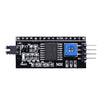
- PCF8574 I²C Serial Interface Adapter - the 8-bit I2C GPIO expander module used in this build
- Arduino Nano V3.0 Pre-Soldered - example Arduino board to control the PCF8574 over I2C
- 120 PCS Dupont Jumper Wires - for quick breadboard wiring
External
- 8 LEDs + 8x 220 ohm current-limiting resistors
- Breadboard
Note: The PCF8574 default I2C address is 0x20 with A0/A1/A2 tied LOW. Pull them HIGH in different combinations for 0x21, 0x22, up to 0x27 (8 boards on one bus).
Step-by-Step Guide
Step 1 - Inspect the Module
Goal: Identify the PCF8574 pins you will wire to the Arduino and the LED outputs.
What to do: Locate the power and I2C pins (VCC, GND, SDA, SCL), the 8 GPIO pins (P0 to P7), and the address select jumpers (A0, A1, A2).


Expected result: You know which pins connect to Arduino I2C and which pins will drive the LEDs.
Step 2 - Wire It Up
Goal: Connect the PCF8574 to the Arduino over I2C and wire 8 LEDs to the expander outputs.
What to do: Make the I2C and power connections first, then connect each PCF8574 output pin (P0 to P7) to an LED and resistor.

- VCC to 5V, GND to GND
- SDA to A4, SCL to A5
- P0 to P7 to LED anode to 220 ohm to GND
Expected result: The Arduino and PCF8574 share power and ground, I2C is connected (SDA and SCL), and each output pin can control one LED through a resistor.
Step 3 - Upload the Sketch
Goal: Send one byte over I2C to control the 8 PCF8574 pins.
What to do: Copy the sketch below into the Arduino IDE and upload it to your board. It uses I2C address 0x20, which matches the default A0/A1/A2 jumper state (all LOW).
Code:
#include <Wire.h>

const byte ADDR = 0x20;

void writeAll(byte b) {
  Wire.beginTransmission(ADDR);
  Wire.write(b);
  Wire.endTransmission();
}

void setup() {
  Wire.begin();
  Serial.begin(9600);
}

void loop() {
  for (byte i = 0; i < 8; i++) {       // Walk one lit LED through the bank
    writeAll(1 << i);
    delay(150);
  }
  writeAll(0xFF);                         // All on
  delay(500);
  writeAll(0x00);                         // All off
  delay(500);
}
One byte written over I2C controls 8 pins. The bit at position N maps to P(N).
Expected result: The Arduino uploads successfully and begins writing patterns to the PCF8574 over I2C.
Step 4 - Watch the LEDs
Goal: Confirm the PCF8574 is driving all 8 outputs through a simple chase and all-on/all-off pattern.
What to do: Power the circuit and observe the LED sequence.


Expected result: A single LED walks across P0 to P7, then all LEDs turn on, then all turn off, repeating.
Step 5 - Where to Take It Next
Goal: Understand common ways to extend this PCF8574 setup for larger I/O projects.
What to do: Consider these next steps as you expand your design.
- Read 8 buttons in parallel by configuring pins as inputs with internal pull-ups
- Stack 4 PCF8574s for 32 GPIO over the same 2-wire bus
- Drive a 4x4 keypad without consuming any native GPIO
- Use a PCF8574-backed LCD1602 backpack instead of wiring 12 lines
Expected result: You have a clear path for scaling from 8 extra pins to larger I2C-based I/O systems.
Conclusion
The Arduino plus PCF8574 is a simple way to stop running out of pins: two I2C wires give you eight new GPIO lines, and you can expand further by changing the I2C address and adding more modules.
Want the exact parts used in this build? Grab them from ShillehTek.com. If you want help customizing this project or building something for your product, check out our IoT consulting services.
Credits: Photos and example code referenced from Instructables.






.png?v=25000753014097803521791168436)

.png?v=68677308723310773341791168436)


