

Project Overview
Arduino Nano + RC522 RFID smart door lock: Combine an RC522 RFID reader, a servo, and a 0.96 inch SSD1306 OLED to build a tap-to-unlock door system where authorized cards unlock the latch and the OLED shows status messages.
Tap a registered card or fob and the servo throws a latch while the OLED prints “ACCESS GRANTED”. Tap an unknown card and the OLED prints “ACCESS DENIED”.
- Time: ~1 hour
- Skill level: Beginner / Intermediate
- What you will build: An RFID-driven door lock with an OLED status display.

Parts List
From ShillehTek
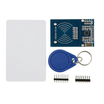
- RC522 RFID Reader Writer Kit (with card + fob) - reads 13.56 MHz RFID card UIDs over SPI.
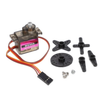
- MG90S Metal-Gear Servo - actuates the latch for lock and unlock motion.
- 0.96 inch I2C SSD1306 OLED - displays “ACCESS GRANTED” and “ACCESS DENIED”.
- Arduino Nano V3.0 Pre-Soldered - runs the RFID read, UID check, OLED messages, and servo control.
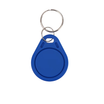
- Extra 13.56 MHz Key Fobs - add more users to your lock.
- 120 PCS Dupont Jumper Wires - makes breadboard wiring quick and clean.
- 400-Point Breadboard - prototyping the full circuit before mounting.
External
- A door, drawer, or box you want to lock
- 3D-printed or wood servo bracket (optional but recommended)
Note: The RC522 is 3.3 V on the logic side. Power VCC from 3.3 V, not 5 V. The servo runs on 5 V.
Step-by-Step Guide
Step 1 - Lay Out the Modules
Goal: Identify each module and confirm you have all the core parts before wiring.
What to do: Place the Arduino Nano, RC522 RFID module, MG90S servo, and SSD1306 OLED on your work surface. If you are using a breadboard, position parts so wiring to SPI pins, I2C pins, and the servo PWM pin is easy.

Expected result: All modules are ready and oriented so you can wire them without crossing too many jumpers.
Step 2 - Wire the RFID Reader (SPI)
Goal: Connect the RC522 to the Arduino Nano over SPI so the Nano can read card UIDs.
What to do: Wire the RC522 using the standard SPI connections plus RST and CS (SDA on many RC522 boards is the CS pin).

- RC522 VCC → 3.3 V (NOT 5 V)
- RC522 GND → GND
- RST → D9, SDA(CS) → D10
- MOSI → D11, MISO → D12, SCK → D13
Expected result: The RC522 is powered from 3.3 V and shares the SPI bus pins correctly with the Arduino Nano.
Step 3 - Wire the Servo and OLED
Goal: Connect the servo for latch movement and the OLED for status messages.
What to do: Wire the servo signal to a PWM-capable pin and connect servo power to 5 V and GND. Then wire the SSD1306 OLED via I2C on A4 (SDA) and A5 (SCL).


- Servo: signal → D6, V+ → 5 V, GND → GND
- OLED: VCC → 5 V, GND → GND, SDA → A4, SCL → A5
Expected result: The servo has a PWM control line and power, and the OLED is on the I2C bus at the typical address used by SSD1306 modules.
Step 4 - Full Wiring Diagram
Goal: Verify the complete wiring matches the intended circuit before uploading code.
What to do: Compare your connections to the diagram. Confirm RC522 VCC is on 3.3 V, the OLED is on A4/A5, and all grounds are common.

Expected result: Your wiring matches the diagram with correct voltages and shared ground.
Step 5 - Upload the Sketch
Goal: Program the Arduino Nano to read RFID tags, compare UIDs, move the servo, and show OLED messages.
What to do: In the Arduino IDE, install these libraries: MFRC522, Adafruit SSD1306, Adafruit GFX, and the built-in Servo. Then paste and upload the sketch below.

Code:
#include <SPI.h>
#include <MFRC522.h>
#include <Wire.h>
#include <Adafruit_SSD1306.h>
#include <Servo.h>

const int RST_PIN = 9, SS_PIN = 10, SERVO_PIN = 6;
MFRC522 rfid(SS_PIN, RST_PIN);
Adafruit_SSD1306 oled(128, 64, &Wire, -1);
Servo lock;

// Replace with the UID(s) of your authorized cards
const byte AUTHORIZED[][4] = {
  {0xDE, 0xAD, 0xBE, 0xEF}
};

void msg(const char* line1, const char* line2) {
  oled.clearDisplay();
  oled.setTextSize(2); oled.setTextColor(SSD1306_WHITE);
  oled.setCursor(0, 8);  oled.println(line1);
  oled.setCursor(0, 36); oled.println(line2);
  oled.display();
}

void setup() {
  Serial.begin(9600);
  SPI.begin(); rfid.PCD_Init();
  oled.begin(SSD1306_SWITCHCAPVCC, 0x3C);
  lock.attach(SERVO_PIN); lock.write(0);
  msg("ShillehTek", "Tap card...");
}

bool isAuthorized(byte* uid) {
  for (auto& tag : AUTHORIZED) {
    if (memcmp(uid, tag, 4) == 0) return true;
  }
  return false;
}

void loop() {
  if (!rfid.PICC_IsNewCardPresent() || !rfid.PICC_ReadCardSerial()) return;

  if (isAuthorized(rfid.uid.uidByte)) {
    msg("ACCESS", "GRANTED");
    lock.write(90); delay(3000); lock.write(0);
  } else {
    msg("ACCESS", "DENIED");
    delay(2000);
  }
  msg("ShillehTek", "Tap card...");
  rfid.PICC_HaltA(); rfid.PCD_StopCrypto1();
}
To register a card: run the ReadUIDSimple example from the MFRC522 library, tap each card, note the 4 UID bytes, and paste them into the AUTHORIZED array.
Expected result: The OLED shows “Tap card...” and the system reacts differently to authorized versus unauthorized tags.
Step 6 - Tap and Watch
Goal: Confirm RFID reads work and the lock behavior matches “granted” and “denied”.
What to do: Tap an authorized card or fob to the RC522, then tap an unauthorized one. Watch the OLED and the servo position.


Expected result: Authorized tags show “ACCESS GRANTED” and move the servo for about 3 seconds, and unauthorized tags show “ACCESS DENIED”.
Step 7 - Where to Take It Next
Goal: Identify safe extensions you can add after the basic lock is working.
What to do: If you want to expand the project, consider these options:
- Log every tap (UID + timestamp) to a microSD for attendance or an audit trail
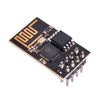
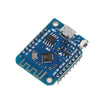
- Push events over Wi-Fi (D1 Mini / ESP-01) to a server for cloud logging
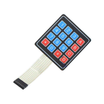
- Add a 4x4 keypad for two-factor access (card + PIN)
- Replace the servo with a 12 V solenoid lock via a 1-channel relay for real doors
Expected result: You have a clear list of next upgrades without changing the core wiring and logic you built.
Conclusion
You built an Arduino Nano smart door lock using an RC522 RFID reader, an MG90S servo for the latch, and an SSD1306 OLED to show access status. With one sketch, the system reads a tag UID, decides if it is authorized, and then unlocks or denies access.
Want the exact parts used in this build? Grab them from ShillehTek.com. If you want help customizing this project or building something for your product, check out our IoT consulting services.
Credits: The smart door lock photos and code in this tutorial are credited to Instructables, which served as the reference for this ShillehTek version.







.png?v=25000753014097803521791038641)

.png?v=68677308723310773341791038641)


