

Project Overview
Arduino + LoRa (RFM98/Ra-02) vs NRF24L01+: This guide helps you choose the right SPI wireless radio for your Arduino project so your remote sensor link has the range, data rate, and battery life you expect.
Picking a wireless link for your project is where many beginner makers get stuck. The cheap, well-documented options are the NRF24L01+ (2.4 GHz), the 433 MHz ASK pair, the HC-12 (semi-smart 433 MHz module), and the LoRa modules (RFM95/RFM98/Ra-02). They differ by 100x in range and by 1000x in data rate. Pick the wrong one and your remote sensor project either runs out of battery in a day or never reaches the other side of the house.
This guide focuses on the two most common SPI radios in maker kits: the LoRa RFM98/Ra-02 long-range chirp radio and the NRF24L01+ 2.4 GHz short-range radio. Same wiring (SPI), same library family, totally different physics.
- Time: 10 to 20 minutes
- Skill level: Beginner
- What you will build: A clear decision on whether LoRa or NRF24L01+ fits your range, data rate, and power goals, plus reference wiring and minimal example code.
Parts List
From ShillehTek
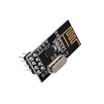
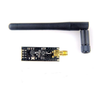
- NRF24L01+ 2.4 GHz Transceiver - the low-cost short-range SPI radio for high data rate links.
- Arduino Nano V3.0 - a common 5 V Arduino reference board for the example pin mappings.
- ESP32 WROOM Dev Board - a 3.3 V MCU option that can talk to both radios without level shifting.
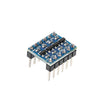
- I²C Logic Level Converter - for mixing 3.3 V radios with 5 V MCUs.
External
- A LoRa Ra-02 (SX1278) or RFM95W/RFM98W module - choose 433 MHz or 868/915 MHz to match your region’s ISM band.
- Two appropriately tuned antennas - either a soldered wire whip cut to λ/4 or a proper helical/PCB antenna.
- 10 µF bypass capacitor across VCC/GND on the NRF24L01+ (this single capacitor solves more "it doesn’t work" complaints than any other fix).
Note: Both radios are 3.3 V parts. If you use a 5 V Arduino, use a 3.3 V regulator and level shifting (or a 3.3 V MCU like an ESP32) for reliable links.
Step-by-Step Guide
Step 1 - Compare the headline specs
Goal: Understand the basic range, data rate, and current draw differences.
What to do: Use these specs as your first filter before you pick a module.

- NRF24L01+: 2.4 GHz ISM band, up to 2 Mbps data rate, range 100 m line of sight (1 km with PA/LNA variant), 11.3 mA TX @ 0 dBm, $2 module.
- LoRa Ra-02 / RFM98 (SX1278): 433/470 MHz (Asia) or 868/915 MHz (EU/US) ISM, data rate 0.018 to 37.5 kbps depending on spreading factor, range 2 to 15 km outdoors line of sight, 120 mA TX @ +20 dBm, $4 module.
Expected result: You can quickly match the radio to your needs: short-range high throughput (NRF24L01+) versus long-range low throughput (LoRa).
Step 2 - Understand why LoRa goes much further
Goal: Learn the physics behind LoRa’s longer range.
What to do: Keep in mind the frequency band and modulation when planning the environment (walls, distance, interference).
The NRF24L01+ uses GFSK at 2.4 GHz, the same band as WiFi and Bluetooth. High frequency means small antennas, but signals are absorbed by walls, water, and air over distance. LoRa uses Chirp Spread Spectrum (CSS) modulation at 433 MHz or 868/915 MHz, which is much lower frequency, much longer wavelength, and much better at penetrating walls and traveling kilometers. The spread-spectrum modulation gives LoRa its strong link budget: you can recover a signal 20 dB below the noise floor.
Expected result: You understand why LoRa is the better choice when you must cross multiple walls or cover large outdoor distances.
Step 3 - Account for the tradeoff: data rate
Goal: Decide if your project’s payload and update rate fit LoRa.
What to do: Map your data needs to the radio’s practical throughput.
LoRa’s range comes from low data rate. At spreading factor 7 you get about 5.5 kbps; at SF12 you get about 290 bps. The NRF24L01+ runs at 250 kbps, 1 Mbps, or 2 Mbps.
- Streaming sensor data 100x per second - NRF24L01+. LoRa will choke.
- Sending one temperature reading per minute from a remote field - LoRa. 100 byte payload at SF7 takes about 150 ms.
Expected result: You can reject the wrong option early based on payload size and update frequency.
Step 4 - Wire the radio over SPI (3.3 V)
Goal: Wire either module correctly and avoid 5 V signal issues.
What to do: Follow the SPI pin mapping below. Power the radios at 3.3 V, and use a level shifter (or a 3.3 V MCU like ESP32) if your MCU is 5 V.

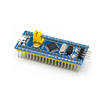
Both radios are 3.3 V SPI. If you wire an NRF24L01+ to a 5 V Arduino, the radio may work but it’s out of spec. Expect short range and random hangs. Use an ESP32, an STM32 Blue Pill, or a level shifter. The same applies to LoRa.
Code:
NRF24L01+        Arduino
VCC      ->     3.3V (with 10uF cap to GND)
GND      ->     GND
CE       ->     D9
CSN      ->     D10
SCK      ->     D13
MOSI     ->     D11
MISO     ->     D12
IRQ      ->     not used

LoRa SX1278     Arduino
VCC      ->     3.3V
GND      ->     GND
NSS/CS   ->     D10
SCK      ->     D13
MOSI     ->     D11
MISO     ->     D12
RST      ->     D9
DIO0     ->     D2 (interrupt)
Expected result: You have a correct wiring reference for both NRF24L01+ and LoRa SX1278 modules on an Arduino-style SPI pinout.
Step 5 - Test with tiny code samples
Goal: See what minimal “send a value” code looks like for each radio.
What to do: Use these snippets as starting points with the common libraries mentioned in the comments.
Code:
// NRF24L01+ with TMRh20 RF24 library
#include <RF24.h>
RF24 r(9, 10);
void setup() { r.begin(); r.openWritingPipe(0xF0F0F0F0E1LL); }
void loop() { uint32_t v=42; r.write(&v, sizeof(v)); delay(1000); }

// LoRa with Sandeep Mistry's LoRa library
#include <LoRa.h>
void setup() {
  LoRa.begin(433E6);   // or 868E6 / 915E6
}
void loop() {
  LoRa.beginPacket();
  LoRa.print("hello");
  LoRa.endPacket();
  delay(5000);
}
Expected result: You can identify the library families and the minimum calls required to transmit a payload.
Step 6 - Pick the radio based on your use case
Goal: Match real projects to the right radio choice.
What to do: Use this checklist to decide, then commit to one radio so you can design the rest of the system around it (power, antenna, enclosure, and update rate).

- Wireless game controller / joystick / RC car - NRF24L01+. Low latency, high data rate, indoor range is fine.
- Multiple sensor nodes in a house talking to one base - NRF24L01+ (it has built-in addressing and ACKs for up to 6 pipes per receiver).
- Remote soil-moisture or weather station in a backyard or farm - LoRa. The range is hard to beat.
- Tracker project that needs to go through several walls and floors - LoRa. NRF24L01+ at 2.4 GHz often fails after two walls.
- Battery-powered transmitter that wakes once an hour - LoRa wins on duty-cycle. Cycle the radio off, sleep MCU, wake, send 50 bytes, sleep again. The packet is so small that even at 120 mA TX the average current is microamps.
Expected result: You can confidently select LoRa or NRF24L01+ based on latency, throughput, range, and power budget.
Conclusion
NRF24L01+ and LoRa aren’t replacements for each other. NRF24L01+ is an indoor, low-latency, multi-node 2.4 GHz radio at low cost. LoRa is a kilometers-of-range, low-data-rate radio that is ideal for sparse sensor updates. Many useful builds combine both: LoRa from a remote field sensor back to a base station, and NRF24L01+ between the base station and nearby in-house display nodes.
Want the exact parts used in this build? Grab them from ShillehTek.com. If you want help customizing this project or building something for your product, check out our IoT consulting services.
Attribution: This guide was inspired by the hands-on tutorial "LoRa RFM98 Tutorial Ra-02 HopeRF Module Comparison" on Instructables. Images credited to the original author of the source tutorial.




.png?v=25000753014097803521791168436)

.png?v=68677308723310773341791168436)


