

Project Overview
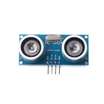
Arduino + HC-SR04 ultrasonic distance sensor: Build a simple distance meter that streams live centimetre readings to the Arduino Serial Monitor. The HC-SR04 fires a 40 kHz ultrasonic ping and times the echo, letting you measure roughly 2 cm to 4 m with hobby grade accuracy for parking sensors, level meters, and obstacle avoiding robots.
- Time: ~10 minutes
- Skill level: Beginner
- What you will build: An Arduino streaming a live distance reading to the Serial Monitor.

Parts List
From ShillehTek
- HC-SR04 Ultrasonic Distance Sensor (4-pin) - generates the ultrasonic ping and returns an echo pulse you time.
- Arduino Nano V3.0 Pre-Soldered - microcontroller board that triggers the sensor and prints distance over Serial.
- 120 PCS Dupont Jumper Wires - for quick connections between the Nano and the sensor.
- 400-Point Solderless Breadboard - makes wiring easy without soldering.
External
- USB cable + computer running the Arduino IDE
Note: The HC-SR04 is 5 V only. If you are wiring it to a 3.3 V board (ESP32, Pi Pico, Pi 5) drop the ECHO line through a level shifter or a divider.
Step-by-Step Guide
Step 1 - Wire the Sensor
Goal: Connect the four pins to your Arduino.
What to do: Place the Arduino Nano and HC-SR04 on the breadboard (or position them so you can jumper between them), then make the connections below.

- VCC -> 5 V
- GND -> GND
- TRIG -> D9
- ECHO -> D10
Expected result: Four jumper wires connected, no extra components needed for an Arduino Nano at 5 V.
Step 2 - Upload the Sketch
Goal: Trigger a ping, measure the echo time, and convert it to centimetres.
What to do: Open the Arduino IDE, select your board and port, then upload the sketch below.
Code:
const int TRIG = 9;
const int ECHO = 10;

void setup() {
  pinMode(TRIG, OUTPUT);
  pinMode(ECHO, INPUT);
  Serial.begin(9600);
}

void loop() {
  digitalWrite(TRIG, LOW);
  delayMicroseconds(2);
  digitalWrite(TRIG, HIGH);
  delayMicroseconds(10);
  digitalWrite(TRIG, LOW);

  long us = pulseIn(ECHO, HIGH);
  float cm = us * 0.0343 / 2.0;   // speed of sound 343 m/s
  Serial.print("Distance: ");
  Serial.print(cm, 1);
  Serial.println(" cm");
  delay(200);
}
The math: sound travels 343 m/s, so each microsecond of round trip echo time means 0.0343 cm of round trip path. Divide by 2 for one way distance.
Expected result: The sketch uploads successfully and the Nano starts printing distance measurements over Serial.
Step 3 - Verify in the Serial Monitor
Goal: Confirm clean readings in real time.
What to do: Open Tools -> Serial Monitor and set the baud rate to 9600. Move your hand toward and away from the sensor to see the numbers change.

Expected result: Readings between 2 cm and about 400 cm, typically within about 1 cm at room temperature.
Step 4 - Where to Take It Next
Goal: Use the distance value to drive outputs or motion.
What to do: Once you have stable readings, you can build on the same sketch with any of these ideas:
- Drive an LED with
analogWriteproportional to distance for a parking aid bar - Wire a buzzer that beeps faster as something approaches
- Mount on a servo to build a 180 degree ultrasonic radar
- Pair with the L298N to make a basic obstacle avoiding robot
Expected result: A clear plan for your next build using the same HC-SR04 distance measurement.
Conclusion
You built an Arduino HC-SR04 distance meter that measures echo time and prints live centimetre readings to the Serial Monitor. With just two GPIO pins (TRIG and ECHO) you can turn distance into useful behavior for robotics, parking aids, and level sensing.
Want the exact parts used in this build? Grab them from ShillehTek.com. If you want help customizing this project or building something for your product, check out our IoT consulting services.





.png?v=25000753014097803521791168436)

.png?v=68677308723310773341791168436)


