

Project Overview
Arduino + 24MHz USB Logic Analyzer: In this guide, you use an Arduino (Nano) and a 24MHz 8-channel USB logic analyzer to capture an I2C transaction and decode it in PulseView, so you can stop debugging SPI, I2C, UART, or 1-Wire blind.
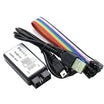
The 24MHz / 8-channel USB analyzer is a low-cost option that works with PulseView/sigrok and Saleae Logic.
- Time: ~25 minutes
- Skill level: Beginner / Intermediate
- What you will build: An Arduino I2C transaction captured live and decoded in PulseView.

Parts List
From ShillehTek
- 24MHz 8-Channel USB Logic Analyzer - captures and decodes digital buses like I2C, SPI, and UART.
- Arduino Nano V3.0 Pre-Soldered - easy target to generate I2C traffic to probe.
- 120 PCS Dupont Jumper Wires - quick connections from analyzer leads to Arduino pins.
External
- A computer running PulseView (free) or Saleae Logic
- A target circuit to probe (any Arduino + I2C sensor works)
Note: 24MHz is fast enough for SPI up to ~10MHz, I2C at any speed, UART up to ~115200 baud, and most slow digital protocols. Not enough for high-speed SDIO or 100MHz QSPI.
Step-by-Step Guide
Step 1 - Inspect the Analyzer
Goal: Identify the connector and channel pins so you know what to hook up.
What to do: Locate the USB-Mini connector and the 10-pin header. The header typically provides 8 channels plus two ground pins.

Expected result: You can point to the channel pins and at least one GND pin before wiring anything.
Step 2 - Install PulseView
Goal: Install capture software and the firmware support needed for the analyzer.
What to do: Download and install PulseView from sigrok.org. It includes the fx2lafw firmware needed by the CY7C68013A chip inside many of these analyzers.

Expected result: PulseView launches and is ready to connect to the logic analyzer.
Step 3 - Probe an I2C Transaction
Goal: Capture SDA and SCL while your Arduino talks to an I2C device.
What to do: Wire any I2C sensor (BME280, MPU6050, OLED) to your Arduino. Then connect the analyzer leads:
- Analyzer GND to Arduino GND
- Channel 0 to SDA (Arduino A4)
- Channel 1 to SCL (Arduino A5)
In PulseView, set the sample rate to 8 MS/s and set total samples to 1 M, then click Start. Run your Arduino sketch to generate I2C traffic.
Expected result: You see two digital traces toggling (SDA and SCL) during I2C activity.
Step 4 - Decode
Goal: Turn the raw SDA/SCL waveforms into readable I2C bytes.
What to do: In PulseView, right-click on the channels and choose Add decoder → I2C. Assign which channel is SDA and which is SCL. PulseView will annotate addresses and data on top of the captured signals.

Expected result: You can read every byte your Arduino writes or reads over I2C directly in the capture timeline.
Step 5 - Where to Take It Next
Goal: Apply the same capture-and-decode workflow to other digital protocols.
What to do: Use the analyzer on other buses and modules you work with:
- Capture SPI traffic to confirm a sensor library is sending what you think
- Decode UART at the wire level when Serial Monitor lies
- Verify NEC IR remote codes by probing the IR receiver output
- Reverse-engineer cheap modules whose datasheets are wrong
Expected result: You have a repeatable workflow for validating digital communications with real signals.
Conclusion
A 24MHz USB logic analyzer paired with PulseView makes it practical to inspect Arduino I2C, SPI, and UART signals and decode real traffic in minutes. Once you can see the bus, debugging turns from guesswork into verification.
Want the exact parts used in this build? Grab them from ShillehTek.com. If you want help customizing this project or need embedded debugging and reverse-engineering support, check out our IoT consulting services.
Credits: The USB logic analyzer photos and PulseView screenshots in this tutorial are credited to Instructables.







.png?v=25000753014097803521788741467)

.png?v=68677308723310773341788741467)


