

Project Overview
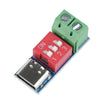
USB-C PD bench power supply: Build a pocket-size lab supply using a USB-C PD charger, a PDSink PD trigger (PD decoy) board, and an adjustable buck converter to get a stable, adjustable output.

Modern USB-C wall chargers can deliver 65 W, 100 W, even 240 W on demand, but only if the load knows how to ask. The "ask" is handled by a tiny chip on a PD trigger board (PD decoy / PD sink). With an inexpensive trigger board you can turn a USB-C laptop charger into a fixed 5/9/12/15/20 V source.
This guide builds a working USB-C PD bench supply around our PDSink trigger board and an adjustable buck converter. You get a tunable 1.5 to 19 V output with an optional real-time current meter, powered by whatever USB-C charger is already on your desk.
- Time: 20 to 45 minutes
- Skill level: Beginner
- What you will build: A USB-C PD powered bench supply using a fixed PD trigger voltage feeding an adjustable buck converter.
Parts List
From ShillehTek
- PDSink PD Decoy Fast Charging Test Board 5-20V - requests a fixed USB-C PD voltage (5/9/12/15/20 V) from your charger.
- Arduino Nano V3.0 - used only if you add the optional digital voltmeter/current meter.
- 830-Point Breadboard - helpful for prototyping the optional meter wiring.
- DuPont Jumper Wires - for quick connections during prototyping.
External
- A 60+ W USB-C PD charger (any modern laptop or phone charger).
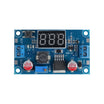
- An adjustable buck converter (LM2596 or similar DC-DC variable module).
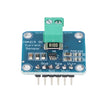
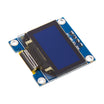
- An OLED I2C display + INA219 current sensor (optional, for the digital meter).
- Binding posts, a 3D-printed case, and a USB-C cable rated for high current (example: 4 A).
Note: Most PD trigger boards select only fixed PD voltages (commonly 5/9/12/15/20 V). In this build, setting the trigger to 20 V and using a buck converter provides the adjustable output range.
Step-by-Step Guide
Step 1 - Understand how USB-C PD trigger boards work
Goal: Know what the PD trigger board is doing so you select the correct output voltage.
What to do: USB-C Power Delivery is a digital protocol. When you plug a device in, PD-capable chips negotiate a voltage. A "PD decoy" or "PD trigger" board is a small IC (often an IP2721 or similar) that pretends to be a device and requests a specific fixed voltage from the charger.

Most trigger boards have solder jumpers on the back to select 5/9/12/15/20 V. Solder one bridge and that becomes the board’s output voltage.
Expected result: You understand that the PD trigger output is fixed and set by jumpers, not continuously adjustable.
Step 2 - Wire the PD trigger to the buck converter and output terminals
Goal: Create an adjustable bench output by feeding a buck converter from the PD trigger board.
What to do: Connect the USB-C charger to the PDSink input, then route the PDSink output into the buck converter input. Finally, connect the buck converter output to your binding posts (or output leads).
Connections:
USB-C charger -> PDSink board (IN)
PDSink OUT(+) -> Buck converter VIN(+)
PDSink OUT(-) -> Buck converter VIN(-)
Buck VOUT(+) -> Binding post (+)
Buck VOUT(-) -> Binding post (-)
For the bench supply, set the PDSink to 20 V (max). The buck converter then drops it to whatever you set with its potentiometer, such as 3.3 V, 5 V, or 12 V.
Expected result: You have a working power path from the USB-C charger to an adjustable output.
Step 3 - Set expectations for output range, current, and power
Goal: Understand realistic electrical performance for planning your projects.
What to do: Use these as typical targets for a build like this (actual results depend on your buck converter, wiring, and USB-C charger capability):
- Input: 20 V from any 60+ W USB-C PD charger.
- Output: 1.5 to 19 V adjustable, up to 3 A.
- Ripple: ~30 mV at most loads (the buck’s output capacitor dominates).
- Power: 60 W on a 60 W charger, or higher if you have a higher wattage charger.
- Cost: about $25 total (including a printed case).
Expected result: You know what loads are reasonable (and when you may need a better buck converter or higher wattage charger).
Step 4 - Optional: add a digital voltmeter and current monitor
Goal: Display real-time voltage and current at the output.
What to do: Add an INA219 between the buck output and the binding post, wire its SDA/SCL to the Nano’s A4/A5, and connect a small 0.96 inch OLED. The Nano reads the INA219 over I2C and prints V/A/W on the OLED in real time. This can be done in roughly 30 lines of Arduino code.
Expected result: Your USB-C bench supply can show how much voltage and current your project is drawing.
Step 5 - Put it to use
Goal: Apply the bench supply to common prototyping tasks.

What to do: Set the buck converter to the voltage you need, then power your project.
- 5 V for Arduino / ESP32: set the buck to 5 V and connect your load.
- 3.3 V for ESP-01 / Raspberry Pi Pico: set to 3.3 V.
- 12 V for LED strips, fans, relays: set to 12 V.
- Soldering iron: for irons that run on 12 to 24 V (example: TS100 / Pinecil), set the PDSink to 20 V and feed the iron directly (no buck needed).
Expected result: You can power a wide range of electronics projects from a USB-C PD charger without hunting for matching wall adapters.
Conclusion
USB-C PD has become a convenient power source for the bench. With a PDSink PD trigger board requesting 20 V and an adjustable buck converter, you can turn a laptop charger into a compact 1.5 to 19 V lab supply, with an optional INA219-based current meter.
Want the exact parts used in this build? Grab them from ShillehTek.com. If you want help customizing this project or building something for your product, check out our IoT consulting services.
Attribution: This guide was inspired by "USB-C Powered Bench Power Supply" on Instructables. Images credited to the original author.






.png?v=25000753014097803521789973449)

.png?v=68677308723310773341789973449)


