

Project Overview
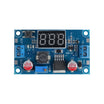
LM2596 DC-DC Buck Converter power distribution: In this tutorial, you will use an LM2596 step-down (buck) converter module to safely power devices that require different voltages from a single battery source, including an Arduino Uno and common 5V and 3.3V modules.
You will learn the module pinout, how to adjust the output voltage, current rating considerations, fuse protection, and practical wiring examples such as powering an Arduino with a servo motor and running both 5V and 3.3V devices from one supply.
- Time: 30 minutes to 1 hour
- Skill level: Beginner
- What you will build: A properly configured power distribution setup using the LM2596 buck converter to supply regulated voltage to microcontrollers and motors.

Parts List
From ShillehTek
- LM2596 Step-Down Buck Converter Module with Digital Voltmeter - the main power converter used in this tutorial
- 120pcs 20cm Dupont Jumper Wires - for wiring the power distribution circuit
- 400-Point Small Solderless Breadboard - for prototyping the power circuit
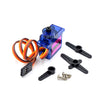
- SG92R 9g Micro Servo Motor - the motor powered in the example circuit
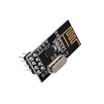
- NRF24L01+ 2.4GHz Wireless Transceiver Module - the 3.3V device used in the dual-voltage example
External
- Arduino Uno R3 (or compatible Uno-form-factor board) - ShillehTek does not sell Arduino boards; source separately for the examples that power the Uno from the buck converter
- 9V alkaline battery or 2S LiPo/Li-Ion battery - the input power source
- Multimeter - essential for checking and adjusting the output voltage
- 2A or 3A fuse - for overcurrent protection
- Small screwdriver - for adjusting the trimmer potentiometer
- Resistors (2kΩ and 1kΩ) - for the voltage divider in the 3.3V example
Note: Always measure the output voltage with a multimeter before connecting any device. The LM2596 accepts 4.5V to 40V input and outputs a lower adjusted voltage.
Step-by-Step Guide
Step 1 - Understand the LM2596 Module Pinout
Goal: Get familiar with the input and output terminals on the LM2596 buck converter module.
What to do: The LM2596 module is built around the LM2596 IC with supporting circuitry that makes it work as an adjustable voltage converter. The pinout has four terminals: IN+ (positive input, 4.5V-40V), IN- (ground input), OUT+ (regulated positive output), and OUT- (ground output).

Expected result: You understand the four terminals and their functions on the LM2596 module.
Step 2 - Adjust the Output Voltage
Goal: Set the converter output to the voltage your project requires.
What to do: Connect your battery to the IN terminals, then connect a multimeter to the OUT terminals. Use a small screwdriver to turn the trimmer potentiometer until the multimeter reads your desired voltage. If this is your first time using the module, you may need to turn the trimmer screw 5 to 10 full rotations before the output begins to change. Once set, disconnect the multimeter and connect your target device.

Expected result: The multimeter shows your desired voltage on the LM2596 output terminals.
Step 3 - Understand Current Rating and Cooling
Goal: Learn the module current limits and when to add a heat sink.
What to do: The LM2596 IC is rated for up to 3A of continuous current, but drawing more than 1.5A for extended periods will cause it to heat up. Adding a small aluminum heat sink to the IC significantly improves thermal performance. Use the module without a heat sink below 1.5A, and with a heat sink for currents above 1.5A.

Expected result: You know when to add a heat sink based on your project current requirements.
Step 4 - Add Fuse Protection for High Current
Goal: Protect the LM2596 from overcurrent damage using a fuse.
What to do: When powering motors or devices that draw unpredictable current spikes, wire a 2A or 3A fuse in series with the positive input line between your battery and the converter. The fuse contains a thin wire that melts if current exceeds its rating, breaking the circuit and protecting the converter.


Expected result: Your converter is protected from overcurrent with a fuse wired on the input side.
Step 5 - Power a Motor and Controller from a Single Source
Goal: Use the LM2596 to power both an Arduino Uno and a servo motor from one battery.
What to do: Wire a 2S LiPo battery (7.4V) through a 2A fuse to the converter, then adjust the output to 6V. Connect the output to both the Arduino VIN pin and the servo motor power wire. Connect all grounds together. Using the converter provides stable voltage with sufficient current and keeps motor power separate from logic power.


Expected result: Both the Arduino and servo motor run reliably from the single regulated 6V supply.
Step 6 - Supply Two Different Voltages from One Source
Goal: Power both a 5V and a 3.3V device from the same converter using a voltage divider.
What to do: Connect a 9V alkaline battery to the converter and adjust the output to 5V. Wire the output to the Arduino and a breadboard. For the 3.3V device (NRF24L01), create a voltage divider using a 2k ohm resistor from the 5V line and a 1k ohm resistor to ground. The junction provides approximately 3.3V for the wireless module.


Expected result: The Arduino runs at 5V and the NRF24L01 receives a stable 3.3V from the same battery.
Conclusion
You learned how to use the LM2596 DC-DC buck converter to step down battery voltage for powering microcontrollers, motors, and wireless modules. You covered the module pinout, voltage adjustment, heat sink considerations, fuse protection, and two practical wiring examples for single-source power distribution.
Want the exact parts used in this build? Grab them from ShillehTek.com. If you want help customizing this project or building something for your product, check out our IoT consulting services.




.png?v=25000753014097803521790455663)

.png?v=68677308723310773341790455663)


