

Project Overview
ESP32-S3 + NEO-6M + SX1262: Build a no-SIM LoRa GPS tracker where an ESP32-S3 reads coordinates from a NEO-6M GPS module and transmits them over an SX1262 LoRa radio to a base station receiver.
This is peer-to-peer radio with no cellular plan and no monthly fees, making it a solid option for tracking bikes, drones, livestock, or hikers in areas with poor reception.
- Time: ~3 hours
- Skill level: Advanced
- What you will build: A battery-powered tracker sending live GPS coordinates over LoRa to a receiver at your home or chase vehicle.

Parts List
From ShillehTek
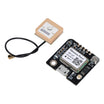
- GT-U7 NEO-6M GPS Module - provides latitude/longitude over UART.
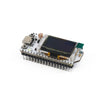
- SX1262 ESP32-S3 LoRa Dev Board (with antenna) - runs the tracker/base firmware and transmits/receives LoRa packets.
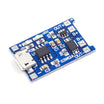
- TP4056 LiPo Charger - charges and protects the battery supply.
- 120 PCS Dupont Jumper Wires - makes the UART power and signal connections.
External
- 2× SX1262 boards (one for the tracker, one for the base station)
- 18650 LiPo cells
- Small project boxes
Note: LoRa frequency is region-specific - 868 MHz for EU, 915 MHz for the US. Match both tracker and base station to the same band, and use the supplied antenna.
Step-by-Step Guide
Step 1 - Gather the components and reference the pinout
Goal: Confirm you have the correct hardware and a clear mapping for the GPS UART pins.
What to do: Lay out the ESP32-S3 SX1262 dev board, the GT-U7 NEO-6M GPS module, wiring, and power parts. Use the pinout reference so you know which ESP32 UART pins will connect to the GPS module.


Expected result: You know which pins will be used for GPS RX/TX and you are ready to wire the tracker.
Step 2 - Wire the tracker
Goal: Connect the NEO-6M GPS module to the ESP32-S3 so the firmware can read NMEA data over UART.
What to do: Wire the GPS module UART lines to the ESP32 UART2 pins as shown: NEO-6M TX to ESP32 GPIO 16 (RX2), and NEO-6M RX to ESP32 GPIO 17 (TX2). The SX1262 radio is pre-wired on the dev board.

Expected result: The GPS module is physically connected and ready to be read by the tracker sketch.
Step 3 - Upload the tracker sketch (send)
Goal: Read GPS latitude/longitude and transmit it periodically over LoRa.
What to do: Flash the following sketch to the tracker ESP32-S3 LoRa board. Confirm the LoRa pin mapping and frequency match your specific board and region.
Code:
#include <TinyGPS++.h>
#include <HardwareSerial.h>
#include <LoRa.h>
HardwareSerial gpsSerial(2);
TinyGPSPlus gps;
void setup() {
  Serial.begin(115200);
  gpsSerial.begin(9600, SERIAL_8N1, 16, 17);
  LoRa.setPins(8, 12, 14);    // SS, RST, DIO0 (board-specific)
  LoRa.begin(915E6);
}
void loop() {
  while (gpsSerial.available()) gps.encode(gpsSerial.read());
  if (gps.location.isUpdated()) {
    String msg = String(gps.location.lat(), 6) + "," + String(gps.location.lng(), 6);
    LoRa.beginPacket(); LoRa.print(msg); LoRa.endPacket();
    Serial.println("Sent: " + msg);
    delay(10000);   // 10s between transmissions
  }
}
Expected result: In Serial Monitor, you see periodic lines like Sent: lat,lng when the GPS has a fix.
Step 4 - Upload the base station sketch (receive)
Goal: Receive LoRa packets and print the latitude/longitude to serial.
What to do: Flash the following sketch to the base station LoRa board. Use the same LoRa pin mapping and frequency as the tracker.
Code:
#include <LoRa.h>
void setup() {
  Serial.begin(115200);
  LoRa.setPins(8, 12, 14);
  LoRa.begin(915E6);
}
void loop() {
  int size = LoRa.parsePacket();
  if (size) {
    String msg = "";
    while (LoRa.available()) msg += (char)LoRa.read();
    Serial.print("Lat,Lng: "); Serial.println(msg);
    // Paste into Google Maps as "lat, lng"
  }
}
Expected result: When the tracker is transmitting, the base station prints Lat,Lng: ... values you can paste into Google Maps.
Step 5 - Deploy the tracker
Goal: Package the tracker for off-grid use and validate reception at the base station.
What to do: Place the tracker in a project box, mount the antenna securely, and power it from your battery setup. Keep the base station powered and monitor its output while moving the tracker to test real-world range.


Expected result: The base station continues receiving updated coordinates as the tracker moves.
Step 6 - Where to take it next
Goal: Identify practical upgrade paths for the same hardware platform.
What to do: If you want to extend this project, consider these next steps.
- Add Meshtastic firmware to both devices - instant phone-pairable encrypted mesh
- Build a Pi-hosted base station that logs to a web dashboard with map view
- Add an ADXL345 for tilt/movement detection - only transmit when bike is moving
- Switch to deep-sleep wake-on-GPS-fix for week-long battery life
Expected result: You have a clear direction for extending the tracker depending on your range, logging, and battery-life goals.
Conclusion
This project uses an ESP32-S3 with an SX1262 LoRa radio and a NEO-6M GPS module to send coordinates without a SIM card or cellular plan. With a tracker node and a base station receiver, you can monitor location in places where phone coverage is unreliable.
Want the exact parts used in this build? Grab them from ShillehTek.com. If you want help customizing this project or building something for your product, check out our IoT consulting services.
Credits: LoRa GPS tracker project credited to Instructables. The original guide served as the reference for this ShillehTek version.



.png?v=25000753014097803521791168436)

.png?v=68677308723310773341791168436)


