

Project Overview
ESP32 + BH1750 smart blinds: Use an ESP32 with a BH1750 light sensor and a 28BYJ-48 stepper motor to roll your blinds up at sunrise and down at sunset, with simple Wi-Fi phone control on your local network.
A 28BYJ-48 stepper motor drives the blind's pull cord through a small pulley. The BH1750 reads ambient brightness, and the ESP32 exposes basic web endpoints so you can raise or lower the blinds from a phone on the same network.
- Time: ~3 hours
- Skill level: Intermediate
- What you will build: Wi-Fi controlled motorized blinds with light-aware automatic behavior (optional lux thresholds), plus an RTC option for backup scheduling.

Parts List
From ShillehTek
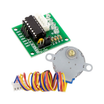
- 28BYJ-48 Stepper + ULN2003 Driver - provides the geared motor and driver board to pull the blind cord from ESP32 GPIO pins.
- ESP32-WROOM Dev Board - runs the Wi-Fi web server and controls the stepper.
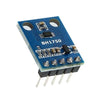
- BH1750 Light Sensor - measures ambient brightness (lux) for optional auto open/close behavior.
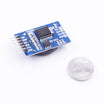
- DS3231 RTC (backup schedule) - optional real-time clock for scheduling if you want time-based control.
- Dupont Jumper Wires - makes prototyping the wiring on a breadboard faster.
External
- 3D-printed mounting bracket + pulley - holds the stepper next to the blind cord and transfers motion to the pull cord.
- 5V power supply - powers the stepper driver and electronics.
Note: The ULN2003 inputs connect to ESP32 GPIOs. The BH1750 and DS3231 share the I2C bus (SDA/SCL). Use a stable 5V supply sized for stepper load.
Step-by-Step Guide
Step 1 - The Mechanism
Goal: Build a simple pulley and bracket so the 28BYJ-48 can pull the roller blind cord.
What to do: Fit a pulley to the stepper shaft and position the stepper next to the blind's pull cord. Ensure the cord tracks consistently on the pulley and does not slip during direction changes.

Expected result: Turning the stepper by hand (or briefly under power later) moves the blind cord smoothly without binding.
Step 2 - Wire It
Goal: Connect the ESP32 to the ULN2003 stepper driver and connect BH1750 (and optional DS3231) over I2C.
What to do: Wire the four ULN2003 input pins to ESP32 GPIOs 12 to 15 as shown. Connect the stepper motor to the ULN2003 motor header. Wire BH1750 to the ESP32 I2C pins (SDA/SCL) and power. If using DS3231, wire it to the same I2C bus and power.


Expected result: Your wiring matches the diagram, with the stepper controlled through the ULN2003 and sensors sharing the I2C bus.
Step 3 - Sketch
Goal: Flash a simple ESP32 sketch that connects to Wi-Fi, reads BH1750 lux, and exposes /up and /down web endpoints to move the stepper.
What to do: Update the Wi-Fi SSID and password, flash the code, and open the Serial Monitor to find the ESP32 IP on your network. Use a phone or browser on the same network to visit http://<esp32-ip>/up and http://<esp32-ip>/down.
Code:
#include <Stepper.h>
#include <WiFi.h>
#include <WebServer.h>
#include <Wire.h>
#include <BH1750.h>
Stepper stepper(2048, 12, 14, 13, 15);
BH1750 light;
WebServer server(80);
void up()    { stepper.step(2048 * 10); }    // 10 turns to roll up
void down()  { stepper.step(-2048 * 10); }
void setup() {
  Wire.begin(); light.begin();
  WiFi.begin("SSID","PASS");
  while (WiFi.status() != WL_CONNECTED) delay(500);
  stepper.setSpeed(15);   // RPM
  server.on("/up",   [](){ up();   server.send(200, "text/plain", "UP"); });
  server.on("/down", [](){ down(); server.send(200, "text/plain", "DOWN"); });
  server.begin();
}
void loop() {
  server.handleClient();
  float lux = light.readLightLevel();
  // Optional: auto-roll based on lux thresholds
}
Expected result: The ESP32 connects to Wi-Fi, and hitting /up or /down moves the blinds. BH1750 lux readings are available in code for optional automation.
Step 4 - Mount It
Goal: Secure the motor and pulley so the mechanism can run reliably on the window frame.
What to do: Attach the bracket to the window frame near the blind cord path. Align the pulley so the cord runs straight and does not rub. Make sure the assembly is rigid enough that the motor does not twist under load.

Expected result: The cord tracks cleanly and the motor stays aligned while the blinds move.
Step 5 - Use It
Goal: Control the blinds from a phone on your local Wi-Fi network.
What to do: On a device connected to the same network, navigate to the ESP32 IP address followed by /up or /down. If desired, adjust step counts and speed in the sketch to match your blind travel and torque needs.

Expected result: The blinds roll up and down on demand using the ESP32 web endpoints.
Step 6 - Where to Take It Next
Goal: Identify safe, optional improvements you can add after the basic build works.
What to do: Consider expanding the project with one of these additions.
- Schedule via DS3231 - open at sunrise, close at sunset, no Wi-Fi needed
- Integrate with Home Assistant via MQTT for whole-house control
- Add a closed-state limit switch - never over-rotate the stepper
- Voice control via Alexa/Google through Home Assistant
Expected result: You have a clear path to add scheduling, integrations, and safer end-stops without changing the core wiring concept.
Conclusion
You built ESP32-controlled motorized blinds using a 28BYJ-48 stepper motor, ULN2003 driver, and a BH1750 light sensor, with simple /up and /down web control and the option to automate based on brightness.
Want the exact parts used in this build? Grab them from ShillehTek.com. If you want help customizing this project or building something for your product, check out our IoT consulting services.
Reference: Original project inspiration credited to Instructables.





.png?v=25000753014097803521791168436)

.png?v=68677308723310773341791168436)


