


Project Overview
CP2102 USB-to-TTL: Use a CP2102 USB-to-UART converter to flash an ESP8266 ESP-01, STM32 boards over UART, and other bootloader-less targets reliably from a computer USB port.
This guide explains what the CP2102 pins do, how to wire it to an ESP-01 for flashing, how to avoid brown-outs with a bulk capacitor, and how to add an auto-reset mod using DTR/RTS for smoother uploads.
- Time: 20 to 40 minutes (longer if doing the auto-reset mod)
- Skill level: Beginner to Intermediate
- What you will build: A repeatable CP2102 wiring and flashing setup for ESP-01 and other UART-programmed boards
Parts List
From ShillehTek
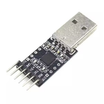
- CP2102 USB-to-TTL UART Serial Converter (6-Pin) - USB to UART bridge for flashing and serial console
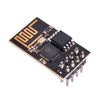
- ESP8266 ESP-01 Module - example target board that commonly needs manual bootloader wiring
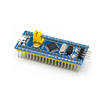
- STM32F103C8T6 Blue Pill - example target that can be flashed via UART bootloader
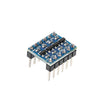
- I²C Logic Level Converter - optional protection if you must interface 5 V UART logic to 3.3 V devices
External
- USB-A cable (the CP2102 module has a USB-A male connector on board)
- 470 µF electrolytic capacitor (for stable ESP-01 flashing during current spikes)
- Optional: a couple of 10 µF capacitors + 10 kΩ resistors (if you mod for auto-reset)
Note: For ESP8266 and STM32 targets, make sure the CP2102 is set for 3.3 V signaling. Supplying 5 V logic to a 3.3 V-only UART device can damage it.
Step-by-Step Guide
Step 1 - Understand the CP2102 pinout
Goal: Know which CP2102 pins you need for power, UART, and auto-reset.
What to do: Identify the CP2102 header pins on your module and match them to their purpose.

- 5V - passed through from USB
- 3V3 - from the onboard regulator (limited current)
- TXD - serial data from CP2102 to the target RX
- RXD - serial data from the target TX to CP2102
- GND - shared ground (required)
- DTR / RTS - control lines used for auto-reset/bootloader entry on some boards
Expected result: You can confidently pick the correct power, TX/RX, and optional DTR/RTS pins before wiring anything.
Step 2 - Wire the CP2102 to an ESP-01 for standard flashing
Goal: Connect power and UART correctly and force the ESP-01 into bootloader mode.
What to do: Wire the ESP-01 using 3.3 V power and cross TX/RX. Ground GPIO0 only during flashing.

Wiring map:
CP2102      ESP-01
3V3      -> VCC (3.3V, never 5V)
3V3      -> CH_PD (chip enable)
GND      -> GND
GND      -> GPIO0 (only during flashing, bootloader mode)
TXD      -> RX
RXD      -> TX
Critical: Put a 470 µF electrolytic capacitor across VCC and GND near the ESP-01. The ESP can draw large current spikes on boot, and the CP2102’s 3.3 V regulator may brown-out without extra bulk capacitance.
Expected result: The ESP-01 has stable 3.3 V power, UART lines are connected correctly, and GPIO0 is held low for flashing.
Step 3 - Flash the ESP-01 (manual bootloader entry)
Goal: Upload firmware/sketch to the ESP-01 using the CP2102 serial port.
What to do: Power up with GPIO0 grounded, reboot once to enter bootloader, then upload from your flashing tool.
- Power the ESP-01 with GPIO0 grounded.
- Reboot the ESP-01 (briefly disconnect 3V3, then reconnect).
- It boots into bootloader mode, ready to receive flash data.
- From Arduino IDE: Tools → Board "Generic ESP8266", Port = CP2102’s COM port, Sketch → Upload.
- After flashing completes, disconnect GPIO0 from GND and reboot again to run your code.
Expected result: Upload completes successfully, and after removing GPIO0 from GND the ESP-01 boots normally into your flashed firmware.
Step 4 - (Optional) Add the auto-reset mod using DTR and RTS
Goal: Avoid manually toggling GPIO0 and reset for every upload.
What to do: Use CP2102 control lines so your IDE can automatically reset the ESP into bootloader mode.

- Wire DTR to ESP-01 GPIO0 (through a small NPN stage or directly, depending on your preferred circuit).
- Wire RTS to ESP-01 RST.
Some CP2102 modules do not expose DTR/RTS on the header. In that case, you may need to solder thin wires directly to the CP2102 IC pads (pin 28 = DTR, pin 27 = RTS).
Expected result: Your upload tool can handle the reset and bootloader sequence automatically, similar to a NodeMCU-style dev board workflow.
Step 5 - Use the CP2102 for other UART flashing and serial tasks
Goal: Reuse the same adapter for multiple boards and serial workflows.
What to do: Apply the same UART basics (common ground, cross TX/RX, correct voltage levels) to these common cases.
- Flashing an STM32 Blue Pill via UART: connect to A9/A10, set BOOT0=1, then flash with stm32flash.
- Programming an Arduino Pro Mini (no USB on board): connect VCC/GND/TX/RX and DTR for auto-reset so the Arduino IDE can upload normally.
- Debug console for any UART device: connect to SIM800 modems, GPS modules, LoRa modems, and use a serial terminal for logs or AT commands.
- Sniffing serial traffic: connect TXD-only to listen passively to a UART TX line for analysis.
Expected result: You can flash or communicate with multiple UART-based devices using one reliable USB-to-TTL adapter.
Step 6 - Avoid the most common wiring and setup mistakes
Goal: Prevent the failures that most often look like a “bricked” board.
What to do: Verify these items before assuming your target is dead.
- 3.3 V vs 5 V logic: If your CP2102 is outputting 5 V UART logic and your target is 3.3 V-only (ESP, STM32), switch the module to 3.3 V signaling.
- Reversed TX/RX: CP2102 TX goes to target RX, and CP2102 RX goes to target TX.
- No driver on Windows: Some Windows installations require the Silicon Labs CP210x driver from silabs.com.
- Garbled output: Usually a baud-rate mismatch (ESP often uses 115200, not 9600).
Expected result: A stable serial connection that uploads firmware and shows readable console output.
Conclusion
A CP2102 USB-to-TTL adapter lets you flash and debug UART devices like the ESP8266 ESP-01 and STM32 Blue Pill without needing a board-specific USB cable. With correct 3.3 V signaling, crossed TX/RX, solid grounding, and a bulk capacitor for ESP power spikes, uploads become repeatable instead of frustrating.
Want the exact parts used in this build? Grab them from ShillehTek.com. If you want help customizing this project or building something for your product, check out our IoT consulting services.
Credit: This guide was inspired by "Mod a USB to TTL Serial Adapter (CP2102) to Program ESP8266" on Instructables.


.png?v=25000753014097803521791168436)

.png?v=68677308723310773341791168436)


