

Project Overview
Arduino Nano + TCA9548A I2C multiplexer: this project shows how to connect up to 8 identical I2C devices (like 0x3C SSD1306 OLEDs) to one Arduino Nano without address collisions by switching I2C channels.
You buy two OLED displays and discover they both live at I2C address 0x3C. There is no jumper to change it. So how do you drive both from one Arduino? The answer is the TCA9548A, an 8-channel I2C multiplexer that exposes the bus on eight separate downstream channels. Your Arduino talks to address 0x70 to pick a channel, then talks to the device on that channel as if it is the only one on the bus.
This guide wires the TCA9548A to an Arduino, drives up to 8 identical 0.96" OLED displays at the same time, and shows the standard pattern for daisy-chaining many sensors with the same address (BME280, MPU6050, VL53L0X).
- Time: 30 to 60 minutes
- Skill level: Beginner to Intermediate
- What you will build: An Arduino Nano setup that selects TCA9548A channels to control multiple identical I2C devices one at a time.
Parts List
From ShillehTek
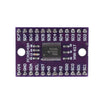
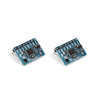
- TCA9548A 1-to-8 I2C 8-Channel Multiplexer - solves I2C address collisions by isolating devices on selectable channels.
- Arduino Nano V3.0 - the I2C master that selects channels and talks to each device.
- 830-Point Breadboard - makes it easy to prototype the multiplexer and multiple devices.
- 120-pc DuPont Wire Kit - for power and I2C wiring between the Nano, mux, and devices.
External
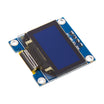
- 2 to 8 SSD1306 OLED displays (0.96") at address
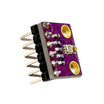
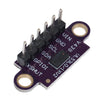
0x3C. - Optional: multiple BME280, VL53L0X, or MPU6050 sensors to multiplex.
Note: The TCA9548A uses I2C address 0x70 by default (configurable to 0x70 through 0x77 via A0/A1/A2). Wire SDA/SCL to the correct I2C pins for your board (Arduino Nano: SDA = A4, SCL = A5).
Step-by-Step Guide
Step 1 - Understand the I2C address collision problem
Goal: See why two identical I2C devices can not share the same bus if their addresses are fixed.

What to do: Keep in mind that I2C uses a 7-bit address to select which slave responds. If two devices share the same address, both respond to the same command and you read garbage.
Address collisions are common with cheap OLEDs (0x3C), BME280 (0x76), VL53L0X (0x29), and MPU6050 (0x68).
Expected result: You understand why the bus needs a way to isolate identical devices so only one can respond at a time.
Step 2 - Learn how the TCA9548A selects channels
Goal: Understand how the Arduino controls which downstream channel is active.
What to do: The TCA9548A inserts itself between the master and the slaves. Only the slaves on the currently-selected channel can hear the master.
- The mux itself sits at I2C address
0x70(configurable0x70to0x77with A0/A1/A2 pins). - Write a single byte to the mux: bit N = 1 enables channel N. So
0x01= channel 0 only,0x80= channel 7 only,0xFF= all 8 simultaneously. - After selecting a channel, every subsequent I2C transaction goes to that channel until you select another.
Expected result: You know the control pattern: write a channel mask to 0x70, then talk to the device as usual.
Step 3 - Wire the TCA9548A to the Arduino Nano and your devices
Goal: Connect the Nano to the mux, then connect each OLED (or sensor) to a separate mux channel.

What to do: Make the upstream I2C connection (Nano to TCA9548A), then put each identical device on its own downstream channel pair (SDn/SCn).
Wiring map:
TCA9548A      Arduino Nano
VIN      ->   5V
GND      ->   GND
SDA      ->   A4
SCL      ->   A5
RESET    ->   (optional, tie HIGH)

For each downstream channel n:
SDn / SCn -> SDA / SCL of OLED #n
Expected result: The Arduino can see the mux at 0x70, and each OLED is electrically separated onto its own channel.
Step 4 - Upload an Arduino sketch that cycles channels and writes to each OLED
Goal: Select a mux channel, initialize the display on that channel, and print different content per channel.
What to do: Use Wire to write the channel bitmask to the mux, then run normal SSD1306 commands while that channel is selected.
Code:
#include <Wire.h>
#include <Adafruit_SSD1306.h>

#define MUX_ADDR 0x70
void selectMuxChan(uint8_t ch) {
  Wire.beginTransmission(MUX_ADDR);
  Wire.write(1 << ch);
  Wire.endTransmission();
}

Adafruit_SSD1306 oled(128, 64, &Wire, -1);

void setup() {
  Wire.begin();
  for (int ch = 0; ch < 4; ch++) {
    selectMuxChan(ch);
    oled.begin(SSD1306_SWITCHCAPVCC, 0x3C);
    oled.clearDisplay();
    oled.setCursor(0, 0);
    oled.setTextSize(3); oled.setTextColor(WHITE);
    oled.printf("CH %d", ch);
    oled.display();
  }
}
void loop() {
  for (int ch = 0; ch < 4; ch++) {
    selectMuxChan(ch);
    oled.clearDisplay();
    oled.setCursor(0, 0);
    oled.setTextSize(2);
    oled.print("uptime ");
    oled.print(millis() / 1000);
    oled.display();
  }
  delay(500);
}
Expected result: Each display shows its channel label during setup, then updates in the loop when its channel is selected.
Step 5 - Apply the same pattern to other identical I2C sensors
Goal: Recognize where an I2C multiplexer is useful beyond OLEDs.

What to do: Use the same workflow for any sensor that has a fixed address. Select channel N, then talk to the sensor on that channel.
-
Multi-zone weather station: four BME280 sensors in four rooms, all at address
0x76. -
Robot proximity ring: eight VL53L0X time-of-flight sensors in 8 directions, all
0x29. -
Multi-axis IMU rig: three MPU6050s on different limbs of an exoskeleton, all
0x68. - Status dashboard: 8 small OLEDs displaying 8 different sensor channels.
Expected result: You can confidently reuse the mux select function to scale any I2C project with duplicate-address devices.
Conclusion
The TCA9548A solves a core constraint of I2C: fixed addresses. Put one between your Arduino Nano and any group of address-collision sensors or OLEDs, select the channel you want, and the rest of your code can stay the same.
Want the exact parts used in this build? Grab them from ShillehTek.com. If you want help customizing this project or building something for your product, check out our IoT consulting services.
Attribution: inspired by "TCA9548A I2C Multiplexer Module - With Arduino and NodeMCU" on Instructables.






.png?v=25000753014097803521791168436)

.png?v=68677308723310773341791168436)


