

Project Overview
Automatic Pet Feeder with Arduino Nano + DS3231 RTC: Use a DS3231 real-time clock to trigger a servo that opens a food hopper at exact scheduled times, with a buzzer alert and a push-button for a manual extra portion.
The DS3231 keeps time on its CR2032 backup battery (about 6 months between changes), so schedules stay accurate even if main power is interrupted.
- Time: ~2 hours
- Skill level: Intermediate
- What you will build: A timer-driven pet feeder that drops food on schedule, with manual override.

Parts List
From ShillehTek
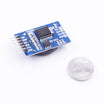
- DS3231 Precision RTC - keeps accurate time for scheduled feeding.
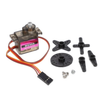
- MG90S Metal-Gear Servo - rotates the dispenser gate to release a portion.
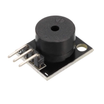
- KY-006 Passive Buzzer - announces feeding time with a chirp.
- Arduino Nano V3.0 Pre-Soldered - runs the schedule logic and controls the servo.
- 120 PCS Dupont Jumper Wires - makes quick, removable connections during prototyping.
External
- Push-button for manual feed
- 3D-printed hopper + rotating dispenser drum
- 5V power supply
Note: This build assumes a 5V Arduino Nano. Wire the DS3231 over I2C, and power the servo from a stable 5V supply so the servo does not brown out the Arduino.
Step-by-Step Guide
Step 1 - Build the Dispenser
Goal: Assemble the hopper and rotating dispenser so the servo can release a measured portion.
What to do: Build or print a hopper that feeds into a rotating drum or gate. Mount the servo so its horn rotates the drum reliably between a closed position (no food) and an open position (food drops into the bowl).

Expected result: Turning the servo by hand (or with a quick test sketch) moves the gate smoothly and drops food when opened.
Step 2 - Wire It
Goal: Connect the DS3231 RTC, servo, buzzer, and manual button to the Arduino Nano.
What to do: Wire the DS3231 to the Arduino Nano using I2C. Connect the servo signal to D9, the buzzer to D8, and the manual feed push-button to D2 using the internal pull-up.

Expected result: The RTC, servo, and buzzer are powered correctly, and the button reads HIGH normally and LOW when pressed.
Step 3 - Set the Clock Once
Goal: Set the DS3231 time one time so schedules run correctly.
What to do: Flash a one-shot sketch that calls rtc.adjust() using compile time, then re-flash with the real feeder sketch after the RTC is set.
Expected result: The DS3231 reports the correct current date and time when read by the Arduino.
Step 4 - Upload the Feeder Sketch
Goal: Run two daily feeding schedules and allow a manual override portion.
What to do: Upload the sketch below. It triggers a dispense at 7:00 and 18:00, chirps the buzzer, rotates the servo to open and close the gate, and lets the button force an extra portion.

Code:
#include <Wire.h>
#include <RTClib.h>
#include <Servo.h>
RTC_DS3231 rtc; Servo gate;
const int BUZZ=8, BTN=2;
const int FEED_HOURS[] = {7, 18};   // 7am + 6pm
int lastFed = -1;
void dispense() {
  tone(BUZZ, 880, 300); delay(400); noTone(BUZZ);
  gate.write(90); delay(800);
  gate.write(0);  delay(800);
}
void setup() {
  Wire.begin(); rtc.begin();
  pinMode(BTN, INPUT_PULLUP);
  pinMode(BUZZ, OUTPUT);
  gate.attach(9); gate.write(0);
}
void loop() {
  DateTime now = rtc.now();
  for (int h : FEED_HOURS) {
    if (now.hour() == h && now.minute() == 0 && lastFed != h) {
      dispense();
      lastFed = h;
    }
  }
  if (digitalRead(BTN) == LOW) dispense();
  delay(500);
}
Expected result: At the scheduled minute, the buzzer chirps and the servo rotates open then closed. Pressing the button dispenses an extra portion.
Step 5 - Test
Goal: Confirm the schedule triggers and the mechanical portioning works reliably.
What to do: Observe a scheduled dispense (or temporarily change FEED_HOURS to an upcoming hour), then press the button to verify manual override.

Expected result: Food drops cleanly into the bowl, the gate returns to closed, and the unit does not repeat-dispense within the same scheduled hour.
Step 6 - Where to Take It Next
Goal: Plan optional upgrades for sensing, logging, and remote control.
What to do: If you want to expand the project, consider the ideas below.
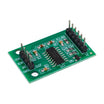
- Add a load cell (HX711) to confirm food was actually dispensed
- Add an HC-SR501 PIR to skip feeding if the pet isn't nearby
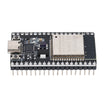
- Add Wi-Fi (ESP32) so you can adjust schedules from your phone
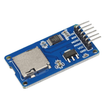
- Log every feed event to an SD card with timestamp
Expected result: You have a clear next-upgrade path without changing the basic DS3231 + servo scheduling approach.
Conclusion
This Arduino Nano pet feeder uses the DS3231 RTC to dispense at exact times, with a servo-driven gate, buzzer alert, and a manual button for extra portions. With the RTC battery backup, your schedule stays consistent even through power interruptions.
Want the exact parts used in this build? Grab them from ShillehTek.com. If you want help customizing this project or building something for your product, check out our IoT consulting services.
Credits: Pet feeder photos credited to Instructables. The original guide served as the reference for this ShillehTek version.





.png?v=25000753014097803521791168436)

.png?v=68677308723310773341791168436)


