

Project Overview
DIY Sous-Vide Cooker: Use an Arduino Nano with a DS18B20 waterproof temperature probe and a relay to control a rice cooker or hotplate and hold a water bath within about ±0.5 °C of your target temperature.
Sous-vide chefs cook food in a precisely temperature-controlled water bath, like steak at 54.4 °C for a perfect medium-rare or eggs at 63 °C for soft-set yolks. Commercial immersion circulators cost $150 to $400, but with a DS18B20 probe, a relay, an Arduino, and a cheap cooker, you can build similar temperature control at home.
- Time: ~1 hour
- Skill level: Intermediate (mains AC handling)
- What you will build: A temperature-controlled water bath that holds around ±0.5 °C near your target setpoint.

Parts List
From ShillehTek
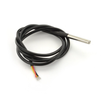
- DS18B20 Waterproof Digital Temperature Probe (1 m) - measures the water bath temperature (1-Wire).
- 1-Channel 5V Relay Module - switches the heater on/off using an Arduino pin.
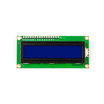
- LCD1602 16×2 Display - shows temperature/status locally.
- Arduino Nano V3.0 Pre-Soldered - runs the control loop and reads the probe.
- 120 PCS Dupont Jumper Wires - breadboard wiring.
- 400-Point Breadboard - quick prototyping for the control wiring.
External
- 4.7 kΩ resistor - 1-Wire pull-up between DS18B20 DATA and VCC
- A cheap rice cooker, slow cooker, or hotplate - used as the heat source
- Vacuum-seal bags + plastic-bag clips (or zip-lock bags + water-displacement method)
- Optional but recommended: cardboard or rigid mount to suspend the probe in the bath
Safety: The relay switches mains AC. If you are not comfortable with mains wiring, use a smart plug or a pre-built mains relay enclosure (Sonoff S31, etc.) and trigger it from the Arduino over WiFi instead.
Step-by-Step Guide
Step 1 - Understand the sous-vide control idea
Goal: Understand why controlling water temperature matters and what the Arduino controller is doing.
What to do: Sous-vide works by cooking at the final doneness temperature instead of cooking hotter and trying to time the result. Food cannot exceed the bath temperature, so the final texture becomes predictable.
The challenge is holding water temperature close to your target for long periods. That is the job of the Arduino-based controller in this build.
Expected result: You know the basic control objective: keep the bath within about ±0.5 °C of your setpoint by switching the heater on and off.
Step 2 - Assemble the main hardware blocks
Goal: Identify the three functional blocks: sense, decide, and act.
What to do: Build the controller setup on a breadboard and plan your wiring layout.

- Sense: DS18B20 waterproof probe submerged in the bath, reading temperature about once per second.
- Decide: Arduino compares the reading against your target. If below, switch the heater ON. If at or above, switch it OFF.
- Act: Relay turns the heater (rice cooker / hotplate) on and off through mains.
Expected result: You have a clear plan for where the probe, relay, and display connect to the Arduino.
Step 3 - Wire the DS18B20 temperature probe
Goal: Connect the DS18B20 so the Arduino can read water temperature reliably.
What to do: Wire the probe and add the required pull-up resistor for 1-Wire.
- DS18B20 red to 5 V
- DS18B20 black to GND
- DS18B20 yellow (data) to D2
- 4.7 kΩ resistor between D2 (data) and 5 V (pull-up for 1-Wire)
Expected result: The DS18B20 is powered and the data line is pulled up correctly for stable readings.
Step 4 - Wire the relay and LCD
Goal: Connect the output switch (relay) and the display to the Arduino.
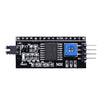
What to do: Wire the relay control input and connect the LCD1602 (I2C if you have the backpack version). Then wire the relay contacts into the heater power path.

- Relay IN to D3
- Relay VCC to 5 V, GND to GND
- Relay COM and NO terminals wired into one leg of the rice-cooker mains cord (cut the live wire, route it through the relay)
- LCD1602 VCC/GND/SDA(A4)/SCL(A5) if you have the I2C backpack version; otherwise wire 4-bit parallel
Expected result: The Arduino can switch the heater via the relay, and you have the LCD wired for status output.
Step 5 - Upload the control sketch (bang-bang with hysteresis)
Goal: Read the DS18B20 temperature and switch the relay to hold temperature near a target.
What to do: Install and use the OneWire and DallasTemperature libraries, then upload this sketch. It turns the heater on below the low threshold and off above the high threshold.
Code:
#include <OneWire.h>
#include <DallasTemperature.h>

const int PROBE = 2;
const int RELAY = 3;
const float TARGET = 54.4;     // target water temp (steak medium-rare)
const float HYSTERESIS = 0.3;  // +/- band

OneWire bus(PROBE);
DallasTemperature sensors(&bus);

void setup() {
  Serial.begin(9600);
  pinMode(RELAY, OUTPUT);
  sensors.begin();
  sensors.setResolution(12);   // 12-bit = 0.0625C resolution
}

void loop() {
  sensors.requestTemperatures();
  float t = sensors.getTempCByIndex(0);
  Serial.print("Water: "); Serial.print(t, 2); Serial.print(" C  ");

  if (t < TARGET - HYSTERESIS) {
    digitalWrite(RELAY, HIGH);   // heater ON
    Serial.println("HEATING");
  } else if (t > TARGET + HYSTERESIS) {
    digitalWrite(RELAY, LOW);    // heater OFF
    Serial.println("IDLE");
  }
  delay(1000);
}
This is a simple on/off controller. For tighter control (around ±0.1 °C), upgrade to a real PID loop using the PID_v1 library by Brett Beauregard.
Expected result: Serial Monitor prints the water temperature and shows when the heater is heating or idle.
Step 6 - Run the bath and verify temperature stability
Goal: Confirm the relay cycles the heater and the bath stabilizes near the setpoint.
What to do: Place the probe in the water bath, power the Arduino, and turn on the heater through the relay-controlled outlet path. Watch the serial output as the temperature approaches your target.


Expected result: The bath reaches your target and stays inside the hysteresis band as the relay turns the heater on and off.
Step 7 - Finish the cook and evaluate the outcome
Goal: Use the stable water bath to cook sous-vide and confirm the expected doneness.
What to do: Cook your food at the chosen temperature and time. When done, remove it from the bag and sear as desired.
Expected result: Consistent doneness from edge to edge, driven by the controlled bath temperature.
Step 8 - Optional upgrades to extend the project
Goal: Identify improvement ideas you can add later.
What to do: Consider these upgrades if you want more features or tighter control.
- Add buttons + a rotary encoder to set target temperature without recompiling
- Save target temp + time profiles for steak / fish / egg / chicken
- Move to a proper PID loop (PID_v1 library) for tighter control
- Add a stir motor for better water circulation
- Bridge to Wi-Fi (ESP32) for phone-app temperature setpoints + cook alerts
Expected result: A clear list of next steps if you want to evolve the build beyond the basic controller.
Conclusion
In this build, you used an Arduino Nano, a DS18B20 waterproof probe, and a relay to control a rice cooker or hotplate and maintain a sous-vide water bath close to your target temperature. Once the probe is submerged and readings are stable, the cook becomes predictable because the food cannot exceed the bath temperature.
Want the exact parts used in this build? Grab them from ShillehTek.com. If you want help customizing this project or building something for your product, check out our IoT consulting services.






.png?v=25000753014097803521790645985)

.png?v=68677308723310773341790645985)


