

Project Overview
Arduino Nano + DS18B20 aquarium controller: Use a DS18B20 waterproof temperature probe to regulate a tank heater, a DS3231 RTC to keep accurate time for a daily light schedule, and relays to switch both loads while an OLED shows live status.
- Time: ~3 hours
- Skill level: Intermediate
- What you will build: A complete aquarium controller - temperature regulation + daylight scheduling + status readout.

Parts List
From ShillehTek
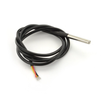
- DS18B20 Waterproof Temperature Probe - reads aquarium water temperature.
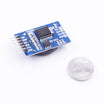
- DS3231 Precision RTC - keeps time for lighting schedule (even after power loss).
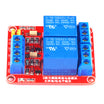
- 2-Channel 5V Relay Module - switches the heater and aquarium light.
- 0.96" I²C SSD1306 OLED - displays temperature, time, and relay states.
- Arduino Nano V3.0 Pre-Soldered - runs the control logic.
- 120 PCS Dupont Jumper Wires - wiring between modules.
External
- Aquarium heater (with its mains plug routed through the relay)
- Aquarium light (mains-powered)
- 4.7 kΩ resistor (pull-up for the DS18B20 data line)
Safety: Relays here switch MAINS AC. If you're not comfortable wiring mains, use smart plugs (e.g. Sonoff S31) triggered over Wi-Fi instead - same effect, less risk.
Step-by-Step Guide
Step 1 - Gather the components
Goal: Make sure you have all modules on hand before wiring and programming.
What to do: Lay out the Arduino Nano, DS18B20 probe, DS3231 RTC module, 2-channel relay module, and SSD1306 I²C OLED so you can verify connectors and pin labels.

Expected result: All parts are identified and ready to be wired.
Step 2 - Wire the modules
Goal: Connect the DS18B20, relays, RTC, and OLED to the Arduino Nano using the correct pins.
What to do: Follow the wiring below. Keep the DS3231 and OLED on the I²C bus, and add the pull-up resistor to the DS18B20 data line.

- DS18B20 red → 5V, black → GND, yellow → D2 (with 4.7kΩ to 5V)
- Relay IN1 → D3 (heater), IN2 → D4 (light)
- DS3231 + OLED on I²C: SDA → A4, SCL → A5
Expected result: All modules are physically connected, and the DS18B20 data line has a 4.7 kΩ pull-up resistor to 5V.
Step 3 - Set the DS3231 clock once
Goal: Initialize the RTC so it keeps correct time even when the system is unplugged.
What to do: Flash a one-shot line like rtc.adjust(DateTime(F(__DATE__), F(__TIME__)));, then re-flash the main sketch after the clock is set.
Expected result: The DS3231 holds the correct time across power cycles.
Step 4 - Upload the main sketch
Goal: Run the control loop for heater temperature regulation and scheduled lighting, with status shown on the OLED.
What to do: Install the required libraries (Wire, OneWire, DallasTemperature, RTClib, Adafruit_GFX, Adafruit_SSD1306), then upload the sketch below to your Arduino Nano.
Code:
#include <Wire.h>
#include <OneWire.h>
#include <DallasTemperature.h>
#include <RTClib.h>
#include <Adafruit_GFX.h>
#include <Adafruit_SSD1306.h>

OneWire bus(2); DallasTemperature ds(&bus);
RTC_DS3231 rtc;
Adafruit_SSD1306 oled(128, 64, &Wire, -1);
const int HEATER = 3, LIGHT = 4;
const float TARGET_C = 25.0, BAND = 0.5;
const int LIGHT_ON_HOUR = 8, LIGHT_OFF_HOUR = 20;

void setup() {
  pinMode(HEATER, OUTPUT); pinMode(LIGHT, OUTPUT);
  ds.begin(); rtc.begin();
  oled.begin(SSD1306_SWITCHCAPVCC, 0x3C);
}

void loop() {
  ds.requestTemperatures();
  float t = ds.getTempCByIndex(0);
  DateTime now = rtc.now();

  bool heaterOn = t < (TARGET_C - BAND);
  bool lightOn  = now.hour() >= LIGHT_ON_HOUR && now.hour() < LIGHT_OFF_HOUR;
  digitalWrite(HEATER, heaterOn ? HIGH : LOW);
  digitalWrite(LIGHT,  lightOn  ? HIGH : LOW);

  oled.clearDisplay();
  oled.setTextColor(SSD1306_WHITE);
  oled.setTextSize(2); oled.setCursor(0, 0);
  oled.print(t, 1); oled.print((char)247); oled.print("C");
  oled.setTextSize(1); oled.setCursor(0, 30);
  oled.print("Heater: "); oled.println(heaterOn ? "ON" : "off");
  oled.print("Light:  "); oled.println(lightOn ? "ON" : "off");
  oled.setCursor(0, 56);
  oled.print(now.hour()); oled.print(':');
  if (now.minute() < 10) oled.print('0'); oled.print(now.minute());
  oled.display();
  delay(2000);
}
Expected result: The OLED updates every 2 seconds with temperature, time, and heater/light state.
Step 5 - Assemble and test near the tank
Goal: Confirm the probe reads correctly, the OLED displays status, and the relays switch the heater and light as intended.
What to do: Put the electronics in an enclosure, place the DS18B20 probe in the water, and mount the controller near the aquarium. Verify the heater relay responds when temperature is below the target band, and the light relay follows the on/off hours.


Expected result: The display shows live readings and the heater/light states change based on temperature and time.
Step 6 - Ideas to expand the build
Goal: Identify optional upgrades you can add later without changing the core design.
What to do: If you want to extend the project, consider:
- Add a servo + RTC trigger for auto-feeding (use our pet feeder build as a guide)
- Add a pH sensor + relay for CO₂ injection on planted tanks
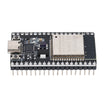
- Wi-Fi alerts via ESP32 if temperature goes out of range
- Log temperature to a CSV via microSD adapter for long-term tank health tracking
Expected result: You have a clear roadmap for optional features to build next.
Conclusion
This Arduino Nano aquarium controller combines a DS18B20 temperature probe, DS3231 RTC scheduling, relays for switching loads, and an OLED status display to automate key tank tasks.
Want the exact parts used in this build? Grab them from ShillehTek.com. If you want help customizing this project or building something for your product, check out our IoT consulting services.





.png?v=25000753014097803521790645985)

.png?v=68677308723310773341790645985)


