


Project Overview
Arduino Nano temperature sensor comparison: Compare the DHT11, DHT22, BME680, and DS18B20 so you can pick the right sensor and wiring approach for your build without overpaying or fighting noisy data.
All four read temperature, two also measure humidity, and one adds gas (VOC index). They differ a lot in accuracy, price, sampling limits, and how they connect (single-wire, I2C, or 1-Wire).
This guide puts the four side-by-side at room temperature, explains which sensor fits common projects (greenhouse, indoor air quality, sous-vide, terrarium, weather station), and shows the wiring differences. All four are stocked at ShillehTek pre-soldered.
- Time: 15 to 25 minutes
- Skill level: Beginner
- What you will build: A clear selection guide for four common Arduino temperature sensors, including wiring requirements and example Arduino IDE library code.
Parts List
From ShillehTek
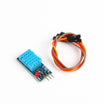
- DHT11 Temperature & Humidity Sensor - budget temperature and humidity option.
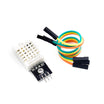
- DHT22 Temperature & Humidity Sensor - higher accuracy and wider range than DHT11.
- BME280 Pre-Soldered (T/H/P) - closest sibling to the BME680 in our catalog (no gas sensing).
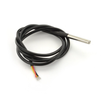
- DS18B20 Waterproof Probe - best for liquids and tight spaces.
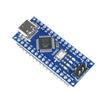
- Arduino Nano V3.0 - controller used for Arduino IDE examples.
External
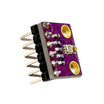
- BME680 if you specifically need VOC/gas readings (not stocked at ShillehTek; the BME280 is the drop-in alternative if you only need temperature, humidity, and pressure).
- 4.7 kΩ pull-up resistor for the DS18B20 data line.
- Breadboard and jumper wires (our DuPont kit covers this).
Note: DHT11/DHT22 typically use a 10 kΩ pull-up on the DATA pin; DS18B20 requires a 4.7 kΩ pull-up between DATA and VCC. BME680 uses I2C and commonly appears at address 0x76 or 0x77 depending on the board.
Step-by-Step Guide
Step 1 - Understand what each sensor measures
Goal: Know what data each sensor can provide and the typical accuracy ranges.
What to do: Use the list below to match sensor capabilities to your project requirements (temperature only vs temperature and humidity vs gas/VOC index).
- DHT11: temperature 0 to 50 C (±2 C), humidity 20 to 80% (±5%).
- DHT22: temperature -40 to +125 C (±0.5 C), humidity 0 to 100% (±2 to 5%).
- BME680: temperature ±1 C, humidity ±3%, pressure ±1 hPa, gas (VOC index).
- DS18B20: temperature only, -55 to +125 C (±0.5 C), waterproof variant available.
Expected result: You can quickly rule sensors in or out based on whether you need humidity, pressure, or gas sensing, and based on accuracy and temperature range.
Step 2 - Compare sampling rate and update speed
Goal: Understand how often each sensor can realistically be read and any constraints that affect usable output.
What to do: Plan your data logging interval around the limits below, especially if you need fast updates or multiple sensors.
- DHT11 can be read once per second.
- DHT22 can be read once every two seconds.
- BME680 can update quickly, but the gas value needs the BSEC library and its multi-day calibration before it is useful.
- DS18B20 takes about 750 ms per conversion at 12-bit resolution; at 9-bit you can read about every 90 ms.
Expected result: You can choose an appropriate sensor and sampling interval without expecting unsupported read rates.
Step 3 - Wire each sensor correctly (single-wire vs I2C vs 1-Wire)
Goal: Wire each sensor type correctly and avoid common pull-up mistakes.
What to do: Follow the connection notes below based on the sensor you are using.

- DHT11/DHT22: single-wire proprietary protocol, 3 pins (VCC, DATA, GND). Use a 10 kΩ pull-up on DATA.
- BME680: I2C, 4 pins (VCC, GND, SDA, SCL). Typically uses address 0x76 or 0x77.
- DS18B20: 1-Wire bus, 3 pins (VCC, DATA, GND). Requires a 4.7 kΩ pull-up between DATA and VCC. You can connect many probes on one data line.
Expected result: Your wiring matches the protocol requirements, including the correct pull-up resistor choice for DHT and DS18B20 sensors.
Step 4 - Use the correct Arduino IDE libraries (example code)
Goal: See how each sensor is typically read in Arduino code using common libraries.
What to do: Use the code snippets as reference for the appropriate library and basic read pattern for each sensor family.
Code:
// DHT11/DHT22
#include <DHT.h>
DHT dht(2, DHT22);  // or DHT11
dht.begin();
float t = dht.readTemperature();
float h = dht.readHumidity();

// DS18B20
#include <OneWire.h>
#include <DallasTemperature.h>
OneWire bus(2);
DallasTemperature ds(&bus);
ds.begin();
ds.requestTemperatures();
float t = ds.getTempCByIndex(0);

// BME680 (with BSEC library)
#include <bsec.h>
Bsec iaq;
iaq.begin(BME68X_I2C_ADDR_HIGH, Wire);
iaq.run();
float t = iaq.temperature;
float gas = iaq.iaq;  // 0-500 index
Expected result: You know which library stack is typically used for each sensor and what the basic read call sequence looks like.
Step 5 - Pick the best sensor for your project type
Goal: Choose the right sensor based on environment, accuracy needs, and whether you need VOC or waterproof temperature.
What to do: Match your project to the recommendations below.

- Greenhouse or room humidity monitor - DHT22 for strong price-to-accuracy on humidity.
- Indoor air quality (VOC, CO2 proxy) - BME680 for gas sensing; closest catalog match is the BME280 if you only need temperature, humidity, and pressure.
- Sous-vide, fish tank, brewing - DS18B20 waterproof probe for liquid contact and tight placements.
- Cheap classroom kit or quick proof-of-function - DHT11, with the expectation that it is not lab-grade.
Expected result: You can pick a sensor based on the real requirement (humidity accuracy, VOC, waterproof temperature) instead of defaulting to the cheapest or most popular option.
Conclusion
If you are choosing one sensor without a strict requirement, the DHT22 is a solid default for most Arduino Nano temperature and humidity projects because it is easy to wire and generally more accurate than the DHT11. Move to a BME680 when you specifically need gas sensing, and switch to a DS18B20 when the sensor must touch liquid or fit into tight spaces.
Want the exact parts used in this build? Grab them from ShillehTek.com. If you want help customizing this project or building something for your product, check out our IoT consulting services.
Credit: This guide was inspired by "Sensor Comparison: DHT11 Vs DHT22 Vs BME680 Vs DS18B20" on Instructables. Images credited to the original author of the source tutorial.




.png?v=25000753014097803521790645985)

.png?v=68677308723310773341790645985)


