

Project Overview
Arduino wearable sensor choice: Use this guide to compare the MAX30100 vs MAX30102 pulse oximeter modules so you can pick the right I2C sensor for accurate heart rate and SpO2 readings in a DIY wearable.

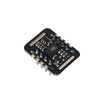
Two heart-rate and pulse-oximeter modules dominate maker kits: the original MAX30100 and the newer MAX30102. They are both red and IR LED photoplethysmography sensors from Maxim Integrated (now Analog Devices), both talk I2C, and both fit on similar 6-pin breakouts. So why does the MAX30102 cost a dollar more, and which one is right for your DIY wearable?
This guide compares both chips side-by-side: optical performance, ADC resolution, power consumption, library support, and the exact build differences that affect a real fitness wearable or sleep monitor project.
- Time: 10 to 20 minutes
- Skill level: Beginner
- What you will build: A clear decision checklist for choosing MAX30100 vs MAX30102, plus wiring and quick test sketches.
Parts List
From ShillehTek
- Arduino Nano V3.0 - simple 5V dev board for quick sensor tests.
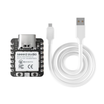
- XIAO ESP32-C3 - tiny BLE host for a wearable.
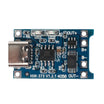
- TP4056 USB-C LiPo Charger - rechargeable power for wearables.
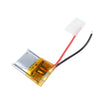
- 500mAh LiPo Battery - compact battery for portable builds.
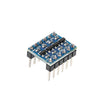
- I2C Level Converter - required if mixing 3.3V and 5V I2C logic levels.
External
- MAX30100 or MAX30102 breakout module (your choice).
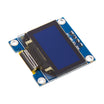
- 0.96 inch I2C OLED display.
- USB cable.
Note: Both MAX30100 and MAX30102 are 3.3V digital devices. Many breakout boards include an onboard regulator and level shifting, but you should verify your specific module before wiring VIN to 5V.
Step-by-Step Guide
Step 1 - Compare the headline specs
Goal: See the key differences that impact signal quality and firmware stability.
What to do: Use the table below as a quick decision baseline. The biggest practical differences show up in ADC resolution, FIFO depth, and ambient light handling.

| MAX30100 | MAX30102 | |
|---|---|---|
| ADC resolution | 14-bit | 18-bit |
| Sample buffer (FIFO) | 16 samples | 32 samples |
| LEDs | 660 nm Red + 880 nm IR | 660 nm Red + 880 nm IR (improved drivers) |
| Operating voltage | 1.8 V (digital) + 3.3 V (LEDs) | 1.8 V (digital) + 3.3 V (LEDs) |
| Package | 14-pin OLGA | 14-pin OESIP (smaller, with glass) |
| Ambient light rejection | Software-based | Hardware ambient cancellation |
| Current (typical) | ~600 uA | ~600 uA (lower at low LED current) |
| I2C address | 0x57 | 0x57 |
| Library support | oxullo/Arduino-MAX30100 | SparkFun MAX3010x |
| Cost (breakout) | $3 to $5 | $4 to $7 |
Expected result: You understand the top-level reasons MAX30102 typically performs better in wearables.
Step 2 - Evaluate optical performance for your use case
Goal: Decide which sensor is more likely to produce clean waveforms on real fingers in real lighting.
What to do: Account for the higher-resolution 18-bit ADC on the MAX30102 vs the MAX30100’s 14-bit. That is 16 times more discrete steps per sample, which can mean cleaner peak detection on weak signals (cold finger, thick skin). Also note the MAX30102’s built-in glass cover that cuts ambient light interference, which usually means cleaner traces in bright rooms.
Expected result: If you expect weaker signals or brighter environments, MAX30102 becomes the safer choice.
Step 3 - Check FIFO depth against your firmware workload
Goal: Avoid dropped samples when your microcontroller is also doing display updates or BLE.
What to do: Compare buffering: MAX30100 buffers 16 samples; MAX30102 buffers 32. At a 100 Hz sample rate, MAX30100 needs to be serviced every 160 ms or you risk losing data. MAX30102 gives you about 320 ms, which is more forgiving if you are also driving an OLED display.
Expected result: You can match the sensor choice to how busy your main loop will be.
Step 4 - Choose your library path (and confirm maintenance)
Goal: Pick the option that best fits your target MCU and desired signal-processing accuracy.

What to do: For MAX30100, the common Arduino library is oxullo/Arduino-MAX30100. It works, but maintenance has slowed and the included SpO2 algorithm is approximate. The chip is officially discontinued as of 2022, so libraries get less attention.
For MAX30102, the common Arduino library is SparkFun’s MAX3010x. It is actively maintained, includes proper SpO2 with the Maxim algorithm, and supports the related MAX30105 (with a green LED) without code changes.
Expected result: You know which library ecosystem you are committing to before you design the wearable firmware.
Step 5 - Wire the sensor (wiring is identical for both chips)
Goal: Connect the breakout safely and match logic levels correctly.
What to do: Use the mapping below for an Arduino Nano. Keep VIN at 3.3V unless your specific breakout explicitly supports a higher VIN input with onboard regulation and level shifting.
Code:
Sensor       Arduino Nano
VIN      ->  3.3V (NOT 5V - both chips are 3.3V digital)
GND      ->  GND
SDA      ->  A4
SCL      ->  A5
INT      ->  D2 (optional)
Many breakouts have a 5V-tolerant LDO and level shifters onboard. If you see a single 5V input pin labeled VIN, the level shifting may be done for you, but you should still verify the board details.
Expected result: The sensor powers up and is ready for an I2C scan or a test sketch.
Step 6 - Run a quick test sketch (same idea, different libraries)
Goal: Confirm your module is alive and producing heart-rate data.
What to do: Use the MAX30100 sketch shape with the MAX30100 library, and the MAX30102 sketch shape with the SparkFun MAX3010x library. These examples show the basic pattern without changing the intent of the original code.
Code:
// MAX30100
#include <MAX30100_PulseOximeter.h>
PulseOximeter pox;
void setup() {
  Serial.begin(115200);
  pox.begin();
  pox.setOnBeatDetectedCallback([](){ Serial.println("beat"); });
}
void loop() {
  pox.update();
  Serial.println(pox.getHeartRate());
  delay(500);
}

// MAX30102
#include <MAX30105.h>
#include <heartRate.h>
MAX30105 sensor;
void setup() {
  Serial.begin(115200);
  sensor.begin();
  sensor.setup();
}
void loop() {
  long ir = sensor.getIR();
  if (checkForBeat(ir)) Serial.println("beat");
}
Expected result: You see changing heart-rate values and beat events in Serial Monitor when a finger is placed steadily on the sensor.
Step 7 - Pick the right sensor for your project
Goal: Make a final selection based on your constraints (budget, accuracy, long-term support).

What to do: Use the guidelines below.
- New project, wearable, learning - MAX30102. Better library support, better optics, and fewer end-of-life concerns.
- Existing project on MAX30100 - keep it. Do not fix what is not broken.
- Tightest budget, classroom demo - MAX30100. Cheaper and still works.
- SpO2 matters (sleep monitor, fitness tracker) - MAX30102. The 18-bit ADC plus glass cover plus ambient cancellation matter at this resolution.
- Adding green-LED HRV detection later - consider the MAX30105 (close cousin of MAX30102 with a third LED). Same library.
Expected result: You can justify your choice based on optics, buffering, and software support.
Conclusion
The MAX30102 is the right pick for most new builds. It offers better optics, higher ADC resolution, stronger library support, and a sensor that is still in production. The MAX30100 can still be fine for an existing build or a budget demo, but for a new DIY wearable, the small cost difference is usually worth it.
Want the exact parts used in this build? Grab them from ShillehTek.com. If you want help customizing this project or building something for your product, check out our IoT consulting services.
Sources that inspired this guide: Arduino Pulse Oximeter Using MAX30100 and Guide to Using MAX30102 Heart Rate and Oxygen Sensor on Instructables.




.png?v=25000753014097803521791168436)

.png?v=68677308723310773341791168436)


