Project Overview
ESP32 + PCM5102 I2S DAC Bluetooth receiver: turn a classic ESP32 and a PCM5102 I2S DAC module into a Bluetooth audio receiver. Your phone streams music over A2DP, the ESP32 sends audio over I2S, and the PCM5102 outputs clean line-level stereo to an amplifier or powered speakers.
- Time: about 45 minutes
- Skill level: Beginner to Intermediate
- What you will build: A Bluetooth speaker adapter named "ShillehTek-Audio" that shows the song title and artist in the Serial Monitor.

Parts List
From ShillehTek
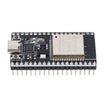
- ESP32 Dev Board 4MB CP2102 USB-C (38-pin) - the Bluetooth Classic (A2DP) microcontroller board used for the receiver.
- PCM5102 I2S stereo DAC module - converts I2S digital audio from the ESP32 into line-level stereo audio.
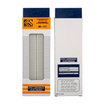
- 830-point solderless breadboard - makes it easy to prototype the wiring.
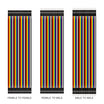
- Dupont jumper wires - for power and I2S signal connections.
External
- Powered speakers, a stereo amplifier, or a mixer with a 3.5 mm or RCA line input
- 3.5 mm audio cable
- USB-C cable and a 5 V USB supply
- A phone or computer with Bluetooth
Note: A2DP needs Bluetooth Classic, which only the original ESP32 has. The ESP32-S3, ESP32-C3, and ESP32-C6 support Bluetooth Low Energy only, so this project will not work on them.
Step-by-Step Guide
Step 1 - Prepare the PCM5102 board
Goal: Make sure the DAC is unmuted and set to standard I2S.
What to do: The PCM5102 has four configuration inputs and a system-clock input. On many purple GY-PCM5102 boards they are set with solder pads on the back (often labeled H1L to H4L) or broken out as pins. Configure them as follows:
- FLT low (normal filter) and DEMP low (de-emphasis off)
- XSMT high (soft mute off). If this pin floats or is low, the DAC stays silent.
- FMT low (I2S format)
- SCK to GND, so the DAC generates its own clock from BCK
If your board's pads are open, bridge them with a little solder, or wire XSMT to 3.3 V and FMT and SCK to GND.
Expected result: A DAC that will produce sound as soon as it receives I2S data.
Step 2 - Wire the DAC to the ESP32
Goal: Connect power and the three I2S lines.
What to do: Make these connections:
- PCM5102 VIN to ESP32 5V (VIN), GND to GND
- PCM5102 BCK to GPIO26
- PCM5102 LCK to GPIO25
- PCM5102 DIN to GPIO22
- PCM5102 3.5 mm jack to your amplifier or powered speakers

Note: If you later get connection but no audio, recheck that XSMT is high and that BCK (GPIO26) and LCK (GPIO25) are not swapped.
Expected result: Five jumpers between the boards and the DAC's jack connected to your amplifier.
Step 3 - Install the libraries and set the partition scheme
Goal: Get the Bluetooth audio libraries and make room for them in flash.
What to do: Install esp32 by Espressif Systems in the Boards Manager and select ESP32 Dev Module. Download ESP32-A2DP and arduino-audio-tools by pschatzmann from GitHub as ZIP files and add both with Sketch → Include Library → Add .ZIP Library; recent ESP32-A2DP versions send their audio through arduino-audio-tools. The Bluetooth stack makes the sketch larger than the default app partition, so set Tools → Partition Scheme to Huge APP (3MB No OTA/1MB SPIFFS).
Expected result: Both libraries appear under File → Examples, and the partition scheme is set.
Step 4 - Upload the receiver sketch
Goal: Start an A2DP sink that plays into the PCM5102.
What to do: Upload the sketch below. The I2SStream is configured with our three pins and handed to BluetoothA2DPSink. Two callbacks report the connection state and the title and artist that the phone sends over AVRCP.
Code:
// ShillehTek ESP32 Bluetooth audio receiver: phone -> A2DP -> PCM5102 DAC -> line out
#include "AudioTools.h"                  // arduino-audio-tools by pschatzmann
#include "BluetoothA2DPSink.h"           // ESP32-A2DP by pschatzmann

const char *DEVICE_NAME = "ShillehTek-Audio";
const int PIN_BCK  = 26;                 // PCM5102 BCK
const int PIN_LRCK = 25;                 // PCM5102 LCK
const int PIN_DATA = 22;                 // PCM5102 DIN

I2SStream i2s;
BluetoothA2DPSink a2dp_sink(i2s);

// Song details sent by the phone over AVRCP
void onMetadata(uint8_t id, const uint8_t *text) {
  if (id == ESP_AVRC_MD_ATTR_TITLE) {
    Serial.printf("Title : %s\n", (const char *)text);
  } else if (id == ESP_AVRC_MD_ATTR_ARTIST) {
    Serial.printf("Artist: %s\n", (const char *)text);
  }
}

void onConnection(esp_a2d_connection_state_t state, void *) {
  if (state == ESP_A2D_CONNECTION_STATE_CONNECTED) {
    Serial.println("Phone connected - press play");
  } else if (state == ESP_A2D_CONNECTION_STATE_DISCONNECTED) {
    Serial.println("Phone disconnected - waiting for a connection");
  }
}

void setup() {
  Serial.begin(115200);

  auto cfg = i2s.defaultConfig();
  cfg.pin_bck = PIN_BCK;
  cfg.pin_ws = PIN_LRCK;
  cfg.pin_data = PIN_DATA;
  i2s.begin(cfg);

  a2dp_sink.set_avrc_metadata_callback(onMetadata);
  a2dp_sink.set_on_connection_state_changed(onConnection);
  a2dp_sink.start(DEVICE_NAME);
  Serial.printf("Pair your phone with \"%s\"\n", DEVICE_NAME);
}

void loop() {
  delay(1000);                           // audio runs in the Bluetooth stack's own tasks
}
Expected result: The Serial Monitor (115200 baud) prints Pair your phone with "ShillehTek-Audio".
Step 5 - Pair and play
Goal: Stream music from your phone.
What to do: Open Bluetooth settings on your phone, tap ShillehTek-Audio, then play something. Start with the amplifier volume low: the PCM5102 delivers a full line-level signal. On most phones the volume buttons still work, because the library applies the volume level the phone sends.
Expected result: Music plays through your speakers, and the Serial Monitor shows lines like Phone connected - press play, Title : ... and Artist: ....
Conclusion
You built a Bluetooth audio receiver with a classic ESP32 and a PCM5102 I2S DAC: the phone streams over A2DP, the ESP32 sends audio over three I2S wires, and the DAC drives any amplifier at line level while the song details appear in the Serial Monitor.
Want the exact parts used in this build? Grab them from ShillehTek.com. If you want help customizing this project or building something for your product, check out our IoT consulting services.
Credits: Photos and images are credited to Ernst Sikora (esikora) on Hackster.io, from Part I and Part II of his ESP32 audio project. The original guide by Ernst Sikora served as the reference for this ShillehTek version.
Credits
All photos and images in this tutorial are credited to Ernst Sikora (esikora) on Hackster.io, from Part I and Part II of his ESP32 audio project. The original guide by Ernst Sikora served as the reference for this ShillehTek version. We thank them for their excellent work in the maker community.