Project Overview
ESP32 BNO085 Head Tracker: Build a wireless head tracker where an ESP32 reads a BNO085 IMU orientation sensor and drives a pan-tilt servo mount that mirrors your head movement in real time using ESP-NOW.
One ESP32 reads the BNO085's on-chip sensor fusion and broadcasts yaw and pitch over ESP-NOW. A second ESP32 smooths the data and drives two MG90S servos.
- Time: 1.5 to 2 hours
- Skill level: Intermediate
- What you will build: A wireless head-tracking rig at 50 updates per second with one-button recentering, smoothing, travel limits and a link-loss failsafe, ready to aim a camera, a laser pointer or an animatronic head.

Parts List
From ShillehTek
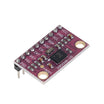
- BNO085 IMU orientation sensor module - provides fused orientation (game rotation vector) for stable head tracking.
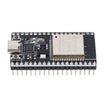
- ESP32 Dev Board 4MB CP2102 USB-C (38-pin) (x2: headset and receiver) - one board sends IMU data over ESP-NOW, the other drives the servos.
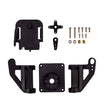
- Pan-tilt servo bracket kit - mechanical mount for the pan and tilt axes.
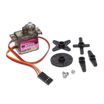
- MG90S metal gear micro servo (x2) - pan and tilt actuation.
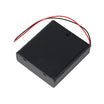
- 4xAA battery holder with switch - dedicated servo power supply.
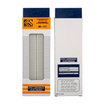
- 830-point solderless breadboard - easy wiring for the receiver side.
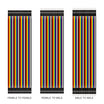
- Dupont jumper wires - connects the ESP32, IMU and servos.
External
- A USB power bank to run the headset ESP32
- A cap or headband, plus tape or a small enclosure for the sensor board
- Four AA cells (NiMH rechargeables give a servo-friendly 4.8 V)
- Something to aim: a small camera, a laser pointer or a puppet head
Note: power the servos from the AA pack, not from the ESP32's 5V pin, and connect the pack's negative lead to the receiver ESP32's GND so the servo signals share a ground.
Step-by-Step Guide
Step 1 - Understand the signal chain
Goal: Know where each part of the motion processing happens.
What to do: The BNO085 fuses its accelerometer and gyroscope on-chip and reports a game rotation vector: a quaternion describing how the sensor is oriented. Because it ignores the magnetometer, it does not jump when you walk past a speaker or a steel desk; the trade-off is a slow yaw drift, which the recenter button takes care of.
The headset ESP32 stores the orientation at the moment you recenter, computes your rotation relative to it, converts that to yaw, pitch and roll, and broadcasts 50 small packets per second over ESP-NOW. The receiver never needs a Wi-Fi router.
Expected result: You know that "straight ahead" is whatever pose you hold when you power up or press BOOT.
Step 2 - Build the headset
Goal: Connect the BNO085 to the first ESP32.
What to do: Wire the sensor over I2C and leave its PS0/PS1 mode pins at their default (low, I2C mode):
- BNO085 VIN → 3V3, GND → GND
- SDA → GPIO21, SCL → GPIO22
Fix the sensor flat on top of the cap, its long edge pointing forward, and run the ESP32 from a power bank in a pocket or on the cap's side.
The sketch tries both common BNO085 I2C addresses (0x4A and 0x4B), so it works whichever way your module's address pin is set.
Expected result: A sensor that moves rigidly with your head, without flopping on its wires.
Step 3 - Build the receiver
Goal: Connect the pan-tilt servos to the second ESP32.
What to do: Assemble the pan-tilt bracket around the two MG90S servos with both horns at the centre of their travel, then wire:
- Pan servo signal (orange) → GPIO18
- Tilt servo signal (orange) → GPIO19
- Both servo red leads → 4xAA pack +
- Both servo brown leads → 4xAA pack −, and the pack − also → ESP32 GND
Expected result: The receiver ESP32 runs from USB while the servos draw from the batteries, with one common ground.
Step 4 - Upload the headset sketch
Goal: Read the rotation vector and broadcast relative yaw and pitch.
What to do: Install Adafruit BNO08x (and the dependencies it offers) from the Library Manager. Select ESP32 Dev Module with the esp32 board package 3.x and upload to the headset board.
Code:
// ShillehTek head tracker (sender): BNO085 game rotation vector -> ESP-NOW broadcast at 50 Hz
#include <WiFi.h>
#include <esp_wifi.h>
#include <esp_now.h>
#include <Wire.h>
#include <Adafruit_BNO08x.h>

const uint8_t CHANNEL = 1;            // sender and receiver must match
const int RECENTER_PIN = 0;           // the board's BOOT button
const uint32_t SEND_MS = 20;          // 50 packets per second
const bool SWAP_PITCH_ROLL = false;   // set true if nodding shows up as roll (board mounted sideways)

struct __attribute__((packed)) TrackPacket {
  uint32_t magic;                     // 'HTRK'
  uint32_t seq;
  int16_t yaw, pitch, roll;           // hundredths of a degree, relative to the recenter pose
};

Adafruit_BNO08x bno(-1);
sh2_SensorValue_t event;
uint8_t broadcastAddr[6] = { 0xFF, 0xFF, 0xFF, 0xFF, 0xFF, 0xFF };
float qw = 1, qx = 0, qy = 0, qz = 0;          // latest orientation
float rw = 1, rx = 0, ry = 0, rz = 0;          // reference (recenter) orientation
bool haveData = false, needRecenter = true, lastButton = HIGH;
uint32_t seq = 0;
unsigned long lastSend = 0;

void enableReports() {
  if (!bno.enableReport(SH2_GAME_ROTATION_VECTOR, 10000)) Serial.println("Could not enable the rotation vector");
}

// Relative rotation q_rel = conj(ref) * q, then yaw/pitch/roll in degrees
void relativeEuler(float &yaw, float &pitch, float &roll) {
  float w = rw * qw + rx * qx + ry * qy + rz * qz;
  float x = rw * qx - rx * qw - ry * qz + rz * qy;
  float y = rw * qy + rx * qz - ry * qw - rz * qx;
  float z = rw * qz - rx * qy + ry * qx - rz * qw;
  yaw   = atan2f(2.0f * (w * z + x * y), 1.0f - 2.0f * (y * y + z * z)) * RAD_TO_DEG;
  float s = 2.0f * (w * y - z * x);
  pitch = asinf(constrain(s, -1.0f, 1.0f)) * RAD_TO_DEG;
  roll  = atan2f(2.0f * (w * x + y * z), 1.0f - 2.0f * (x * x + y * y)) * RAD_TO_DEG;
}

void setup() {
  Serial.begin(115200);
  pinMode(RECENTER_PIN, INPUT_PULLUP);
  Wire.begin();                                    // SDA 21, SCL 22
  if (!bno.begin_I2C(0x4A, &Wire) && !bno.begin_I2C(0x4B, &Wire)) {
    Serial.println("BNO085 not found at 0x4A or 0x4B - check wiring");
    while (true) delay(1000);
  }
  enableReports();

  WiFi.mode(WIFI_STA);
  esp_wifi_set_channel(CHANNEL, WIFI_SECOND_CHAN_NONE);
  if (esp_now_init() != ESP_OK) {
    Serial.println("ESP-NOW init failed");
    while (true) delay(1000);
  }
  esp_now_peer_info_t peer = {};
  memcpy(peer.peer_addr, broadcastAddr, 6);
  peer.channel = CHANNEL;
  peer.encrypt = false;
  esp_now_add_peer(&peer);
  Serial.println("Hold still and look straight ahead; press BOOT any time to recenter");
}

void loop() {
  if (bno.wasReset()) enableReports();
  if (bno.getSensorEvent(&event) && event.sensorId == SH2_GAME_ROTATION_VECTOR) {
    qw = event.un.gameRotationVector.real;
    qx = event.un.gameRotationVector.i;
    qy = event.un.gameRotationVector.j;
    qz = event.un.gameRotationVector.k;
    haveData = true;
  }
  if (!haveData) return;

  bool button = digitalRead(RECENTER_PIN);
  if (button == LOW && lastButton == HIGH) needRecenter = true;   // act on the press, not while held
  lastButton = button;
  if (needRecenter) {
    rw = qw; rx = qx; ry = qy; rz = qz;
    needRecenter = false;
    Serial.println("Recentered");
  }

  if (millis() - lastSend >= SEND_MS) {
    lastSend = millis();
    float yaw, pitch, roll;
    relativeEuler(yaw, pitch, roll);
    if (SWAP_PITCH_ROLL) { float t = pitch; pitch = roll; roll = t; }
    TrackPacket p = { 0x4B525448, ++seq, (int16_t)(yaw * 100), (int16_t)(pitch * 100), (int16_t)(roll * 100) };
    esp_now_send(broadcastAddr, (uint8_t *)&p, sizeof(p));
    if (seq % 25 == 0) Serial.printf("yaw %6.1f  pitch %6.1f  roll %6.1f\n", yaw, pitch, roll);
  }
}
Expected result: The Serial Monitor prints yaw, pitch and roll twice a second, starting near zero, and "Recentered" whenever you press BOOT.
Step 5 - Upload the receiver sketch
Goal: Turn the packets into smooth servo motion.
What to do: Upload this to the second ESP32. It accepts only correctly sized packets with the right signature, eases each servo toward its target with a smoothing factor and a 300°/s rate limit, clamps travel to ±80°, and simply holds position if the link drops for more than a second.
Code:
// ShillehTek head tracker (receiver): ESP-NOW packets -> smoothed pan/tilt servos
#include <WiFi.h>
#include <esp_wifi.h>
#include <esp_now.h>

const uint8_t CHANNEL = 1;
const int PAN_PIN = 18, TILT_PIN = 19;
const float PAN_SIGN = 1.0f, TILT_SIGN = -1.0f;   // flip to match how your servos are mounted
const float LIMIT_DEG = 80.0f;                    // servo travel either side of centre
const float SMOOTH = 0.25f;                       // 0..1, lower = smoother
const float MAX_DEG_PER_TICK = 6.0f;              // rate limit at 50 Hz (300 deg/s)
const unsigned long TIMEOUT_MS = 1000;            // no packets for this long: hold position

struct __attribute__((packed)) TrackPacket {
  uint32_t magic;
  uint32_t seq;
  int16_t yaw, pitch, roll;
};

volatile int16_t rxYaw = 0, rxPitch = 0;
volatile bool fresh = false;
volatile unsigned long lastPacket = 0;
float panDeg = 0, tiltDeg = 0;
unsigned long lastTick = 0;

void onReceive(const esp_now_recv_info_t *info, const uint8_t *data, int len) {
  if (len != sizeof(TrackPacket)) return;
  TrackPacket p;
  memcpy(&p, data, sizeof(p));
  if (p.magic != 0x4B525448) return;
  rxYaw = p.yaw;
  rxPitch = p.pitch;
  lastPacket = millis();
  fresh = true;
}

void writeServo(int pin, float deg) {
  float us = 1500.0f + deg * (1000.0f / 90.0f);    // about 1000 us per 90 degrees
  ledcWrite(pin, (uint32_t)(us * 16383.0f / 20000.0f));
}

float approach(float current, float target) {
  float step = (target - current) * SMOOTH;
  step = constrain(step, -MAX_DEG_PER_TICK, MAX_DEG_PER_TICK);
  return current + step;
}

void setup() {
  Serial.begin(115200);
  ledcAttach(PAN_PIN, 50, 14);
  ledcAttach(TILT_PIN, 50, 14);
  writeServo(PAN_PIN, 0);
  writeServo(TILT_PIN, 0);
  WiFi.mode(WIFI_STA);
  esp_wifi_set_channel(CHANNEL, WIFI_SECOND_CHAN_NONE);
  if (esp_now_init() != ESP_OK) {
    Serial.println("ESP-NOW init failed");
    while (true) delay(1000);
  }
  esp_now_register_recv_cb(onReceive);
  Serial.println("Waiting for the head tracker...");
}

void loop() {
  if (millis() - lastTick < 20) return;           // 50 Hz servo update
  lastTick = millis();
  if (millis() - lastPacket > TIMEOUT_MS) return; // link lost: hold the last position
  float targetPan  = constrain(PAN_SIGN  * rxYaw   / 100.0f, -LIMIT_DEG, LIMIT_DEG);
  float targetTilt = constrain(TILT_SIGN * rxPitch / 100.0f, -LIMIT_DEG, LIMIT_DEG);
  panDeg  = approach(panDeg, targetPan);
  tiltDeg = approach(tiltDeg, targetTilt);
  writeServo(PAN_PIN, panDeg);
  writeServo(TILT_PIN, tiltDeg);
  if (fresh) {
    fresh = false;
    static uint8_t n = 0;
    if (++n % 25 == 0) Serial.printf("pan %5.1f  tilt %5.1f\n", panDeg, tiltDeg);
  }
}
Expected result: With both boards powered, turning your head left and right pans the mount and nodding tilts it, with only a short lag.
Step 6 - Tune the feel
Goal: Match the directions and responsiveness to your build.
What to do: Adjust the constants at the top of the sketches:
- If the mount turns the wrong way, flip
PAN_SIGNorTILT_SIGNin the receiver. - If nodding moves the pan axis or shows up as roll, the sensor is mounted sideways: set
SWAP_PITCH_ROLLto true in the headset sketch, or rotate the board. - Raise
SMOOTHtoward 0.5 for snappier motion, or lower it for a calmer, filmic movement. - Reduce
LIMIT_DEGif the brackets hit their stops.
Expected result: The mount follows you naturally. If yaw slowly wanders over several minutes, look straight ahead and press BOOT to recenter.
Conclusion
You built a wireless head tracker: a BNO085 doing on-chip sensor fusion, an ESP32 converting its quaternions into recentered yaw and pitch, ESP-NOW carrying 50 updates per second, and a second ESP32 driving a pan-tilt mount with smoothing, limits and a failsafe.
Want the exact parts used in this build? Grab them from ShillehTek.com. If you want help customizing this project or building something for your product, check out our IoT consulting services.
Credits
All photos and images in this tutorial are credited to Mike McGurrin (ViennaMike) on Hackster.io (MIT license). The original guide by Mike McGurrin served as the reference for this ShillehTek version. We thank them for their excellent work in the maker community.