

Project Overview
ESP32-CAM + HC-SR501 PIR doorbell: An HC-SR501 PIR sensor watches the doorway and, when motion is detected, the ESP32-CAM snaps a photo, saves it to a microSD card, and sends it over Wi-Fi (email, or Telegram if you prefer). The build can be battery-powered, hidden in a small enclosure, and optimized for long runtime with deep-sleep.
- Time: ~1.5 hours
- Skill level: Intermediate
- What you will build: A standalone doorbell camera that emails a photo every time someone approaches.

Parts List
From ShillehTek
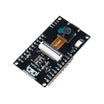
- ESP32-CAM (with OV3660 Camera) - captures JPEG photos and connects over Wi-Fi.
- HC-SR501 PIR Motion Sensor - detects motion and triggers the camera.
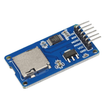
- Micro SD Card Adapter - stores captured photos locally (microSD).
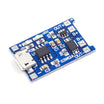
- TP4056 LiPo Charger - charges and powers the build from a single 18650 cell.
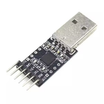
- CP2102 USB-to-TTL (for ESP32-CAM flashing) - required to program the ESP32-CAM (no built-in USB).
- 120 PCS Dupont Jumper Wires - quick prototyping and wiring.
External
- microSD card (≤32 GB) - storage for photos.
- 18650 LiPo cell - battery power source.
- Gmail account (or Telegram bot) - delivery endpoint for alerts.
Note: The ESP32-CAM has no built-in USB. Flash via the CP2102 USB-to-TTL adapter, then power the deployed unit from the TP4056 + 18650.
Step-by-Step Guide
Step 1 - Gather the components
Goal: Confirm you have the ESP32-CAM, PIR sensor, and microSD storage ready before wiring.
What to do: Collect the ESP32-CAM module, HC-SR501 PIR sensor, and microSD hardware (card and adapter/slot). Verify your power plan (TP4056 + 18650) and your programming method (CP2102 USB-to-TTL).

Expected result: All parts are on hand and you know how the device will be powered and programmed.
Step 2 - Wire the PIR and power
Goal: Connect the HC-SR501 output to the ESP32-CAM so motion can trigger a capture, and provide stable power.
What to do: Wire the PIR sensor to the ESP32-CAM and connect power as listed below.

- HC-SR501 VCC to 5V, GND to GND, OUT to GPIO 13
- ESP32-CAM has a built-in SD slot - no extra wiring needed
- Power: TP4056 + 18650 to ESP32-CAM 5V pin
Expected result: The PIR sensor is connected to GPIO 13 and the ESP32-CAM can be powered reliably for testing and deployment.
Step 3 - Upload the email sketch and test
Goal: Connect to Wi-Fi, capture a photo with the ESP32-CAM, and send it via email when motion is detected.
What to do: Install ESP Mail Client by Mobizt via the Arduino Library Manager. Create an app-password on your Gmail account for SMTP. Update Wi-Fi credentials and email settings in the sketch, then flash it to the ESP32-CAM using your USB-to-TTL adapter.

Code:
#include <WiFi.h>
#include <esp_camera.h>
#include <ESP_Mail_Client.h>
#define PIR_PIN 13
const char* SSID = "WIFI";
const char* PASS = "PWD";
const char* FROM = "you@gmail.com";
const char* APP_PASS = "GMAIL_APP_PASSWORD";
const char* TO = "you@gmail.com";
SMTPSession smtp;

void setup() {
  Serial.begin(115200);
  pinMode(PIR_PIN, INPUT);
  WiFi.begin(SSID, PASS);
  while (WiFi.status() != WL_CONNECTED) delay(500);
  // camera_config + esp_camera_init(&config) goes here
}

void snapAndEmail() {
  camera_fb_t *fb = esp_camera_fb_get();
  // attach fb->buf as JPEG to the SMTP message, send via smtp.connect + MailClient.sendMail
  esp_camera_fb_return(fb);
}

void loop() {
  if (digitalRead(PIR_PIN) == HIGH) {
    snapAndEmail();
    delay(60000);   // 1 min cooldown
  }
  delay(200);
}
Expected result: When the PIR detects motion, the ESP32-CAM captures an image and sends it through your configured delivery method (email in this sketch).
Step 4 - Extend the project (optional)
Goal: Plan upgrades without changing the core motion-to-photo workflow.
What to do: Choose one of the enhancements below to match your use case.
- Add deep-sleep with EXT0 wake-on-PIR for much longer battery life
- Post photos to a Telegram bot instead of email for faster phone alerts
- Upload to AWS S3 with timestamps for a cloud-stored event log
- Add a relay-controlled chime + LED for a full smart doorbell
Expected result: You have a clear next step to improve battery life or notifications while keeping the same trigger and capture logic.
Conclusion
This build uses an ESP32-CAM and an HC-SR501 PIR sensor to detect motion, capture a photo, save it to microSD, and send an alert over Wi-Fi. It is a practical way to turn a low-cost camera module into a simple doorbell-style security notifier.
Want the exact parts used in this build? Grab them from ShillehTek.com. If you want help customizing this project or building something for your product, check out our IoT consulting services.





.png?v=25000753014097803521791168436)

.png?v=68677308723310773341791168436)


