

Project Overview
Breadboard Arduino + TP4056 charger: In this build you wire a TP4056 lithium-ion charger module, an 18650 cell, and a small boost converter to create a rechargeable 5 V power source for breadboard projects.
This setup lets your Arduino (or any 5 V breadboard circuit) run untethered and recharge over USB.
- Time: 30 to 45 minutes
- Skill level: Beginner
- What you will build: A compact rechargeable 5 V power module that can feed breadboard power rails.

Parts List
From ShillehTek
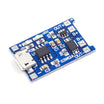
- TP4056 1A 3.7-4.2V LiPo Battery Charging Board with Micro USB & Current Protection - single-cell lithium charger module for this build (micro USB input, current protection).
- Micro USB Cable 0.5m (1.64ft) - plugs into the TP4056 for charging and firmware use.
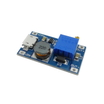
- MT3608 DC-DC Step-Up Boost Converter (adjustable, 2 A) - boosts the lithium cell voltage up to a steady 5 V.
- 400-Point Small Solderless Breadboard - compact base for a breadboard Arduino build.
- 830-Point Solderless Breadboard - more room if your circuit needs it.
- 120pcs 20cm Dupont Jumper Wires - for connecting the 5 V output to your project rails.
- Arduino Nano V3 (pre-soldered) - a simple 5 V target if you want a drop-in Arduino for your breadboard.
External
- 18650 lithium-ion cell (reputable brand)
- Single-cell 18650 battery holder
- USB-C cable (only if you use a charger board with USB-C instead of micro USB)
- 22 AWG solid-core hookup wire (for breadboard rails/output leads)
- Multimeter (to verify polarity and set the output voltage)
Note: Lithium cells store a lot of energy in a small package. Use cells in good condition, avoid shorts, confirm polarity before powering, and keep the assembly away from heat while charging.
Step-by-Step Guide
Step 1 - Identify your TP4056 board pads and variant
Goal: Confirm what pads you should use for input, battery, and load output.
What to do: Check the labels on your TP4056 board:
- IN+ / IN- - 5 V charging input (USB or external 5 V source)
- BAT+ / BAT- - lithium cell connection
- OUT+ / OUT- - protected load output (only on the protected variant)
If your board does not have OUT pads, connect your load to BAT+ / BAT- instead.


Expected result: You know whether you will pull power from OUT+/OUT- (protected board) or from BAT+/BAT- (unprotected board).
Step 2 - (Optional) Set the TP4056 charge current for your battery
Goal: Make sure the charger current matches your battery type and size.
What to do: Many TP4056 boards ship set around 1 A, which is generally fine for an 18650 cell but can be too high for small lithium-polymer pouch cells. Charge current is set by resistor R3 (RPROG) on the board.

If you do not want to work with the small surface-mount resistor, you can desolder R3 and use a standard through-hole resistor across the same pads. Choose the resistor based on the battery C-rate and the datasheet table.

Expected result: Your TP4056 board is configured to charge at an appropriate current for your cell.
Step 3 - Wire the battery to the TP4056
Goal: Connect the 18650 holder to the charger and prepare leads for the load side.
What to do: Solder the holder red lead to BAT+ and the black lead to BAT-. Then solder two additional wires to OUT+ and OUT- (or to BAT+ and BAT- if your board is unprotected). These wires will feed the boost converter next.

Expected result: When USB power is connected, the TP4056 charging LED indicates charging. With the cell installed, it remains in the charging state until full.
Step 4 - Connect the boost converter input
Goal: Feed battery power (or protected output power) into the boost converter.
What to do: Solder OUT+ (or BAT+) to the boost converter IN+, and OUT- (or BAT-) to IN-. Keep the leads short to reduce voltage drop.

Expected result: The boost converter is powered from the battery side of the system and is ready to be adjusted.
Step 5 - Set the boost converter to 5.0 V and add breadboard output leads
Goal: Create a stable 5 V output you can plug into breadboard power rails.
What to do: Before connecting your project, use a multimeter on the boost converter output and adjust the trim pot until you read about 5.0 V. Then solder two stiff 22 AWG solid-core leads to the boost converter output pads.
If the output pads are not labeled, measure DC voltage to confirm polarity before soldering your final leads.


Expected result: The output measures a steady 5.0 V suitable for powering a 5 V breadboard Arduino.
Step 6 - Power your breadboard project (and charge over USB)
Goal: Power your circuit from the new battery-backed 5 V supply and confirm charging behavior.
What to do: Insert the output leads into your breadboard rails with correct polarity (red to +5 V, black to GND). Plug USB into the TP4056 when you want to charge the cell while your project runs.

Expected result: Your breadboard Arduino powers on. The boost converter output remains at 5 V, and the TP4056 LED indicates charging when USB is connected.
Note: If your project must run at 3.3 V, a single lithium cell spans roughly 4.2 V down to about 2.7 V. A boost-only converter cannot regulate when the input is above 3.3 V, and a buck-only converter cannot regulate once the cell drops below 3.3 V. Use a buck-boost converter for a regulated 3.3 V rail.
Conclusion
You built a rechargeable power module using a TP4056 lithium charger, an 18650 cell, and an MT3608-style boost converter to deliver a stable 5 V rail for a breadboard Arduino. This approach is a practical way to run portable prototypes and still recharge over USB.
Want the exact parts used in this build? Grab them from ShillehTek.com. If you want help adapting this power scheme to a custom board or a battery-backed IoT product, check out our IoT consulting services.
Photo credit: Images referenced from Ruben's Thoughts (rlopezxl.com).



.png?v=25000753014097803521788741467)

.png?v=68677308723310773341788741467)


