

Project Overview

Arduino temperature sensors guide: If you are using an Arduino (like an Arduino Nano) and need temperature data, this guide helps you choose the right sensor type (thermistor, DHT, DS18B20, BME/BMP, thermocouple, RTD) for accurate results in your specific project.
"Just use a DHT22" is the lazy advice. The real maker question is what kind of temperature sensor fits your use case: thermistor (NTC), digital one-wire (DS18B20), I2C calibrated (BMP/BME), thermocouple, or RTD. Each is built on different physics, has different accuracy, and is right for completely different projects.
A thermistor is great for a fan controller; it is terrible for a sous-vide. A thermocouple is great for a 3D-printer nozzle; it is overkill for a greenhouse.
This guide walks through common sensor types stocked in maker kits, explains the trade-off triangle (accuracy vs response time vs cost), and recommends a specific sensor for each common project you might build.
- Time: 10 to 20 minutes
- Skill level: Beginner
- What you will build: A clear decision framework for picking the best temperature sensor for your project and reading it with common microcontrollers.
Parts List
From ShillehTek
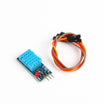
- DHT11 Temperature & Humidity Sensor - entry-level digital temperature and humidity.
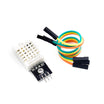
- DHT22 Temperature & Humidity Sensor - more accurate digital temperature and humidity.
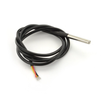
- DS18B20 Waterproof Probe - 1-Wire probe for liquids and wet environments.
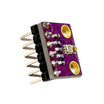
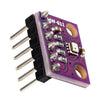
- BME280 (T/H/Pressure) - factory-calibrated I2C sensor with temperature, humidity, and pressure.
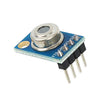
- MLX90614 Infrared Temp Sensor - non-contact temperature by pointing at an object.
- BMP280 (T/Pressure) - factory-calibrated I2C sensor with temperature and pressure.
- Arduino Nano V3.0 - example microcontroller used to read sensors.
External
- An NTC thermistor (10 kOhm @ 25 C is the common maker standard).
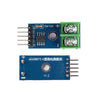
- A type-K thermocouple plus a MAX6675 or MAX31855 breakout for thermocouple projects.
- 4.7 kOhm pull-up resistor for any DS18B20 1-Wire bus.
Note: Thermistors require an analog input and a conversion curve. DS18B20 typically needs a 4.7 kOhm pull-up on the data line. Thermocouples require a dedicated interface IC (MAX6675/MAX31855) because the signal is extremely small.
Step-by-Step Guide
Step 1 - Understand the sensor types
Goal: Know what each temperature sensor category is and what it is best at.

What to do: Use the summaries below to match sensor physics to your job.
- NTC thermistor: A resistor whose resistance drops as temperature rises. Cheap, fast (milliseconds), and can reach around plus or minus 1 C with careful calibration. Needs an analog pin and a math curve.
- DHT11/DHT22: A capacitive humidity sensor plus a thermistor plus a small MCU. Single-wire output. DHT11 is typically plus or minus 2 C; DHT22 is typically plus or minus 0.5 C.
- DS18B20: Fully digital sensor with onboard ADC, calibration, and a 1-Wire bus. Typically plus or minus 0.5 C across -55 to +125 C.
- BMP280 / BME280 / BME680: I2C silicon sensors with factory calibration. Temperature is typically around plus or minus 0.5 C, plus pressure (and humidity on BME280/680, plus gas on BME680).
- MLX90614: Non-contact infrared sensor that reads the temperature of the object it is pointed at. Often around plus or minus 0.5 C in the comfort range.
- Thermocouple (type K) plus MAX6675: Two dissimilar metals welded together. Survives 1000+ C with fast response, but accuracy is typically around plus or minus 2 C and needs a dedicated IC.
- RTD (PT100/PT1000): Platinum element with very predictable resistance change. Can be lab-grade (for example plus or minus 0.15 C) with an IC like MAX31865, but costs more.
Expected result: You can name the sensor family that fits your temperature range, accuracy target, and environment (air, liquid, contact, non-contact, extreme heat).
Step 2 - Use the trade-off triangle to narrow choices
Goal: Pick the best sensor by balancing accuracy, response time, and cost.

What to do: Decide what matters most for your build:
Every sensor compromises along three axes: accuracy, response time, and cost. The DHT11 is cheap and slow with mediocre accuracy. The thermistor is cheap and fast with okay accuracy. The DS18B20 is medium-cost, medium-speed, with good accuracy. The PT100 is expensive, medium speed, and lab-grade. The thermocouple is medium-cost, very fast, with lower accuracy, but it is the only one in this list that survives 1000 C.
Expected result: You can eliminate sensor types that miss your range (freezer vs oven), accuracy (fan control vs sous-vide), or speed requirements.
Step 3 - Know how each sensor is read in code
Goal: Understand the interface style for each sensor so you can plan wiring and libraries.
What to do: Use these example snippets to see the typical Arduino-style approach (analog, single-wire, 1-Wire, I2C).
// Thermistor (analog)
int adc = analogRead(A0);
float R = 10000.0 * (1023.0 / adc - 1);  // for 10k NTC + 10k pull-up
// Steinhart-Hart for proper temp conversion

// DHT22 (single-wire)
#include <DHT.h>
DHT dht(2, DHT22); dht.begin();
float t = dht.readTemperature();

// DS18B20 (1-Wire)
#include <OneWire.h>
#include <DallasTemperature.h>
OneWire b(2); DallasTemperature ds(&b);
ds.begin(); ds.requestTemperatures();
float t = ds.getTempCByIndex(0);

// BME280 (I2C)
#include <Adafruit_BME280.h>
Adafruit_BME280 bme; bme.begin(0x76);
float t = bme.readTemperature();

// MLX90614 (I2C non-contact)
#include <Adafruit_MLX90614.h>
Adafruit_MLX90614 mlx; mlx.begin();
float t = mlx.readObjectTempC();
Expected result: You know whether your project needs an analog pin, a single GPIO with timing constraints, a 1-Wire bus with a pull-up resistor, or an I2C bus with an address.
Step 4 - Match sensors to real projects
Goal: Choose a sensor based on common maker scenarios.

What to do: Use the recommendations below as a starting point.
- PC fan controller or "is the room warmer than the setpoint" - thermistor. Cheap, fast, and accuracy is usually good enough.
- Greenhouse or room monitor with humidity - DHT22. Solid balance of price and accuracy.
- Sous-vide, fish tank, brewing, freezer alarm - DS18B20 waterproof. Stainless probe plus good accuracy on 1-Wire.
- Weather station with altitude or barometric trends - BME280. Temperature, humidity, and pressure over I2C.
- Forehead thermometer or pour-temperature gauge - MLX90614. Non-contact measurement is the point.
- 3D-printer hotend, soldering iron - thermocouple. It survives temperatures that other sensors cannot.
- Lab-grade reference or calibration source - PT100/PT1000 with a MAX31865 breakout. Higher cost, higher accuracy.
Expected result: You can pick a sensor with confidence based on environment, temperature range, and accuracy needs.
Conclusion
There is no single best temperature sensor. There is a best sensor for your project, based on temperature range, required accuracy, and response time. For many maker builds, the practical answer ends up being a DHT22 or a DS18B20.
Want the exact parts used in this guide? Grab them from ShillehTek.com. If you want help customizing a sensing setup or building a product-ready solution, check out our IoT consulting services.
Attribution: This guide was inspired by the broad survey tutorial "Comparison of Temperature Sensors" on Instructables; images are credited to the original author of that source tutorial.



.png?v=25000753014097803521791168436)

.png?v=68677308723310773341791168436)


