

Project Overview
Arduino Nano + PCA9685 servo driver robotic arm: Build a 6-axis robotic arm controlled by a joystick, with six MG90S micro servos driven over I2C and an OLED that shows the current angles.
Six MG90S micro servos give the arm 6 degrees of freedom: base rotation, shoulder, elbow, wrist twist, wrist tilt, and gripper. A 2-axis joystick maps to the most-used joints; the OLED shows current angles. The foundation of every robotics project - from animatronics to entry-level industrial pick-and-place.
- Time: ~4 hours
- Skill level: Advanced
- What you will build: A 6-DOF robotic arm with joystick control + saved positions.

Parts List
From ShillehTek
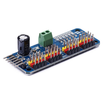
- PCA9685 16-Ch PWM Servo Driver - drives multiple servos from a single I2C interface
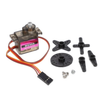
- MG90S Metal-Gear Servo (x6) - provides the 6 joints of motion
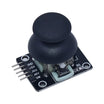
- KY-023 Joystick Module - analog input for manual joint control
- 0.96" SSD1306 OLED - displays current joint angles
- Arduino Nano V3.0 - microcontroller for reading inputs and commanding servos
- Dupont Jumper Wires - wiring between modules
External
- 3D-printed or laser-cut arm frame (open-source designs everywhere)
- 5V/2-3A external supply for the servos
Note: Do not power 6 servos from the Arduino's 5V. They can pull ~700mA each at peak. Use a separate 5V supply with a common ground.
Step-by-Step Guide
Step 1 - Wire the PCA9685
Goal: Connect the Arduino Nano, PCA9685, joystick, OLED, and external 5V servo power safely.
What to do: Connect the PCA9685 to the Arduino over I2C (SDA/SCL). Connect six MG90S servos to PCA9685 channels 0 to 5. Power the servos from a separate 5V supply connected to the PCA9685 V+ input, and make sure the external supply ground and Arduino ground are tied together (common ground).


Expected result: All modules are connected, and the PCA9685 has a dedicated 5V supply for servo power with a shared ground.
Step 2 - Install Library + Test
Goal: Verify the PCA9685 is communicating and can center the servos.
What to do: Install the Adafruit PWM Servo Driver library in the Arduino IDE. Upload the following sketch to initialize the driver and set channels 0 to 5 to their midpoint pulse.
Code:
#include <Wire.h>
#include <Adafruit_PWMServoDriver.h>
Adafruit_PWMServoDriver pwm = Adafruit_PWMServoDriver();
const int SERVO_MIN = 150, SERVO_MAX = 600;
void setup() {
  pwm.begin(); pwm.setPWMFreq(50);
  for (int s = 0; s < 6; s++) pwm.setPWM(s, 0, (SERVO_MIN + SERVO_MAX) / 2);
}
void loop() {}
Expected result: All connected servos move to a centered position and hold steady.
Step 3 - Joystick Control Sketch
Goal: Control the base and shoulder joints using the joystick analog axes.
What to do: Wire the joystick outputs to A0 and A1 (as shown in the wiring diagram). Upload this loop code that reads analog values, applies a deadband, updates target angles, and writes PWM values to the PCA9685 on channels 0 and 1.
Code:
int curBase = 90, curShoulder = 90;
void loop() {
  int xRaw = analogRead(A0) - 512;
  int yRaw = analogRead(A1) - 512;
  if (abs(xRaw) > 50) curBase = constrain(curBase + xRaw/200, 0, 180);
  if (abs(yRaw) > 50) curShoulder = constrain(curShoulder + yRaw/200, 0, 180);
  pwm.setPWM(0, 0, map(curBase, 0, 180, SERVO_MIN, SERVO_MAX));
  pwm.setPWM(1, 0, map(curShoulder, 0, 180, SERVO_MIN, SERVO_MAX));
  delay(20);
}
Expected result: Moving the joystick smoothly rotates the base and moves the shoulder, without jitter when the joystick is near center.
Step 4 - Use It
Goal: Operate the arm with joystick control and confirm the display and joint mapping.
What to do: Use joystick X for base rotation and joystick Y for shoulder movement. Use the additional buttons to cycle through elbow, wrist, and gripper control. Watch the OLED to confirm the current joint angle values.


Expected result: The arm responds smoothly to joystick input, and the OLED updates with the joint angles.
Step 5 - Where to Take It Next
Goal: Identify practical next upgrades once basic motion control is working.
What to do: Consider these extensions after your core wiring and control loop are stable:
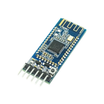
- Add a Bluetooth/Wi-Fi link - phone-app control (HM-10 or ESP32)
- Record/playback joint positions for repeatable demos (animatronics)
- Add inverse-kinematics math - control by target (x, y, z) instead of joint angles
- Pair with a webcam + computer vision - pick objects by color or shape
Expected result: You have a clear roadmap for expanding the project beyond manual joystick control.
Conclusion
This build uses an Arduino Nano, a PCA9685 servo driver, and six MG90S servos to create a 6-DOF robotic arm you can drive with a joystick while viewing joint angles on an SSD1306 OLED.
Want the exact parts used in this build? Grab them from ShillehTek.com. If you want help customizing this project or building something for your product, check out our IoT consulting services.





.png?v=25000753014097803521791168436)

.png?v=68677308723310773341791168436)


