

Project Overview
Arduino Nano + TCS3200 color sensor: In this project, you will wire a GY-31 TCS3200 color recognition sensor to an Arduino Nano and print raw RGB channel readings to the Serial Monitor for basic color detection.
The TCS3200 is a programmable color light-to-frequency converter. White, red, green, and blue LEDs illuminate the target while a photodiode array measures reflected intensity in each channel. The module outputs a square wave whose frequency is proportional to the selected color channel intensity.
- Time: ~20 minutes
- Skill level: Beginner
- What you will build: An Arduino that prints the RGB values of whatever object you point the sensor at.

Parts List
From ShillehTek
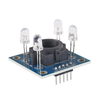
- GY-31 TCS3200 Colour Sensor - senses color by outputting a frequency for each selected filter channel.
- Arduino Nano V3.0 Pre-Soldered - reads the sensor output and prints values over Serial.
- 120 PCS Dupont Jumper Wires - makes breadboard and module wiring quick and reliable.
External
- Coloured paper, cards, or objects to test
Note: Hold the sensor 1-2 cm above the target. Too close and the LEDs saturate; too far and ambient light interferes.
Step-by-Step Guide
Step 1 - Inspect the Module
Goal: Identify the main parts and the pins you will use for frequency scaling and color selection.
What to do: Locate the LEDs, sensor area, and the header pins labeled VCC, GND, S0, S1, S2, S3, and OUT.


Expected result: You understand which pins control scaling (S0/S1), which pins select the color filter (S2/S3), and which pin outputs the pulse train (OUT).
Step 2 - Wire It Up
Goal: Connect the TCS3200 module to the Arduino Nano so the Arduino can select channels and measure pulse width using pulseIn.
What to do: Make the following connections between the sensor module and the Arduino Nano.

pulseIn.- VCC 9 5 V, GND 9 GND
- S0 9 D4, S1 9 D5 (set HIGH for 100% scaling)
- S2 9 D6, S3 9 D7
- OUT 9 D8
Expected result: The sensor is powered from 5 V and the control/output pins are connected to the Arduino exactly as listed.
Step 3 - Upload the Sketch
Goal: Program the Arduino to select red, green, and blue filters and print the measured pulse values over Serial.
What to do: Paste the sketch into the Arduino IDE, select your Arduino Nano board and port, then upload.
Code:
const int S0 = 4, S1 = 5, S2 = 6, S3 = 7, OUT = 8;

void setup() {
  pinMode(S0, OUTPUT); pinMode(S1, OUTPUT);
  pinMode(S2, OUTPUT); pinMode(S3, OUTPUT);
  pinMode(OUT, INPUT);
  digitalWrite(S0, HIGH); digitalWrite(S1, HIGH);  // 100% scaling
  Serial.begin(9600);
}

int readChannel(bool s2, bool s3) {
  digitalWrite(S2, s2);
  digitalWrite(S3, s3);
  delay(50);
  return pulseIn(OUT, LOW);
}

void loop() {
  int red   = readChannel(LOW,  LOW);
  int blue  = readChannel(LOW,  HIGH);
  int green = readChannel(HIGH, HIGH);
  Serial.print("R="); Serial.print(red);
  Serial.print(" G="); Serial.print(green);
  Serial.print(" B="); Serial.println(blue);
  delay(200);
}
Expected result: After upload, the Arduino is ready to output R, G, and B readings to the Serial Monitor at 9600 baud.
Step 4 - Aim at Colours
Goal: Verify readings change when you point the sensor at different colored objects.
What to do: Open the Serial Monitor at 9600 baud and hold the sensor about 1-2 cm above a colored target. Try white, black, red, green, and blue objects.

Expected result: The printed R, G, and B numbers change as you switch between different colors and materials.
Step 5 - Where to Take It Next
Goal: Apply the same raw readings to simple automation or classification ideas.
What to do: Use the values you see in Serial to decide thresholds for your application, such as the ideas below.
- Sort items on a conveyor belt by colour (red M&Ms vs green M&Ms)
- Build a colour-mixing demo with an RGB LED that mirrors what the sensor sees
- Trigger different relay channels for different colour cards (a simple barcode alternative)
- Calibrate against known colours and convert raw counts to RGB hex
Expected result: You have a clear next step for turning raw TCS3200 readings into decisions or outputs in your Arduino project.
Conclusion
You built an Arduino Nano project using the TCS3200 (GY-31) color sensor to read RGB channels and print the values to Serial. With these raw readings, you can start classifying colors, triggering outputs, or building simple sorting and lighting demos.
Want the exact parts used in this build? Grab them from ShillehTek.com. If you want help customizing this project or building something for your product, check out our IoT consulting services.






.png?v=25000753014097803521790645985)

.png?v=68677308723310773341790645985)


