

Project Overview
Arduino Nano + RC522 RFID + servo cat door: Build an RFID-controlled cat flap where an RC522 reads a 13.56 MHz tag and an Arduino Nano drives a servo to unlock the latch only for allowed UIDs.
Your cat wears an RFID tag on a breakaway collar. When the tag approaches the reader, the Arduino checks it against an allow-list. If it matches, the servo unlocks the door for a short time; otherwise it stays locked.
- Time: ~3 hours
- Skill level: Intermediate
- What you will build: A motorised cat door that only opens for tagged cats.

Parts List
From ShillehTek
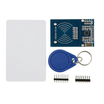
- RC522 RFID Reader (with cards + fobs) - reads 13.56 MHz ISO14443A tags over SPI.
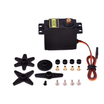
- MG995 High-Torque Servo - moves the latch reliably with plenty of torque.
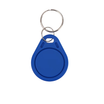
- 13.56 MHz Key Fob (for the cat's collar) - the tag your cat carries (UID is used for access control).
- Arduino Nano V3.0 - runs the RFID read + allow-list logic and drives the servo.
- Dupont Jumper Wires - quick, removable wiring for prototyping.
External
- Standard cat flap (the door itself)
- 5V power supply
- Mechanical latch + linkage to the servo arm
Note: Use a tiny lightweight RFID fob attached to a breakaway collar. Never attach anything heavy to a cat.
Step-by-Step Guide
Step 1 - Build the latch mechanism
Goal: Create a reliable physical lock that the servo can move between locked and unlocked.
What to do: Mount the MG995 so its horn/arm can pull or push a sliding bolt (or similar latch). Confirm the bolt fully blocks the flap when locked, and fully clears it when unlocked.

Expected result: Moving the servo arm by hand (or temporarily powering the servo) cleanly locks and unlocks the door.
Step 2 - Wire the RC522 and servo to the Arduino Nano
Goal: Connect the RC522 over SPI and connect the servo to a PWM-capable pin.
What to do: Wire the RC522 to the Arduino Nano SPI pins and power it correctly. Wire the servo signal to D6 (PWM), plus 5V and GND to your power supply and common ground.

Expected result: The RC522 powers up at 3.3V and the servo has stable power with a shared ground to the Arduino.
Step 3 - Read your cat's RFID tag UID
Goal: Get the UID from the fob so you can add it to the allow-list.
What to do: Use the MFRC522 library and run its ReadUIDSimple example. Present the cat's fob to the RC522 and write down the 4-byte UID shown in the serial output.

Expected result: You have a 4-byte UID you can paste into the sketch as hex bytes.
Step 4 - Upload the Arduino sketch
Goal: Make the Arduino unlock the servo when an allowed UID is detected.
What to do: Paste your UID into the ALLOWED array, compile, and upload. The sketch keeps the door locked (servo at 0 degrees) until an allowed tag is seen, then unlocks (90 degrees) for 8 seconds.
Code:
#include <SPI.h>
#include <MFRC522.h>
#include <Servo.h>
const int RST_PIN = 9, SS_PIN = 10;
MFRC522 rfid(SS_PIN, RST_PIN);
Servo lock;
const byte ALLOWED[][4] = {
  {0x12, 0x34, 0x56, 0x78}    // replace with your cat's UID
};
void setup() {
  SPI.begin(); rfid.PCD_Init();
  lock.attach(6); lock.write(0);   // locked
}
bool isAllowed(byte* uid) {
  for (auto& tag : ALLOWED) {
    if (memcmp(uid, tag, 4) == 0) return true;
  }
  return false;
}
void loop() {
  if (!rfid.PICC_IsNewCardPresent() || !rfid.PICC_ReadCardSerial()) return;
  if (isAllowed(rfid.uid.uidByte)) {
    lock.write(90); delay(8000); lock.write(0);   // 8 seconds to slip through
  }
  rfid.PICC_HaltA(); rfid.PCD_StopCrypto1();
}
Expected result: Presenting an allowed tag moves the servo to unlock for about 8 seconds, then returns to locked.
Step 5 - Install and test on the real door
Goal: Validate the latch movement and RFID read distance on the installed flap.
What to do: Mount the electronics and servo mechanism on the cat flap. Present the allowed fob near the RC522 and confirm the latch retracts long enough for the cat to pass through. Try a non-allowed tag to confirm the door stays locked.


Expected result: Allowed fob unlocks the door consistently; non-allowed tags do nothing.
Step 6 - Where to take it next
Goal: Extend the same RFID access-control idea for additional features.
What to do: Consider these upgrades:
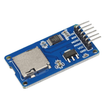
- Log every entry to microSD with a timestamp (track your cat's nightly schedule)
- Multi-cat support - add each cat's UID to the ALLOWED array
- Wi-Fi notifications (ESP32) - "Mittens just came home" to your phone
- Time-locked mode - cat door only opens during daytime hours
Expected result: A clear list of next improvements you can add without changing the core wiring concept.
Conclusion
You built an Arduino Nano RFID cat door using an RC522 reader and a servo latch, so only tags in your allow-list can unlock the flap. It is the same core idea as commercial units, but you control the behavior and do not need an app.
Want the exact parts used in this build? Grab them from ShillehTek.com. If you want help customizing this project or building something for your product, check out our IoT consulting services.




.png?v=25000753014097803521791168436)

.png?v=68677308723310773341791168436)


