

Project Overview
Arduino Nano + MAX6675 K-type thermocouple: In this project you will read high temperatures (up to about 1024 c) and display live Celsius values on an I b2C OLED, with an optional over-temperature relay cutoff for safety.

DHT22 and DS18B20 cap out around 125 c, which is far below the temperatures inside a 3D printer hot end, a kiln, a reflow oven, or a sous-vide circulator running too hot. For those, you need a K-type thermocouple: two dissimilar metal wires welded together that produce a tiny voltage proportional to temperature, surviving up to about 1024 c. The MAX6675 is a cheap, well-supported chip that turns that microvolt signal into clean Celsius numbers an Arduino can read over SPI.
- Time: 20 to 40 minutes
- Skill level: Beginner
- What you will build: A high-temperature Arduino thermometer with OLED readout and an over-temp relay output.
Parts List
From ShillehTek
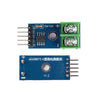
- MAX6675 K-Type Thermocouple Module (with thermocouple probe included) - converts the thermocouple signal to SPI temperature data.
- Arduino Nano V3.0 - reads the MAX6675 over SPI and drives the display/relay.
- 1-Channel 5V Relay Module - for over-temp shutdown.
- Breadboard + jumper wires - for quick, no-solder prototyping.
External
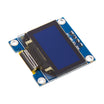
- A 0.96 inch I b2C OLED display (SSD1306) - for showing live temperature.
- A small buzzer (optional) - for an audible alarm.
- USB cable - to power and program the Arduino.
Note: This wiring uses an Arduino Nano (5V logic). The MAX6675 module and most SSD1306 OLED modules commonly work at 5V, but always confirm your specific display module voltage requirements.
Step-by-Step Guide
Step 1 - Understand how the K-type thermocouple and MAX6675 work
Goal: Know what the thermocouple produces and what the MAX6675 does before wiring.

What to do: A K-type thermocouple is a junction of two specific metal alloys (chromel and alumel). The voltage across the junction is roughly 41 b5V per c, which is far too small to read directly with an Arduino e2 80 99s 10-bit ADC. The MAX6675 amplifies, cold-junction-compensates, and digitizes that signal, then outputs 12-bit temperature data over SPI at about 0.25 c resolution.
Expected result: You understand why the MAX6675 is required and why the wiring uses SPI pins.
Step 2 - Wire the MAX6675, OLED, and thermocouple probe
Goal: Connect SPI (MAX6675) and I b2C (OLED) correctly to the Arduino Nano.
What to do: Use the mapping below. Keep connections short and double-check pin labels on your specific modules.
Wiring map:
MAX6675       Arduino Nano
VCC      ->   5V
GND      ->   GND
SCK      ->   D13 (SPI clock)
CS       ->   D10
SO       ->   D12 (SPI MISO)

OLED I2C      Arduino Nano
VCC      ->   5V
GND      ->   GND
SDA      ->   A4
SCL      ->   A5

Thermocouple probe + (yellow) -> MAX6675 + terminal
Thermocouple probe - (red)    -> MAX6675 - terminal
Polarity matters. If you wire it backwards, the temperature reads downward as the probe heats up. Yellow is + on standard K-type.
Expected result: All modules power up normally, and the thermocouple is secured in the MAX6675 screw terminal with correct polarity.
Step 3 - Upload the Arduino sketch
Goal: Read Celsius from the MAX6675, show it on the OLED, and drive a relay above a threshold.
What to do: Install the required libraries in the Arduino IDE (MAX6675 library and Adafruit SSD1306/GFX), then upload the sketch below. The relay control is set by OVERTEMP_C.
Code:
#include <SPI.h>
#include <max6675.h>
#include <Adafruit_GFX.h>
#include <Adafruit_SSD1306.h>

const int SCK_PIN = 13, CS_PIN = 10, SO_PIN = 12;
const int RELAY = 7;
const float OVERTEMP_C = 250.0;

MAX6675 tc(SCK_PIN, CS_PIN, SO_PIN);
Adafruit_SSD1306 oled(128, 64, &Wire, -1);

void setup() {
  pinMode(RELAY, OUTPUT);
  digitalWrite(RELAY, HIGH);
  Serial.begin(9600);
  oled.begin(SSD1306_SWITCHCAPVCC, 0x3C);
  delay(500);
}
void loop() {
  float c = tc.readCelsius();
  oled.clearDisplay();
  oled.setCursor(0,0);
  oled.setTextSize(2); oled.setTextColor(WHITE);
  oled.print(c, 1); oled.print(" C");
  oled.display();
  Serial.println(c);
  digitalWrite(RELAY, c > OVERTEMP_C ? LOW : HIGH);
  delay(500);
}
Expected result: The OLED updates with the live temperature in Celsius, Serial Monitor prints the same value, and the relay output changes state when the temperature crosses 250 c.
Step 4 - Place the probe and use it in real projects
Goal: Apply the thermocouple to high-temperature measurements where typical sensors fail.

What to do: Try one of these common applications:
- 3D printer hotend logger: tape the probe to the heater block and watch overshoot/undershoot during PID tuning.
- Sous-vide overtemp safety: if the water bath spikes above 100 c (heater failure), cut the relay.
- Reflow oven controller: the MAX6675 + Arduino is a common DIY foundation for reflow setups.
- Espresso boiler: monitor brew-head temperature drift between shots.
- Kiln / forge / wood stove: practical Arduino-readable temperatures in this range.
Expected result: You can measure temperatures far above 125 c and trigger a safety action if needed.
Step 5 - Understand accuracy and limitations
Goal: Know what accuracy to expect and when to choose different hardware.

What to do: The MAX6675 is good to about b12 c in normal conditions. For lab-grade accuracy you would step up to the MAX31855 (handles thermocouple types K, J, T, etc.) or a PT100 with a MAX31865. For most maker projects, b12 c is fine when you are reading 250 c, not 25 c.
Expected result: You understand the realistic performance of the MAX6675 in typical builds.
Conclusion
You built a high-temperature Arduino Nano thermometer using a MAX6675 K-type thermocouple module, with live OLED readout and an over-temperature relay output. This setup is a practical way to measure up to about 1024 c in projects like reflow ovens, kilns, and hot-end monitoring where common digital sensors cannot survive.
Want the exact parts used in this build? Grab them from ShillehTek.com. If you want help customizing this project or building something for your product, check out our IoT consulting services.
Attribution: This guide was inspired by "Arduino Thermometer With MAX6675 and OLED" on Instructables.







.png?v=25000753014097803521791168436)

.png?v=68677308723310773341791168436)


