

Project Overview
Arduino Nano + INMP441 + MAX7219: Build a real-time audio spectrum visualizer where an INMP441 microphone captures music, the Arduino runs an FFT, and a MAX7219 32×8 LED matrix displays bouncing frequency bars.
The effect is similar to a classic graphic equalizer display. You can mount it on a speaker, keep it on your desk, or attach it to a guitar amp.
- Time: ~1.5 hours
- Skill level: Intermediate
- What you will build: A 32×8 LED spectrum analyzer that visualises any audio source.

Parts List
From ShillehTek
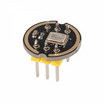
- INMP441 I²S Microphone - captures audio for FFT analysis
- MAX7219 4-in-1 32×8 Dot Matrix - displays the spectrum bars
- Arduino Nano V3.0 - reads the mic signal and runs the FFT
- Dupont Jumper Wires - makes breadboard and module connections easy
External
- 5V supply (USB power works)
- Audio source (speaker, phone, guitar amp)
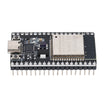
Note: For deeper frequency analysis, use ESP32 instead of Arduino Nano. The ESP32's faster processor handles larger FFT sizes (64+ bands).
Step-by-Step Guide
Step 1 - Wire It Up
Goal: Connect the INMP441 microphone and the MAX7219 LED matrix to the Arduino Nano.
What to do: Build the circuit so the INMP441 feeds the Arduino (for sampling), and the MAX7219 is connected for display output. Follow the wiring shown in the diagrams below.


Expected result: Your Arduino, microphone module, and LED matrix are fully connected and ready for programming.
Step 2 - Install Libraries
Goal: Install the Arduino libraries required for FFT processing and MAX7219 matrix control.
What to do: In the Arduino IDE, install these libraries: arduinoFFT, MD_Parola, and MD_MAX72XX.
Expected result: The libraries are available in your IDE so the sketch compiles without missing dependency errors.
Step 3 - Upload the Sketch
Goal: Program the Arduino Nano to sample audio, compute an FFT, and draw bar heights on the 32×8 LED matrix.
What to do: Paste the code below into a new Arduino sketch, then compile and upload it to your Arduino Nano.
Code:
#include <arduinoFFT.h>
#include <MD_Parola.h>
#include <MD_MAX72xx.h>
#include <SPI.h>
#define MIC_PIN A0
#define SAMPLES 64
#define MAX_DEVICES 4
double vReal[SAMPLES], vImag[SAMPLES];
arduinoFFT FFT;
MD_Parola display(MD_MAX72XX::FC16_HW, 10, MAX_DEVICES);
const int BANDS = 16;
void setup() {
  display.begin(); display.setIntensity(2); display.displayClear();
}
void loop() {
  for (int i = 0; i < SAMPLES; i++) {
    vReal[i] = analogRead(MIC_PIN) - 512;
    vImag[i] = 0;
  }
  FFT.Windowing(vReal, SAMPLES, FFT_WIN_TYP_HAMMING, FFT_FORWARD);
  FFT.Compute(vReal, SAMPLES, FFT_FORWARD);
  FFT.ComplexToMagnitude(vReal, SAMPLES, FFT_FORWARD);
  display.displayClear();
  for (int b = 0; b < BANDS; b++) {
    int h = constrain(vReal[b + 2] / 50, 0, 8);
    // draw a vertical bar 'h' pixels tall at column b*2
    for (int y = 8 - h; y < 8; y++) {
      display.getGraphicObject()->setPoint(y, b * 2, true);
    }
  }
  display.getGraphicObject()->update();
}
Expected result: The sketch uploads successfully, and the matrix begins updating with bar-style output once audio is present.
Step 4 - Calibrate the Sensitivity
Goal: Adjust the bar scaling so typical room volume reaches a useful range on the display.
What to do: Tweak the divisor in the sketch (the line similar to vReal[b] / 50) until the bars hit full scale at your normal listening volume.

Expected result: Bars rise and fall smoothly, with loud sections reaching near the top row without staying pegged at maximum.
Step 5 - Watch It Dance
Goal: Verify the visualizer responds to real music or audio.
What to do: Play audio near the microphone (from a speaker, phone, or amp) and observe the LED bars.

Expected result: The matrix shows a moving spectrum where low frequencies tend to appear toward the left and higher frequencies toward the right.
Step 6 - Where to Take It Next
Goal: Explore optional enhancements after the core build is working.
What to do: Consider extending the project with one of the ideas below.
- Add peak-hold indicators that linger at the highest reading
- RGB version - use a WS2812B strip for full colour spectrum
- Multiple matrices side-by-side for a wider display
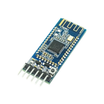
- Wireless audio from a Bluetooth receiver → standalone reactive lamp
Expected result: You have a clear path for upgrades once the basic Arduino FFT spectrum display is stable.
Conclusion
You built an Arduino Nano audio spectrum visualizer using an INMP441 microphone and a MAX7219 32×8 LED matrix. With FFT-based frequency bands driving the display, the result is an eye-catching, sound-reactive LED bar graph.
Want the exact parts used in this build? Grab them from ShillehTek.com. If you want help customizing this project or building something for your product, check out our IoT consulting services.






.png?v=25000753014097803521791168436)

.png?v=68677308723310773341791168436)


