

Project Overview
Arduino Nano + DHT22 climate readings: In this tutorial, you will wire a DHT22 temperature and humidity sensor to an Arduino Nano and print readings to the Serial Monitor every 2 seconds.
The DHT22 is a one-wire digital sensor that reports temperature (-40 C to +80 C) and relative humidity (0 to 100%) over a single GPIO pin. It is commonly used for grow tents, weather stations, fridge loggers, and HVAC monitoring.
- Time: ~10 minutes
- Skill level: Beginner
- What you will build: An Arduino logging temperature + humidity to the Serial Monitor every 2 seconds.

Parts List
From ShillehTek
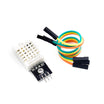
- DHT22 Temperature & Humidity Sensor - measures temperature and relative humidity over a single data pin
- Arduino Nano V3.0 Pre-Soldered - compact Arduino board to read the sensor and print to Serial
- 120 PCS Dupont Jumper Wires - quick breadboard or header wiring
External
- USB cable - to power and program the Arduino Nano
- Arduino IDE - to install the library and upload the sketch
Note: A 10 kOhm pull-up between DATA and VCC is required if your module is just a bare DHT22. ShillehTek’s DHT22 with cables already includes the pull-up on the breakout.
Step-by-Step Guide
Step 1 - Identify the Pins
Goal: Know what each lead does.
What to do: Confirm the DHT22 pins before wiring: VCC, DATA, NC, and GND. Leave the NC pin unconnected.

Expected result: You can identify VCC, DATA, and GND confidently before connecting to the Arduino.
Step 2 - Wire It Up
Goal: Connect the DHT22 to the Arduino Nano correctly.
What to do: Wire the sensor to the Arduino as shown. Use D2 for the data pin to match the sketch.

- VCC to 5 V (3.3 V also works on ESP32 / Pi Pico)
- DATA to D2
- GND to GND
Expected result: The DHT22 is powered and its DATA line is connected to Arduino digital pin 2.
Step 3 - Install the Library
Goal: Add the Arduino library needed to talk to the DHT22.
What to do: In the Arduino IDE, open Tools → Manage Libraries and install DHT sensor library by Adafruit. Accept the prompt to install dependencies (Adafruit Unified Sensor).
Expected result: The DHT sensor library and its dependencies are installed successfully.
Step 4 - Upload the Sketch
Goal: Program the Arduino Nano to print humidity and temperature.
What to do: Paste the sketch below, select your board and port, then upload.

Code:
#include <DHT.h>

#define DHTPIN 2
#define DHTTYPE DHT22

DHT dht(DHTPIN, DHTTYPE);

void setup() {
  Serial.begin(9600);
  dht.begin();
}

void loop() {
  delay(2000);
  float h = dht.readHumidity();
  float t = dht.readTemperature();
  if (isnan(h) || isnan(t)) {
    Serial.println(F("DHT read failed"));
    return;
  }
  Serial.print(F("Humidity: "));
  Serial.print(h, 1);
  Serial.print(F("%  Temp: "));
  Serial.print(t, 1);
  Serial.println(F(" C"));
}
Expected result: The upload completes, and the Arduino begins sampling the DHT22 about once every 2 seconds.
Step 5 - Watch the Output
Goal: Verify the sensor readings in the Serial Monitor.
What to do: Open the Serial Monitor at 9600 baud and watch the printed humidity and temperature values. The DHT22 needs about 2 seconds between samples.


Expected result: You see lines like “Humidity: XX.X% Temp: YY.Y C” updating every 2 seconds.
Step 6 - Where to Take It Next
Goal: Extend the project after you confirm basic readings.
What to do: Pick one of these next steps for your build.
- Push readings to a Google Sheet via an ESP32 + IFTTT
- Drive an LCD1602 to display T/RH live
- Trigger a relay-controlled fan or heater above/below thresholds
- Stream to MQTT for Home Assistant integration
Expected result: You have a clear direction for turning simple serial output into a real monitoring or automation project.
Conclusion
You just wired a DHT22 temperature and humidity sensor to an Arduino Nano and logged readings to the Serial Monitor. With one data pin and the Adafruit library, you can quickly turn it into a basic climate monitor.
Want the exact parts used in this build? Grab them from ShillehTek.com. If you want help customizing this project or building something for your product, check out our IoT consulting services.
Credits: The DHT22 wiring photos and Serial Monitor screenshots are credited to Instructables, which served as a reference for this version.





.png?v=25000753014097803521790645985)

.png?v=68677308723310773341790645985)


