

Project Overview
Arduino DS18B20 relay fermentation controller: Use an Arduino Nano with a DS18B20 waterproof temperature probe and a 1-channel relay to cycle a small heating pad and hold a stable fermentation temperature for yogurt, sourdough, or kombucha.
Yogurt cultures typically want 42 to 46 C for 6 to 12 hours. Sourdough starters often prefer 24 to 26 C, and kombucha SCOBYs tend to like 22 to 28 C. This build helps you keep a target temperature for as long as you want.
- Time: ~1.5 hours
- Skill level: Intermediate
- What you will build: A precision fermentation controller that holds 10.5 C around any target.

Parts List
From ShillehTek
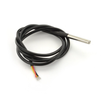
- DS18B20 Waterproof Probe - measures chamber temperature inside the cooler.
- 1-Channel 5V Relay Module - switches the heating pad on and off based on temperature.
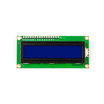
- LCD1602 Display (status) - optional local readout for temperature and state.
- Arduino Nano V3.0 - runs the control loop and drives the relay.
- Dupont Jumper Wires - quick wiring between the Nano, sensor, and relay.
External
- Mains-powered heating pad / seed-starting heat mat (~20W is plenty)
- Insulated container (small cooler works)
- 4.7ka9 resistor (1-Wire pull-up)
Safety: The relay switches mains AC. If you're uncomfortable with mains wiring, use a smart plug controlled by Wi-Fi instead.
Step-by-Step Guide
Step 1 - Build the chamber
Goal: Create an insulated space where a small heater can raise and maintain temperature.
What to do: Place the heating pad inside an insulated container such as a small cooler. Route the DS18B20 probe into the chamber so it measures the air or the area near your fermentation vessel.

Expected result: You have a closed, insulated chamber with a heater and a temperature probe placed inside.
Step 2 - Wire the Arduino, DS18B20, relay, and LCD
Goal: Connect the temperature probe and relay to the Arduino so it can read temperature and control the heater.
What to do: Wire the DS18B20 data line to Arduino D2 and add a 4.7ka9 pull-up resistor for the 1-Wire bus. Wire the relay module control input to Arduino D3. If you are using the LCD status display, connect it via I b2C as shown in your module's pinout.


Expected result: The Arduino can read temperature from the DS18B20 and has a digital output ready to switch the relay.
Step 3 - Upload the Arduino sketch
Goal: Run a simple control loop that turns heat on below the target temperature band.
What to do: Install the required libraries (OneWire and DallasTemperature) in the Arduino IDE, then upload the sketch below. It targets 44 C with a 10.5 C band for yogurt incubation.
Code:
#include <OneWire.h>
#include <DallasTemperature.h>
const int PROBE = 2, RELAY = 3;
const float TARGET = 44.0;   // yogurt incubation temp
const float BAND = 0.5;
OneWire bus(PROBE); DallasTemperature ds(&bus);
void setup() {
  Serial.begin(9600); ds.begin();
  pinMode(RELAY, OUTPUT);
}
void loop() {
  ds.requestTemperatures();
  float t = ds.getTempCByIndex(0);
  digitalWrite(RELAY, t < (TARGET - BAND) ? HIGH : LOW);
  Serial.printf("T=%.2f C  Heat: %s\n", t,
    (t < TARGET - BAND) ? "ON" : "OFF");
  delay(1000);
}
Expected result: In Serial Monitor, you see the current temperature and whether heating is ON or OFF.
Step 4 - Run the fermentation cycle
Goal: Maintain a stable fermentation temperature for the full duration of your batch.
What to do: Put your fermentation vessel in the chamber, close it up, and power the controller and heater. Let it run for the required time (often 8 to 12 hours for yogurt).

Expected result: The relay cycles the heating pad to keep temperature near your target for the full fermentation period.
Step 5 - Optional upgrades
Goal: Extend the controller for more fermentation types and tighter control.
What to do: If you want to take the build further, consider these add-ons.
- Multiple presets via buttons (yogurt 44 C, sourdough 25 C, kombucha 24 C)
- Cooling cycle - add a relay-controlled fan for hot summer days
- Push readings to Home Assistant for batch-tracking
- Add a real PID controller (PID_v1 library) for tighter 10.1 C control
Expected result: A more flexible fermentation controller that better matches your process and environment.
Conclusion
This Arduino Nano build uses a DS18B20 waterproof probe and a relay to control a heating pad and maintain stable fermentation temperatures for yogurt, sourdough, kombucha, and more. Once your chamber holds temperature reliably, results become repeatable from batch to batch.
Want the exact parts used in this build? Grab them from ShillehTek.com. If you want help customizing this project or building something for your product, check out our IoT consulting services.





.png?v=25000753014097803521791168436)

.png?v=68677308723310773341791168436)


