

Project Overview
Arduino Nano + BH1750 light sensor: In this project, you will wire a BH1750 (GY-302) digital ambient light sensor to an Arduino Nano and print real lux readings to the Serial Monitor for a simple, accurate lux meter.
The BH1750 is a 16-bit digital light sensor that outputs lux directly, so you do not need calibration math like you would with a photoresistor. It is a good fit for plant grow-lights, photography meters, and circadian-rhythm projects.
- Time: ~10 minutes
- Skill level: Beginner
- What you will build: An Arduino reading ambient light in lux over Serial.

Parts List
From ShillehTek
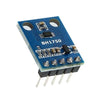
- BH1750 Pre-Soldered Digital Light Sensor - measures ambient light and reports lux over I2C.
- Arduino Nano V3.0 Pre-Soldered - reads the sensor over I2C and prints lux over Serial.
- 120 PCS Dupont Jumper Wires - quick connections between the Nano and the BH1750 module.
External
- USB cable + Arduino IDE
Note: BH1750 default I2C address is 0x23. Tie ADDR HIGH for 0x5C (rare).
Step-by-Step Guide
Step 1 - Inspect the module
Goal: Identify the BH1750 pins so you can wire I2C correctly.
What to do: Locate the 5 header pins on the GY-302 board: VCC, GND, SCL, SDA, and ADDR.


Expected result: You can confidently match each BH1750 pin to the correct Arduino Nano connection in the next step.
Step 2 - Wire I2C to the Arduino
Goal: Connect the BH1750 to the Arduino Nano using I2C.
What to do: Wire the module as shown: VCC to 5 V, GND to GND, SDA to A4, and SCL to A5. Leave ADDR floating to use the default address (0x23).

Expected result: The BH1750 is powered and connected to the Nano I2C bus.
Step 3 - Install the library and upload the sketch
Goal: Load code that initializes the BH1750 and prints lux readings to Serial.
What to do: In the Arduino IDE, open Library Manager and install BH1750 by Christopher Laws. Then paste the sketch below, select your board and port, and upload.

begin() and readLightLevel().Code:
#include <Wire.h>
#include <BH1750.h>

BH1750 light;

void setup() {
  Serial.begin(9600);
  Wire.begin();
  light.begin();
}

void loop() {
  float lux = light.readLightLevel();
  Serial.print("Lux: "); Serial.println(lux, 1);
  delay(500);
}
Expected result: The sketch uploads successfully and the Arduino begins sampling the sensor about twice per second.
Step 4 - View lux readings in Serial Monitor
Goal: Confirm the BH1750 is reporting real lux values.
What to do: Open the Serial Monitor at 9600 baud. Change the light level (cover the sensor, point it at a lamp, move it near a window) and watch the lux values change.

Expected result: You see lines like Lux: 123.4 updating repeatedly, and the value changes when lighting changes.
Step 5 - Build on the lux value
Goal: Use the lux reading as an input for automation or logging.
What to do: Pick a direction and add your own logic based on a lux threshold or target value.
- Auto-dim an LED strip to maintain target lux on a desk
- Trigger a relay-controlled grow-light when ambient drops below a threshold
- Build a photographer’s exposure meter with an OLED
- Log daily light exposure for plants or chickens
Expected result: You have a working lux signal that can drive decisions in your next project.
Conclusion
You built an Arduino Nano and BH1750 light sensor setup that reports real lux values over Serial. Switching from raw ADC counts to lux makes smart-lighting and light-logging projects much more actionable.
Want the exact parts used in this build? Grab them from ShillehTek.com. If you want help customizing this project or building something for your product, check out our IoT consulting services.






.png?v=25000753014097803521791168436)

.png?v=68677308723310773341791168436)


