

Project Overview
Arduino + AD8232 ECG Module: In this project you will use an Arduino (Nano) with the AD8232 ECG module to capture a single-lead ECG signal and plot your heart’s waveform in the Arduino Serial Plotter.
The AD8232 is an analog front-end commonly used in entry-level wearable cardio devices. With three disposable electrodes and a simple sketch, you can stream a live ECG trace over USB for learning and prototyping.
- Time: ~25 minutes
- Skill level: Intermediate
- What you will build: An Arduino streaming a live ECG waveform.

Parts List
From ShillehTek
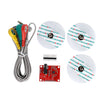
- AD8232 ECG Module Kit - the ECG analog front-end module plus cable and electrodes for a single-lead reading.
- Arduino Nano V3.0 Pre-Soldered - reads the analog ECG signal and streams it to your computer over Serial.
- 120 PCS Dupont Jumper Wires - for quick breadboard-style connections between the Nano and the AD8232 pins.
External
- 3 disposable ECG electrodes (the kit ships with these and the cable)
Note: This is a hobby device, not medical equipment. Use the readings for learning and personal interest, not diagnosis.
Step-by-Step Guide
Step 1 - Inspect the Module
Goal: Identify the key connectors and pins on the AD8232 board before wiring.
What to do: Locate the 3.5 mm jack for the electrode cable, and the 6-pin header used to connect to your Arduino.

Expected result: You can clearly identify the electrode jack and the pins you will connect for power, output, and lead-off detection.
Step 2 - Place the Electrodes
Goal: Attach the three electrodes so the AD8232 can pick up a stable single-lead ECG signal.
What to do: Place the electrodes on your chest as shown, then connect the electrode snaps to the cable (and the cable to the AD8232 jack).

Expected result: The electrodes are attached and the electrode cable is plugged into the AD8232 board.
Step 3 - Wire It Up
Goal: Connect the AD8232 to the Arduino Nano for power, analog sampling, and lead-off detection.
What to do: Wire the AD8232 to the Arduino using the connections below. Power the AD8232 from 3.3 V (not 5 V).

- 3.3 V to 3.3 V on AD8232 (not 5 V)
- GND to GND
- OUTPUT to A0
- LO+ to D11, LO- to D10 (lead-off detect)
Expected result: The AD8232 is powered from 3.3 V and its analog OUTPUT is connected to A0, with LO+ and LO- connected for electrode-disconnect detection.
Step 4 - Upload the Sketch
Goal: Stream either ECG samples (A0) or a disconnect indicator to the Serial Plotter.
What to do: Paste the sketch below into the Arduino IDE, select your board and port, then upload.
Code:
void setup() {
  Serial.begin(9600);
  pinMode(10, INPUT); // LO-
  pinMode(11, INPUT); // LO+
}

void loop() {
  if (digitalRead(10) == HIGH || digitalRead(11) == HIGH) {
    Serial.println('!');           // electrode disconnected
  } else {
    Serial.println(analogRead(A0));
  }
  delay(2);                         // ~500 Hz sample rate
}
Expected result: The Arduino begins printing values to Serial, and prints ! when an electrode is disconnected.
Step 5 - Watch Your Heart Beat
Goal: Visualize the ECG waveform on your computer.
What to do: In the Arduino IDE, open Tools to Serial Plotter and confirm the plot updates continuously.

Expected result: A live ECG waveform appears in Serial Plotter when the electrodes are connected.
Step 6 - Where to Take It Next
Goal: Identify practical next steps you can build on top of the basic ECG stream.
What to do: Choose one of the extensions below and adapt your code and hardware as needed.
- Implement Pan-Tompkins peak detection to compute live BPM
- Stream over BLE to a phone for a wearable monitor
- Log to microSD for a 24-hour Holter-style recording
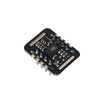
- Combine with an MAX30102 for a dual heart-rate device
Expected result: You have a clear path to extend the project into BPM calculation, logging, or wireless streaming.
Conclusion
You built an Arduino Nano project with the AD8232 ECG module that streams a single-lead ECG waveform to the Serial Plotter. Once you can capture and visualize your own ECG signal, wearable and bio-signal prototypes become much more approachable.
Want the exact parts used in this build? Grab them from ShillehTek.com. If you want help customizing this project or building something for your product, check out our IoT consulting services.
Credits: The AD8232 photos and wiring diagrams in this tutorial are credited to Instructables.




.png?v=25000753014097803521791168436)

.png?v=68677308723310773341791168436)


