


Project Overview
Seeed XIAO nRF52840 + BME280: In this build, you set up Arduino IDE and create a BLE temperature/humidity peripheral that advertises to your phone and targets ultra-low sleep current for long battery life.
The Seeed XIAO nRF52840 is a strong choice when you want a BLE device that can run for years on a coin cell. Nordic Semi’s nRF52840 is used in many commercial wearables: ARM Cortex-M4F @ 64 MHz, 1 MB Flash, 256 KB SRAM, BLE 5 (including long-range PHY), NFC, and native USB, all on a thumbnail-sized board. With Arduino IDE support and Adafruit’s Bluefruit libraries, you can go from zero to a BLE sensor quickly.
This guide gets a new XIAO nRF52840 board onto Arduino IDE, builds a BLE-broadcast temperature/humidity sensor, and explains where the nRF52840 beats ESP32 variants for battery life.
- Time: About 20 to 30 minutes
- Skill level: Beginner to Intermediate
- What you will build: A BLE advertising sensor that reports temperature (and optionally humidity) from a small I2C sensor to a phone app.
Parts List
From ShillehTek
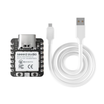
- XIAO ESP32-C3 Pre-Soldered - a close comparable for ESP-side BLE projects.
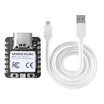
- XIAO ESP32-S3 Pre-Soldered - an alternative option when you need more features beyond BLE-only builds.
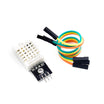
- DHT22 Sensor - a simple temperature/humidity sensor option.
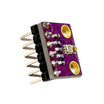
- BME280 - I2C temperature, pressure, and humidity sensing for the BLE peripheral example.
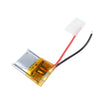
- 500 mAh LiPo - or use a CR2032 coin cell for ultra-long battery life experiments.
External
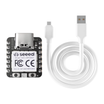
- Seeed XIAO nRF52840 board - the board this guide focuses on.
- USB-C cable.
- Arduino IDE 2.x with Adafruit nRF52 boards installed.
- (Optional) A BLE scanner app such as nRF Connect (mobile).
Note: This guide uses Adafruit’s nRF52 (Bluefruit) Arduino support. For the BME280 example, the sensor is assumed to be on I2C at address 0x76.
Step-by-Step Guide
Step 1 - Understand why nRF52840 can beat ESP32 for BLE-only battery life
Goal: Know when the nRF52840 is a better fit than ESP32 variants for wearables and coin-cell sensors.

What to do: Compare your project requirements. The ESP32-C3 is excellent for WiFi plus BLE, but for pure BLE wearables the nRF52840 has advantages:
- Deep-sleep current: nRF52840 is about 1.5 µA with RAM retention. ESP32-C3 is about 5 µA typical, and can be much higher if BLE keeps any state.
- BLE radio efficiency: Nordic’s BLE stack is well known for low power; long-range PHY can reach about 1 km line of sight in ideal conditions.
- NFC tag emulation: nRF52840 can be tapped by a phone to launch a URL or assist pairing.
- Native USB: Useful for certain workflows and device modes.
- Coin-cell friendly voltage: nRF52840 can operate down to about 1.7 V. ESP32 typically needs around 3.0 V minimum.
Expected result: You can decide if your project is BLE-only and battery-limited (nRF52840 advantage) or if you need WiFi and higher performance (often ESP32).
Step 2 - Install the Adafruit nRF52 board support in Arduino IDE
Goal: Get Arduino IDE ready to compile and upload sketches for the Seeed XIAO nRF52840.
What to do:
- Open File - Preferences. Add this to Additional Boards Manager URLs:
https://www.adafruit.com/package_adafruit_index.json - Open Boards Manager, search nRF52, then install Adafruit nRF52 by Adafruit.
- Go to Tools - Board - Adafruit nRF52 Boards - select Seeed XIAO nRF52840.
- Go to Tools - Port and select the USB CDC port that appears when you plug the board in.
Expected result: The XIAO nRF52840 appears as a selectable board and a valid serial/USB port is available for upload and Serial Monitor.
Step 3 - Upload a first sketch that advertises over BLE
Goal: Confirm the toolchain works and the board can advertise as a BLE device.
What to do: Paste this sketch into Arduino IDE and upload it to the board.
Code:
#include <bluefruit.h>

void setup() {
  Serial.begin(115200);
  Bluefruit.begin();
  Bluefruit.setName("ShillehTek-XIAO");
  Bluefruit.setTxPower(0);
  Bluefruit.Advertising.addFlags(BLE_GAP_ADV_FLAGS_LE_ONLY_GENERAL_DISC_MODE);
  Bluefruit.Advertising.addTxPower();
  Bluefruit.Advertising.start(0);
  Serial.println("Advertising");
}

void loop() {}
Expected result: Open a BLE scanner app (for example nRF Connect) and you should see ShillehTek-XIAO appear in the scan list quickly.
Step 4 - Build a BLE temperature/humidity peripheral using a BME280
Goal: Read temperature from a BME280 and expose it over BLE.
What to do: Wire your BME280 to the XIAO nRF52840 using I2C (SDA, SCL, 3V3, GND). Then upload the sketch below.

Code:
#include <bluefruit.h>
#include <Adafruit_BME280.h>

Adafruit_BME280 bme;
BLEService envSvc("181A");                       // Environmental Sensing
BLECharacteristic tempC("2A6E", BLECharacteristic::READ);

void setup() {
  Wire.begin();
  bme.begin(0x76);
  Bluefruit.begin();
  Bluefruit.setName("XIAO-Env");
  envSvc.begin();
  tempC.setProperties(CHR_PROPS_READ | CHR_PROPS_NOTIFY);
  tempC.setFixedLen(2);
  tempC.begin();
  Bluefruit.Advertising.addService(envSvc);
  Bluefruit.Advertising.start(0);
}

void loop() {
  int16_t t = (int16_t)(bme.readTemperature() * 100);
  tempC.write((uint8_t*)&t, 2);
  delay(5000);
}
Expected result: In your BLE app, you can connect to XIAO-Env and see the Environmental Sensing service with a temperature characteristic that updates every 5 seconds.
Step 5 - Apply the low-power approach needed to reach very low sleep current
Goal: Understand what changes are required to approach the sub-20 µA sleep target.
What to do: Use a sleep strategy consistent with low-power BLE designs: stop BLE advertising during sleep, drop the CPU into System ON sleep, then wake on a GPIO interrupt (button) or an RTC timer. In the Adafruit nRF52 environment, relevant primitives include sd_app_evt_wait() and NRF_POWER->SYSTEMOFF.
Expected result: You have a clear path to modify the sketch so it only advertises when needed and spends most of its time sleeping.
Step 6 - Choose a power source that matches your runtime target
Goal: Pick a battery and power approach appropriate for a wearable or sensor node.
What to do: Use one of these common options:
- CR2032 coin cell (240 mAh): roughly 3 to 5 years for a sensor that reports every 5 minutes.
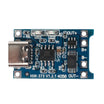
- 500 mAh LiPo + TP4056: roughly 6 months between charges for a worn device with frequent BLE traffic.
- Single 18650 + boost regulator: roughly 5 years for a stationary sensor (high capacity, often overkill).
Expected result: You can match the chemistry and capacity to your update interval and BLE activity level.
Step 7 - Map the platform to real projects where it makes sense
Goal: Identify practical BLE-first products where nRF52840 strengths matter.

What to do: Use the nRF52840 approach for projects like these:
- Door and window sensors: wake on a reed switch, broadcast once, then sleep. CR2032 can last 5+ years.
- BLE asset tags and iBeacons: multi-year coin-cell battery life with low-duty advertising.
- Fitness wearable: heart rate plus accelerometer with strong power efficiency.
- Smart-home button: wake on press, send an event, then sleep again.
- Plant moisture trackers: wake on a schedule, transmit, then deep sleep for long intervals.
Expected result: You can quickly tell whether your application is a good fit for coin-cell BLE design and the nRF52840 feature set.
Conclusion
The Seeed XIAO nRF52840 is a strong MCU choice when BLE battery life matters more than adding WiFi. With Arduino IDE and Bluefruit libraries, you can build a small BLE temperature sensor using a BME280 and then extend it toward very low sleep current by advertising only when needed.
Want the exact parts used in this build? Grab them from ShillehTek.com. If you want help customizing this project or building something for your product, check out our IoT consulting services.
Credits: This guide was inspired by Easy Very Low Power BLE <20µA (2022/2024) With Arduino on Instructables. Images credited to the original author.


.png?v=25000753014097803521791168436)

.png?v=68677308723310773341791168436)


