

Video Tutorial (Optional)
Watch first if you want to see the STM32 Blue Pill and MPU6050 wiring and Arduino setup on video.
If you have not set up Arduino for the STM32 Blue Pill yet, watch part 1 first (this is required for the upload steps below).
Project Overview
STM32 Blue Pill + MPU6050: In this tutorial, you connect an MPU6050 accelerometer and gyroscope module to an STM32 Blue Pill over I2C, read raw sensor data in Arduino, and apply a simple gyroscope calibration to reduce static offset.
This setup is useful for motion-based projects like robotics, drones, and wearable devices.
- Time: 20 to 40 minutes
- Skill level: Beginner
- What you will build: An Arduino sketch that prints raw accelerometer and gyroscope values (with an optional gyro calibration step) from an MPU6050 on an STM32 Blue Pill
Parts List
From ShillehTek
- ShillehTek components collection - source for electronics parts used in builds
External
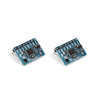
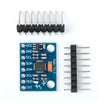
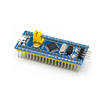
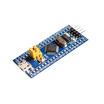
- MPU6050 and STM32 Blue Pill (pre-soldered options) - example source link from the original article
- STM32 Blue Pill (STM32F103) - microcontroller board
- MPU6050 module - accelerometer + gyroscope sensor
- Jumper wires - for I2C and power connections
- Breadboard (optional) - for quick prototyping
- Arduino IDE - for uploading code and using Serial Monitor
Note: This guide uses I2C on the STM32 Blue Pill with PB6 = SCL and PB7 = SDA, and powers the MPU6050 from 3.3V.
Step-by-Step Guide
Step 1 - Wire the MPU6050 to the STM32 Blue Pill (I2C)
Goal: Connect power and I2C so the STM32 Blue Pill can communicate with the MPU6050.
What to do: Make the following connections.
Power:
- MPU6050
VCCto STM32 Blue Pill3.3V - MPU6050
GNDto STM32 Blue PillGND
I2C:
- MPU6050
SCLto STM32 Blue PillPB6(default I2C SCL) - MPU6050
SDAto STM32 Blue PillPB7(default I2C SDA)
Expected result: The MPU6050 is powered from 3.3V and wired to PB6/PB7 for I2C communication.
Step 2 - Install the MPU6050 library in Arduino IDE
Goal: Add an MPU6050 library so your sketch can initialize the sensor and read data.
What to do: In the Arduino IDE, go to Sketch > Include Library > Manage Libraries, search for MPU6050, and install a library compatible with your setup.
Expected result: You can include the library headers in your sketch without compile errors.
Step 3 - Upload code to read raw data (with optional gyro calibration)
Goal: Initialize the MPU6050, verify the connection, and print accelerometer and gyroscope raw values to the Serial Monitor. Optionally, calibrate the gyroscope to reduce static offset.
What to do: Choose one of the code options below, compile, and upload it to your STM32 Blue Pill using the Arduino IDE.
Code (without calibration):
#include <Wire.h>
#include <MPU6050.h>

MPU6050 mpu;

void setup() {
  Wire.begin();
  Serial.begin(115200);

  // Initialize MPU6050
  Serial.println("Initializing MPU6050...");
  mpu.initialize();

  // Check if the MPU6050 is connected
  if (mpu.testConnection()) {
    Serial.println("MPU6050 connection successful");
  } else {
    Serial.println("MPU6050 connection failed");
    while (1); // Halt the program if MPU6050 is not connected
  }
}

void loop() {
  // Variables to hold the raw data
  int16_t ax, ay, az;
  int16_t gx, gy, gz;

  // Read raw accelerometer and gyroscope data
  mpu.getAcceleration(&ax, &ay, &az);
  mpu.getRotation(&gx, &gy, &gz);

  // Print accelerometer raw values
  Serial.print("Accel X: "); Serial.print(ax);
  Serial.print(" | Accel Y: "); Serial.print(ay);
  Serial.print(" | Accel Z: "); Serial.println(az);

  // Print gyroscope raw values
  Serial.print("Gyro X: "); Serial.print(gx);
  Serial.print(" | Gyro Y: "); Serial.print(gy);
  Serial.print(" | Gyro Z: "); Serial.println(gz);

  delay(100); // Delay for readability
}
Code (with gyro calibration):
#include <Wire.h>
#include <MPU6050.h>

MPU6050 mpu;

int16_t ax, ay, az;
int16_t gx, gy, gz;
int16_t gyroXOffset = 0, gyroYOffset = 0, gyroZOffset = 0;

void setup() {
  Wire.begin();
  Serial.begin(115200);

  // Initialize MPU6050
  Serial.println("Initializing MPU6050...");
  mpu.initialize();

  // Check if the MPU6050 is connected
  if (mpu.testConnection()) {
    Serial.println("MPU6050 connection successful");
  } else {
    Serial.println("MPU6050 connection failed");
    while (1); // Halt the program if MPU6050 is not connected
  }

  // Calibrate gyroscope
  Serial.println("Calibrating gyroscope... Please keep the sensor steady.");
  calibrateGyro();
  Serial.println("Calibration complete.");
}

void loop() {
  // Read raw accelerometer and gyroscope data
  mpu.getAcceleration(&ax, &ay, &az);
  mpu.getRotation(&gx, &gy, &gz);

  // Subtract the gyro offsets from the raw values
  gx -= gyroXOffset;
  gy -= gyroYOffset;
  gz -= gyroZOffset;

  // Print accelerometer raw values
  Serial.print("Accel X: "); Serial.print(ax);
  Serial.print(" | Accel Y: "); Serial.print(ay);
  Serial.print(" | Accel Z: "); Serial.println(az);

  // Print gyroscope raw values
  Serial.print("Gyro X: "); Serial.print(gx);
  Serial.print(" | Gyro Y: "); Serial.print(gy);
  Serial.print(" | Gyro Z: "); Serial.println(gz);

  delay(100); // Delay for readability
}

void calibrateGyro() {
  int32_t gyroXSum = 0, gyroYSum = 0, gyroZSum = 0;
  const int numReadings = 1000;

  for (int i = 0; i < numReadings; i++) {
    mpu.getRotation(&gx, &gy, &gz);
    gyroXSum += gx;
    gyroYSum += gy;
    gyroZSum += gz;
    delay(3); // Delay to allow for a reasonable calibration time
  }

  // Calculate the average offsets
  gyroXOffset = gyroXSum / numReadings;
  gyroYOffset = gyroYSum / numReadings;
  gyroZOffset = gyroZSum / numReadings;

  Serial.print("Gyro X Offset: "); Serial.println(gyroXOffset);
  Serial.print("Gyro Y Offset: "); Serial.println(gyroYOffset);
  Serial.print("Gyro Z Offset: "); Serial.println(gyroZOffset);
}
Expected result: The sketch uploads successfully. The Serial Monitor shows accelerometer values (ax, ay, az) and gyroscope values (gx, gy, gz). In the calibrated version, the gyroscope values are corrected by subtracting the measured offsets.
Step 4 - View the sensor output in Serial Monitor
Goal: Confirm the STM32 Blue Pill is receiving data from the MPU6050 and printing it correctly.
What to do: After upload, open Tools > Serial Monitor and set the baud rate to 115200.
- Observe accelerometer and gyroscope values being printed continuously.
- If you uploaded the calibrated version, the gyroscope readings should be corrected for static offset.
Expected result: You see a steady stream of MPU6050 readings in the Serial Monitor at 115200 baud.
Conclusion
You integrated an MPU6050 with an STM32 Blue Pill over I2C, read raw accelerometer and gyroscope data in Arduino, and (optionally) applied a simple gyroscope calibration to reduce bias. This gives you a solid starting point for motion tracking in robotics, drones, and other motion-based projects.
Want the parts used in this build? Grab them from ShillehTek.com or browse the ShillehTek Amazon Store. If you want help customizing this for your product or project, you can hire IoT services on UpWork.
More platforms from the original article: YouTube and Buy Me A Coffee. Amazon store links: Canada and Japan.






.png?v=25000753014097803521788741467)

.png?v=68677308723310773341788741467)


