

Project Overview
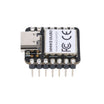
Seeeduino XIAO SAMD21 USB-HID macropad: In this build, you use the Seeeduino XIAO SAMD21 with a 4x4 matrix keypad to create a USB-HID numpad that types keys and full macro strings on your computer.
The Seeeduino XIAO SAMD21 is a thumbnail-sized Arduino-class board (ATSAMD21G18 ARM Cortex-M0+ @ 48 MHz, 256 KB Flash, 32 KB SRAM) with native USB-HID support. It runs CircuitPython, MicroPython, and Arduino C, and it is a strong choice when you need a tiny board that can act like a USB keyboard, mouse, or MIDI device.

- Time: 30 to 60 minutes
- Skill level: Beginner to Intermediate
- What you will build: A USB-HID numpad/macropad that types single keys or multi-character macros when you press buttons.
Parts List
From ShillehTek
- XIAO ESP32-S3 - bigger sibling for advanced builds.
- XIAO ESP32-C3 - cheap BLE alternative.
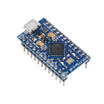
- Pro Micro ATmega32U4 - the classic USB-HID board.
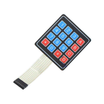
- 4x4 Membrane Matrix Keypad - for the numpad layout.
- DuPont Wires - for quick prototyping and keypad connections.
External
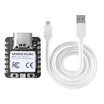
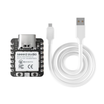
- Seeeduino XIAO SAMD21 board
- USB-C cable
- 16 mechanical key switches (Cherry MX / Kailh) + keycaps, OR a 4x4 membrane keypad
- Arduino IDE 2.x with the "Seeeduino SAMD" boards package installed
Note: This guide uses the XIAO SAMD21 because it supports native USB-HID. If you swap boards, confirm the board and core you choose supports the Keyboard library or an equivalent HID stack.
Step-by-Step Guide
Step 1 - Understand why the XIAO SAMD21 is still a great USB-HID choice
Goal: Know when the XIAO SAMD21 is the right tool for a macropad or HID project.
What to do: Keep these strengths in mind before you start building:
- USB-HID projects: Native USB-HID plus a small footprint is ideal for macropads, dial controllers, and similar devices.
- Boards that fit anywhere: About 20 mm x 17 mm.
- CircuitPython for beginners: Drag-and-drop firmware updates and edit code from a simple drive.
- Industrial deployments: SAMD21 is an automotive-grade chip with long-term availability.
- No WiFi/BLE radio: Helpful when you do not want radio certification overhead.
Expected result: You know why this board is commonly used for small USB keyboard-style builds.
Step 2 - Install the Seeed SAMD board package in Arduino IDE
Goal: Make Arduino IDE recognize the Seeeduino XIAO SAMD21.
What to do:
-
In Arduino IDE: File -> Preferences. Add this Boards Manager URL:
https://files.seeedstudio.com/arduino/package_seeeduino_boards_index.json - Open Tools -> Board -> Boards Manager, then install: Seeed SAMD Boards by Seeed Studio.
- Go to Tools -> Board -> Seeeduino SAMD -> Seeeduino XIAO.
Expected result: The Seeeduino XIAO board option is available and selected.
Step 3 - Upload a first USB-HID sketch that types text
Goal: Confirm USB-HID keyboard output works on your computer.
What to do: Upload this sketch, then focus a text editor and plug in (or reset) the board.
Code:
#include <Keyboard.h>

void setup() {
  Keyboard.begin();
  delay(2000);
  Keyboard.print("Hello from ShillehTek XIAO!");
}

void loop() {}
Expected result: After about 2 seconds, the board types the message into whichever app currently has focus.
Step 4 - Wire a 4x4 keypad and scan it as a numpad
Goal: Read a 4x4 matrix keypad and send a keypress over USB when a key is pressed.
What to do: Wire 4 columns and 4 rows of the keypad to XIAO pins D0 through D7. The code below scans the matrix in loop() and emits a mapped character.

Code:
#include <Keyboard.h>

const int ROW_PINS[] = {0, 1, 2, 3};
const int COL_PINS[] = {4, 5, 6, 7};

const char KEYMAP[4][4] = {
  {'1','2','3','+'},
  {'4','5','6','-'},
  {'7','8','9','*'},
  {'0','.','=','/'},
};

void setup() {
  Keyboard.begin();

  for (int r : ROW_PINS) pinMode(r, OUTPUT);
  for (int c : COL_PINS) pinMode(c, INPUT_PULLUP);
  for (int r : ROW_PINS) digitalWrite(r, HIGH);
}

void loop() {
  for (int r = 0; r < 4; r++) {
    digitalWrite(ROW_PINS[r], LOW);

    for (int c = 0; c < 4; c++) {
      if (digitalRead(COL_PINS[c]) == LOW) {
        Keyboard.press(KEYMAP[r][c]);
        delay(80);
        Keyboard.releaseAll();
      }
    }

    digitalWrite(ROW_PINS[r], HIGH);
  }

  delay(5);
}
Expected result: Pressing a keypad button types the mapped character (1, 2, 3, +, etc.) on the host computer.
Step 5 - Upgrade keys into real macros (type whole snippets)
Goal: Replace single key outputs with multi-character strings or sequences.
What to do: Update your key handling so certain keys type full snippets such as git push, a common email address, or any repeated text. The XIAO SAMD21 stores these strings in flash, so they persist across power cycles.

Expected result: Pressing selected keys types whole snippets instead of single characters.
Step 6 - Use CircuitPython instead of Arduino (optional)
Goal: Get the same HID behavior using CircuitPython.
What to do:
- Double-tap the reset pin so the XIAO mounts as an ARDUINO drive.
- Copy the CircuitPython UF2 onto it. It reboots as CIRCUITPY.
- Edit
code.pyin any text editor. Changes auto-reload.
Code:
import board, digitalio, usb_hid
from adafruit_hid.keyboard import Keyboard
from adafruit_hid.keycode import Keycode

kbd = Keyboard(usb_hid.devices)
btn = digitalio.DigitalInOut(board.D0)
btn.switch_to_input(pull=digitalio.Pull.UP)

while True:
    if not btn.value:
        kbd.send(Keycode.CONTROL, Keycode.C)
        while not btn.value:
            pass
Expected result: Pressing the button on D0 sends the Ctrl+C shortcut over USB.
Step 7 - Know where the XIAO SAMD21 wins over an ESP32-C3 for HID
Goal: Understand tradeoffs if you are choosing between boards.
What to do: Use these points as a quick comparison:
- Small footprint and simple USB-HID behavior.
- No radio, which can reduce certification complexity for production hardware.
- CircuitPython is typically more polished on SAMD21 than on ESP32-C3.
- USB-HID works without extra boot configuration steps.
- Industrial-grade silicon with long-term availability.
Expected result: You can justify the SAMD21 choice for wired HID macropads and similar projects.
Conclusion
You built a Seeeduino XIAO SAMD21 USB-HID macropad using a 4x4 keypad matrix, starting from a simple “type on plug-in” sketch and expanding into a real numpad and macro-typing workflow.
Want the exact parts used in this build? Grab them from ShillehTek.com. If you want help customizing this project or building something for your product, check out our IoT consulting services.
Inspiration and image credit: HID Numpad With XIAO SAMD21 (Instructables).



.png?v=25000753014097803521791168436)

.png?v=68677308723310773341791168436)


