

Project Overview
Raspberry Pi Pico W + ULN2003 + 28BYJ-48: In this build, you will wire a ULN2003 driver board to a Raspberry Pi Pico W and use MicroPython to rotate a 28BYJ-48 stepper motor in both directions.
You will also learn what the ULN2003 does (a Darlington transistor array used as a driver stage) and why it is commonly used to let a low-current microcontroller safely control higher-current inductive loads like stepper motors.
- Time: 20 to 40 minutes
- Skill level: Beginner to Intermediate
- What you will build: A Raspberry Pi Pico W setup that controls a 28BYJ-48 stepper motor through a ULN2003 driver board

Parts List
From ShillehTek
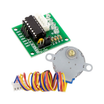
- ULN2003 5V 4-Phase Stepper Motor with Driver Board - includes ULN2003 driver and 28BYJ-48 motor used in this build
- ShillehTek 120pcs 10cm Multicolored Jumper Wire - for connecting the Pico W to the ULN2003
- ShillehTek 400-Point Breadboard (optional) - for a cleaner solderless setup
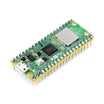
- Raspberry Pi Pico 2W - the WiFi microcontroller board used in this build
External
- External 5V supply for the motor side
- USB cable for programming the Pico W
- Thonny IDE with MicroPython installed on the Pico W
Note: Use a separate 5V supply for the motor side. Do not try to power the stepper motor directly from a Pico W GPIO pin.
Step-by-Step Guide
Step 1 - Understand what the ULN2003 does
Goal: Know why the driver board is needed before you wire anything.
What to do: Treat the Pico W as the controller that outputs a step sequence on four GPIO pins. The ULN2003 acts as the switching stage that handles the coil current required by the 28BYJ-48, which a GPIO pin cannot supply directly.
Expected result: You understand the signal flow: Pico W GPIO (logic) to ULN2003 inputs to stepper motor coils.
Step 2 - Wire the ULN2003 inputs and common ground
Goal: Connect the four control lines and ensure a shared reference.
What to do: Wire the ULN2003 input pins to the Pico W GPIO pins like this:
- ULN2003 IN1 → Pico W GPIO 28
- ULN2003 IN2 → Pico W GPIO 27
- ULN2003 IN3 → Pico W GPIO 26
- ULN2003 IN4 → Pico W GPIO 22
- ULN2003 GND → Pico W GND
Expected result: The Pico W can now send the step sequence to the ULN2003 logic inputs.
Step 3 - Add external 5V motor power (and share ground)
Goal: Provide enough current for the stepper motor without stressing the Pico W.
What to do: Power the ULN2003 motor side from an external 5V supply (matching your 28BYJ-48 motor). Connect:
- ULN2003 VCC → External 5V supply positive
- External 5V supply negative → Pico W GND
Important: The Pico W and the external motor power supply must share a common ground, or the control signals may not work correctly.

Expected result: The driver board has adequate power for the motor, and the control side and power side share a proper reference.
Step 4 - Plug in the 28BYJ-48 stepper motor
Goal: Physically connect the motor to the driver board.
What to do: Plug the 5-wire 28BYJ-48 connector into the ULN2003 motor socket. The connector is typically keyed and should only fit one way.
Expected result: The motor is connected to the ULN2003 and ready to be driven by the step sequence.
Step 5 - Upload the MicroPython code and run it
Goal: Rotate the motor clockwise and counterclockwise in a loop.
What to do: In Thonny, select your Pico W (with MicroPython installed) and save the following script as main.py.
from machine import Pin
from time import sleep_ms

# ULN2003 inputs connected to Pico W
in1 = Pin(28, Pin.OUT)
in2 = Pin(27, Pin.OUT)
in3 = Pin(26, Pin.OUT)
in4 = Pin(22, Pin.OUT)

pins = [in1, in2, in3, in4]

# Full-step sequence for 28BYJ-48 through ULN2003
sequence = [
    [1, 0, 0, 0],
    [1, 1, 0, 0],
    [0, 1, 0, 0],
    [0, 1, 1, 0],
    [0, 0, 1, 0],
    [0, 0, 1, 1],
    [0, 0, 0, 1],
    [1, 0, 0, 1]
]

def set_step(step):
    for i in range(4):
        pins[i].value(step[i])

def step_motor(steps, delay_ms=2, direction=1):
    seq = sequence if direction == 1 else sequence[::-1]

    for _ in range(steps):
        for step in seq:
            set_step(step)
            sleep_ms(delay_ms)

def release_motor():
    for pin in pins:
        pin.value(0)

while True:
    # Roughly quarter turn depending on sequence and gearbox behavior
    step_motor(256, delay_ms=2, direction=1)
    sleep_ms(500)

    step_motor(256, delay_ms=2, direction=-1)
    sleep_ms(500)

    release_motor()
    sleep_ms(1000)
If the motor vibrates but does not turn, verify IN1 to IN4 wiring order, confirm the external 5V supply is connected to the ULN2003, and confirm the grounds are tied together. You can also try increasing delay_ms to 3 or 4.
Expected result: The motor rotates one direction, pauses, rotates back, and repeats.
Conclusion
You wired a Raspberry Pi Pico W to a ULN2003 driver board and used MicroPython to control a 28BYJ-48 stepper motor, rotating it in both directions. This pattern is a solid starting point for adding precise motion to Pico W projects while keeping motor current off the GPIO pins.
Want the exact parts used in this build? Grab the ULN2003 stepper motor, jumper wires, and breadboard from ShillehTek.com. If you want help customizing this project or building something for your product, check out our IoT consulting services or reach out via UpWork.





.png?v=25000753014097803521791168436)

.png?v=68677308723310773341791168436)


