

Video Tutorial (Optional)
Watch first if you want to see the L298N motor driver and Raspberry Pi Pico W wiring and MicroPython motor control in real time.
Project Overview
In this project, you will use a Raspberry Pi Pico W with an L298N motor driver to run a DC motor forward and backward with PWM speed control in MicroPython.
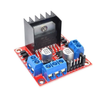
The L298N is a dual H-bridge motor driver that lets a low-power microcontroller control higher-voltage, higher-current motors safely. It can control direction and speed for up to two DC motors.
- Time: 20 to 40 minutes
- Skill level: Beginner
- What you will build: A Pico W + L298N setup that alternates a DC motor forward and backward with adjustable PWM speed
Parts List
From ShillehTek
- ShillehTek L298N Motor Driver Board - dual H-bridge driver for direction and PWM speed control
- ShillehTek 400-Point Solderless Breadboard - for easier prototyping and Pico W connections
- ShillehTek 120pcs 20cm Dupont Wires - connect Pico W GPIO to L298N inputs
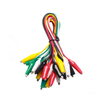
- ShillehTek 50cm Alligator Clips Test Leads - optional for quick temporary motor and power connections
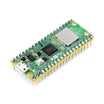
- Raspberry Pi Pico 2W - the WiFi microcontroller board used in this build
External
- DC motor - the motor being driven by the L298N
- Power source (e.g., 12V battery pack) - powers the motor through the L298N
Note: Power the motor through the L298N using your motor supply (example: 12V). Power the Pico W from a separate supply, as described in the wiring step.
Step-by-Step Guide
Step 1 - Wire the Pico W to the L298N and motor
Goal: Connect power, direction pins, and a PWM enable pin so the Pico W can control motor direction and speed through the L298N.
What to do: Make the following connections.
Power connections:
- Connect your 12V power supply to the 12V IN and GND pins of the L298N driver.
- Connect the Pico W to a separate power supply externally.
Motor control connections (Pico W to L298N):
- IN3 on the L298N to GPIO 14 on the Pico W (direction control).
- IN4 on the L298N to GPIO 15 on the Pico W (direction control).
- ENB on the L298N to GPIO 13 on the Pico W (PWM speed control).
Motor connection:
- Connect the DC motor leads to OUT3 and OUT4 on the L298N motor driver.
Expected result: The Pico W has three control wires to the L298N (IN3, IN4, ENB), and the motor is connected to OUT3/OUT4 with motor power connected to 12V IN/GND.
Step 2 - Write the MicroPython motor control code
Goal: Create simple forward, backward, and stop functions, and drive the motor using PWM for speed control.
What to do: Copy the following MicroPython script into your editor.
Code:
from machine import Pin, PWM
from time import sleep

# Motor pins
in3 = Pin(14, Pin.OUT)  # IN3 connected to GPIO 14
in4 = Pin(15, Pin.OUT)  # IN4 connected to GPIO 15
enb = PWM(Pin(13))      # ENB connected to GPIO 13 for PWM control
enb.freq(1000)          # Set PWM frequency to 1 kHz

# Motor functions
def motor_forward(speed):
    in3.high()          # Set IN3 high
    in4.low()           # Set IN4 low
    enb.duty_u16(speed) # Set motor speed (0-65535 for duty cycle)

def motor_backward(speed):
    in3.low()           # Set IN3 low
    in4.high()          # Set IN4 high
    enb.duty_u16(speed) # Set motor speed (0-65535 for duty cycle)

def motor_stop():
    in3.low()           # Stop motor
    in4.low()           # Stop motor
    enb.duty_u16(0)     # Disable motor (set PWM duty cycle to 0)

# Main loop to test motor
try:
    while True:
        print("Moving forward")
        motor_forward(32768)  # Set speed to 50% (PWM value)
        sleep(2)

        print("Stopping")
        motor_stop()
        sleep(2)

        print("Moving backward")
        motor_backward(32768)  # Set speed to 50% (PWM value)
        sleep(2)

        print("Stopping")
        motor_stop()
        sleep(2)
except KeyboardInterrupt:
    motor_stop()
    print("Program stopped")
Expected result: You have functions to run the motor forward/backward using IN3/IN4, and a PWM-based speed control on ENB using duty_u16() (0 to 65535).
Step 3 - Upload and run the script on the Pico W
Goal: Execute the script on your Pico W and confirm the motor direction and speed control work.
What to do: Upload the script to the Raspberry Pi Pico W using a MicroPython editor such as Thonny, then run it.
The motor should alternate between moving forward and backward with a 2-second pause between actions. You can adjust the speed by changing the duty_u16 value passed into motor_forward() and motor_backward().
Expected result: The motor moves forward, stops, moves backward, stops, and repeats while status messages print to the console.
Conclusion
You now have a DC motor running from a Raspberry Pi Pico W through an L298N motor driver, with direction control on IN3/IN4 and PWM speed control on ENB using MicroPython. This is a solid base for robotics and automation projects that need reliable motor control.
Want the exact parts used in this build? Grab them from ShillehTek.com. If you want help customizing this project or building a motor-control solution for your product, check out our IoT consulting services.




.png?v=25000753014097803521791168436)

.png?v=68677308723310773341791168436)


