

Video Tutorial
Watch first if you want to see the project in action.
Project Overview
ESP32 + TCS3200 (GY-31): In this project, you will wire a TCS3200 (GY-31) RGB color sensor to an ESP32 and print a live color name plus normalized RGB values to the Serial Monitor using Arduino.
You will also do a quick black and white calibration so the readings are stable and the color detection works consistently under your lighting.
The TCS3200 measures reflected red, green, and blue light and outputs a frequency signal. The ESP32 reads those pulses, converts them into numbers, and the calibration step helps map them to reliable RGB (0 to 255) values and a color label.
- Time: 10 to 20 minutes
- Skill level: Beginner
- What you will build: An ESP32 color detector that calibrates on black and white, then outputs RGB (0 to 255) and a color label like RED, GREEN, BLUE, WHITE, BLACK, YELLOW
Parts List
From ShillehTek
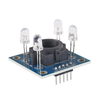
- ShillehTek GY-31 TCS3200 RGB Color Recognition Sensor - measures reflected red, green, and blue light intensity
- Breadboard - quick wiring without soldering
- Jumper wires - connects the ESP32 to the sensor
- ESP-WROOM-32 ESP32 Dev Board CP2102 USB-C Pre-Soldered - the development board used in this build
External
- White paper and a dark surface (for calibration)
Note: Use ESP32 3.3V logic. The wiring below powers the TCS3200 from 3V3 and reads the OUT pin on an ESP32 GPIO.
Step-by-Step Guide
Step 1 - Wire the TCS3200 to the ESP32
Goal: Connect power, ground, control pins, and the sensor output so the ESP32 can read color values.
What to do: Wire the sensor like this:
- TCS3200 VCC to ESP32 3V3
- TCS3200 GND to ESP32 GND
-
TCS3200 OUT to ESP32 GPIO4 (this matches
#define TCS_OUT 4) - TCS3200 S0 to ESP32 GPIO2
- TCS3200 S1 to ESP32 GPIO15
- TCS3200 S2 to ESP32 GPIO18
- TCS3200 S3 to ESP32 GPIO19
- TCS3200 OE (if present) to GND (keeps output enabled)

Expected result: The sensor powers from 3.3V, OUT is connected to an ESP32 input pin, and S0 to S3 are connected to ESP32 GPIO pins for filter and scaling control.
Note: The TCS3200 measures how much red, green, and blue light is reflected. Calibration helps it stay consistent under your lighting.
Step 2 - Upload the code (calibrated color name output)
Goal: Flash the ESP32 so it prints a color name and normalized RGB values.
What to do: Copy and upload this sketch. It includes a simple calibration flow for black and white.
Code:
#define TCS_OUT 4
#define TCS_S0  2
#define TCS_S1  15
#define TCS_S2  18
#define TCS_S3  19

struct Cal {
  unsigned long r = 0;
  unsigned long g = 0;
  unsigned long b = 0;
  bool set = false;
};

Cal calBlack, calWhite;

void setScaling20Percent() {
  digitalWrite(TCS_S0, HIGH);
  digitalWrite(TCS_S1, LOW);
}

unsigned long readPulseWidth(bool s2, bool s3) {
  digitalWrite(TCS_S2, s2 ? HIGH : LOW);
  digitalWrite(TCS_S3, s3 ? HIGH : LOW);
  delay(3);
  return pulseIn(TCS_OUT, LOW, 25000);
}

void readRaw(unsigned long &r, unsigned long &g, unsigned long &b) {
  r = readPulseWidth(false, false);
  b = readPulseWidth(false, true);
  g = readPulseWidth(true, true);
}

int clamp255(int x) {
  if (x < 0) return 0;
  if (x > 255) return 255;
  return x;
}

int normalize(unsigned long raw, unsigned long blackRaw, unsigned long whiteRaw) {
  if (blackRaw == 0 || whiteRaw == 0) return 0;

  unsigned long rawMin = min(blackRaw, whiteRaw);
  unsigned long rawMax = max(blackRaw, whiteRaw);

  if (raw < rawMin) raw = rawMin;
  if (raw > rawMax) raw = rawMax;

  long val = (long)(rawMax - raw) * 255L / (long)(rawMax - rawMin);
  return clamp255((int)val);
}

const char* detectColor(int R, int G, int B) {
  int maxv = max(R, max(G, B));
  int minv = min(R, min(G, B));

  if (maxv < 40) return "BLACK";
  if (minv > 180 && (maxv - minv) < 40) return "WHITE";

  if (R > G + 30 && R > B + 30) return "RED";
  if (G > R + 30 && G > B + 30) return "GREEN";
  if (B > R + 30 && B > G + 30) return "BLUE";

  if (R > 160 && G > 160 && B < 100) return "YELLOW";
  if (G > 160 && B > 160 && R < 100) return "CYAN";
  if (R > 160 && B > 160 && G < 100) return "MAGENTA";

  return "UNKNOWN";
}

void printCalStatus() {
  Serial.print("Black cal: ");
  Serial.print(calBlack.set ? "SET" : "NOT SET");
  Serial.print(" | White cal: ");
  Serial.println(calWhite.set ? "SET" : "NOT SET");
}

void setup() {
  Serial.begin(115200);

  pinMode(TCS_S0, OUTPUT);
  pinMode(TCS_S1, OUTPUT);
  pinMode(TCS_S2, OUTPUT);
  pinMode(TCS_S3, OUTPUT);
  pinMode(TCS_OUT, INPUT);

  setScaling20Percent();

  Serial.println("TCS3200 + ESP32 color demo");
  Serial.println("1) Put sensor on BLACK, press 'b' in Serial Monitor");
  Serial.println("2) Put sensor on WHITE paper, press 'w'");
  Serial.println("Then it prints RGB (0-255) + color name");
  printCalStatus();
}

void loop() {
  if (Serial.available()) {
    char c = (char)Serial.read();
    if (c == 'b' || c == 'B') {
      readRaw(calBlack.r, calBlack.g, calBlack.b);
      calBlack.set = true;
      Serial.print("Saved BLACK raw: R="); Serial.print(calBlack.r);
      Serial.print(" G="); Serial.print(calBlack.g);
      Serial.print(" B="); Serial.println(calBlack.b);
      printCalStatus();
    } else if (c == 'w' || c == 'W') {
      readRaw(calWhite.r, calWhite.g, calWhite.b);
      calWhite.set = true;
      Serial.print("Saved WHITE raw: R="); Serial.print(calWhite.r);
      Serial.print(" G="); Serial.print(calWhite.g);
      Serial.print(" B="); Serial.println(calWhite.b);
      printCalStatus();
    }
  }

  unsigned long rr, gg, bb;
  readRaw(rr, gg, bb);

  if (!calBlack.set || !calWhite.set) {
    Serial.print("RAW  R: "); Serial.print(rr);
    Serial.print("  G: "); Serial.print(gg);
    Serial.print("  B: "); Serial.print(bb);
    Serial.println("  | press 'b' for black, 'w' for white");
    delay(200);
    return;
  }

  int R = normalize(rr, calBlack.r, calWhite.r);
  int G = normalize(gg, calBlack.g, calWhite.g);
  int B = normalize(bb, calBlack.b, calWhite.b);

  const char* name = detectColor(R, G, B);

  Serial.print("RGB  R: "); Serial.print(R);
  Serial.print("  G: "); Serial.print(G);
  Serial.print("  B: "); Serial.print(B);
  Serial.print("  -> ");
  Serial.println(name);

  delay(200);
}
Expected result: The sketch uploads successfully to the ESP32.
Step 3 - Calibrate (black and white)
Goal: Lock in stable readings under your lighting conditions so color naming works reliably.
What to do:
- Open Tools -> Serial Monitor and set baud to 115200
- Place the sensor about 1 inch (2.5 cm) from a black surface, type b, then press enter

- Place the sensor close to white paper, type w, then press enter

Expected result: You will see confirmation lines like Saved BLACK raw... and Saved WHITE raw..., then the output switches to normalized RGB plus a color name.
Step 4 - Test color detection
Goal: Confirm it detects basic colors correctly.
What to do: Hold different colors 1 to 3 cm from the sensor. Try red, green, blue, white, and black. Keep lighting consistent.
Expected result: You should see output like:
RGB R: 210 G: 45 B: 38 -> REDRGB R: 40 G: 210 B: 55 -> GREENRGB R: 35 G: 60 B: 220 -> BLUERGB R: 220 G: 225 B: 215 -> WHITERGB R: 10 G: 12 B: 9 -> BLACK
Note: If you get flickering between labels, reduce room light, get closer to the object, and keep the sensor steady. You can also add smoothing later if you want it to be more stable.
Conclusion
You wired a TCS3200 (GY-31) to an ESP32 and built a calibrated color detector that prints normalized RGB values and a color name to the Serial Monitor. With black and white calibration saved, the readings become much more consistent under your lighting.
Want the exact parts used in this build? Grab them from ShillehTek.com. If you want help customizing this project or building something for your product, check out our IoT consulting services.





.png?v=25000753014097803521791168436)

.png?v=68677308723310773341791168436)


