

Project Overview
ESP32-CAM + HC-SR501 PIR motion sensor: build a solar-powered, off-grid motion camera that wakes on motion, snaps a photo, sends it to Telegram (or your own server), then returns to deep sleep with no cloud subscription.
An ESP32-CAM costs about $10 and can shoot VGA-to-UXGA still images. Pair it with a 6V solar panel, a CN3791 MPPT charger, an 18650, and a BMS, and you have a wildlife, trail, or doorbell camera that can run indefinitely in the sun without battery swaps or running power wires.
This guide combines the same solar architecture from our Solar Weather Station build with an ESP32-CAM and a motion trigger to create a complete off-grid camera system.
- Time: 1 to 2 hours (plus enclosure work)
- Skill level: Intermediate
- What you will build: A motion-triggered ESP32-CAM that uploads photos and sleeps to maximize battery life.
Parts List
From ShillehTek
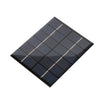
- 110 x 136 mm 6V 2W Solar Panel - provides daytime power for charging and runtime.
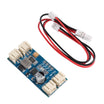
- CN3791 6V MPPT Solar Charger Module - efficiently charges the 18650 from the panel.
- 1S 3A BMS Protection Board - protects the Li-ion cell (overcharge/over-discharge/short).
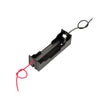
- 18650 Battery Holder - secure, simple way to mount and wire the cell.
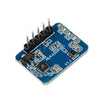
- HC-SR501 PIR Motion Sensor - wake-up trigger for motion events.
- HLK-2410C mmWave Radar - alternative wake trigger with longer range/through-wall detection.
External
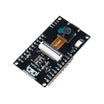
- ESP32-CAM module (AI-Thinker) with OV2640 camera.
- One 18650 Li-ion cell (3.7 V, ~3000 mAh).
- Weatherproof enclosure with a small camera-window cutout.
- A Telegram bot token (free) for the photo upload destination.
Note: ESP32-CAM boards are commonly powered from 5V. Your solar/battery system may require a suitable 5V boost stage depending on your exact ESP32-CAM module and power design.
Step-by-Step Guide
Step 1 - Understand the system architecture
Goal: Map the power path and the wake-capture-upload-sleep flow.
What to do: Review how power and logic move through the system before wiring anything.


Power flow: Solar panel -> CN3791 MPPT -> 18650 (with BMS) -> ESP32-CAM (boosted to 5V if needed).
Logic flow: PIR HIGH -> EXT0 wake interrupt -> ESP32 boots from deep sleep -> capture image -> connect WiFi -> POST to Telegram -> deep sleep again.
Expected result: You understand what each module does and why deep sleep is key for long runtime.
Step 2 - Wire the wake-on-motion trigger
Goal: Connect the motion sensor output to an RTC-capable wake pin on the ESP32-CAM.
What to do: Wire the PIR to the ESP32-CAM as shown below.
HC-SR501 PIR    ESP32-CAM
VCC          -> 5V
GND          -> GND
OUT          -> GPIO13 (any RTC GPIO works for EXT0 wakeup)
For longer range or through-wall detection, swap the HC-SR501 for an HLK-2410C mmWave radar on the same pin. The wakeup logic is identical, and the radar replaces the PIR with no code change.
Expected result: The ESP32-CAM has a motion signal connected to a wake-capable GPIO.
Step 3 - Load a sketch that wakes, captures, uploads, then sleeps
Goal: Use deep sleep and EXT0 wake to minimize power use between motion events.
What to do: Start from the sketch structure below and fill in the standard AI-Thinker ESP32-CAM pin map in the camera configuration section.
Code:
#include "esp_camera.h"
#include <WiFi.h>
#include <HTTPClient.h>
#include "driver/rtc_io.h"

#define MOTION_PIN GPIO_NUM_13

void setup() {
  Serial.begin(115200);
  // Camera config (AI-Thinker defaults)
  camera_config_t config = {};
  // ... fill in standard AI-Thinker pin map ...
  esp_camera_init(&config);

  // Capture one frame
  camera_fb_t* fb = esp_camera_fb_get();

  // Connect WiFi
  WiFi.begin("MY_SSID","MY_PASS");
  while (WiFi.status() != WL_CONNECTED) delay(200);

  // POST to Telegram
  HTTPClient http;
  http.begin("https://api.telegram.org/botKEY/sendPhoto?chat_id=ID");
  http.addHeader("Content-Type", "image/jpeg");
  http.POST(fb->buf, fb->len);
  http.end();
  esp_camera_fb_return(fb);

  // Sleep until motion
  rtc_gpio_pulldown_dis(MOTION_PIN);
  rtc_gpio_pullup_en(MOTION_PIN);
  esp_sleep_enable_ext0_wakeup(MOTION_PIN, 1);
  esp_deep_sleep_start();
}
void loop() {}
Expected result: On a motion event, the ESP32-CAM wakes, captures a photo, uploads it, then goes back to deep sleep until the next motion trigger.
Step 4 - Sanity-check battery life and solar budget
Goal: Estimate how many uploads you can support per day and why this can run long-term.
What to do: Use the current and time figures below to estimate per-photo energy and daily capacity.

- Sleep current: ~5 uA with PIR or mmWave on the wake pin.
- Capture + upload burst: ~250 mA for ~8 seconds = 0.56 mAh per photo.
- 3000 mAh 18650 capacity: ~5000 photos on a full charge, even with zero solar input.
- Solar harvest: 1 to 2 Wh per sunny day from a 6V 2W panel = enough for 50 to 100 daily photos long-term.
Expected result: You can predict whether your motion frequency and solar exposure will keep the system charged.
Step 5 - Mount the hardware in a weatherproof enclosure
Goal: Protect the electronics while keeping the camera lens and sensor positioned correctly.
What to do: Mount the solar panel on the south face of a 3D-printed enclosure tilted toward the equator. Cut a 12 mm hole for the camera lens, and glue in a glass disc for weatherproofing. Place the PIR in front pointed at your trail, driveway, or door. Use cable glands for anything that exits the box.

Expected result: The camera, motion sensor, and power system are protected from weather and aligned for reliable captures.
Step 6 - Pick a deployment use case
Goal: Choose where to place the camera and what motion events you want it to capture.
What to do: Use one of the example applications below as a starting point.
- Trail or wildlife camera: place it on a tree so photos upload when animals walk past.
- Doorbell camera: motion at the front door sends a photo to your phone.
- Mailbox notifier: motion at the mailbox sends a photo of who opened it.
- Site security: monitor a remote shed or barn without running power; uses WiFi if in range, or a SIM hotspot if needed.
- Coop guardian: monitor a chicken coop and get a photo when an animal shows up.
Expected result: You have a clear target location and trigger behavior for your build.
Conclusion
An ESP32-CAM with a motion trigger (HC-SR501 PIR or HLK-2410C mmWave) plus a 6V solar panel and a single 18650 can create a low-maintenance outdoor camera that captures photos on motion and avoids cloud subscriptions by sending images directly to Telegram or your own server.
Want the exact parts used in this build? Grab them from ShillehTek.com. If you want help customizing this project or building something for your product, check out our IoT consulting services.
Credit: This guide was inspired by "Solar Harvesting Wi-Fi Camera" on Instructables. Images credited to the original author.




.png?v=25000753014097803521789973449)

.png?v=68677308723310773341789973449)


