

Project Overview
ESP32 + BME280 + ST7735 TFT weather station: Build a Wi-Fi desktop weather station where a BME280 measures indoor temperature, humidity, and pressure, the ESP32 pulls outdoor weather from OpenWeatherMap, and a 1.8 inch ST7735 color TFT displays both side by side.
You end up with a self-contained weather dashboard that sits on your desk and refreshes automatically.
- Time: ~2 hours
- Skill level: Intermediate
- What you will build: Desktop weather station showing live indoor and outdoor conditions on a 1.8 inch color TFT.

Parts List
From ShillehTek
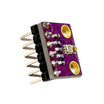
- BME280 Pre-Soldered Sensor - reads indoor temperature, humidity, and barometric pressure over I2C.
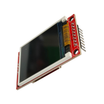
- 1.8" TFT LCD (ST7735) - color screen for displaying indoor and outdoor readings.
- ESP32-WROOM Dev Board - connects to Wi-Fi, calls the API, and drives the sensor and display.
- Dupont Jumper Wires - quick breadboard style wiring between modules.
External
- Free OpenWeatherMap API key
- Wi-Fi network
Note: BME280 is 3.3V and the ESP32 is 3.3V, so direct connection is safe. The ST7735 module used here has on-board level shifting and can run from 5V or 3.3V.
Step-by-Step Guide
Step 1 - Gather the components
Goal: Make sure you have the ESP32, BME280, and ST7735 TFT ready before wiring.
What to do: Lay out the modules and confirm the display is an ST7735 1.8 inch TFT and the sensor is a BME280 breakout.


Expected result: You are ready to wire the sensor and display to the ESP32.
Step 2 - Wire the BME280 (I2C) and ST7735 (SPI)
Goal: Connect the BME280 to the ESP32 over I2C and the ST7735 TFT to the ESP32 over SPI.
What to do: Follow the wiring diagram. The BME280 uses I2C on GPIO 21 (SDA) and GPIO 22 (SCL). The ST7735 uses SPI, with the module pins connected to the ESP32 pins shown.

Expected result: The modules are fully wired and powered from the ESP32, ready for firmware upload.
Step 3 - Get an OpenWeatherMap API key
Goal: Get credentials so the ESP32 can request outdoor weather data.
What to do: Register free at openweathermap.org/api. Copy your API key and your city ID.
Expected result: You have an API key and a city ID to paste into the sketch.
Step 4 - Upload the Arduino sketch
Goal: Program the ESP32 to read the BME280, fetch outdoor temperature from OpenWeatherMap, and render everything on the ST7735 TFT.
What to do: Paste the code below into the Arduino IDE, then replace YOUR_WIFI, YOUR_PASS, YOUR_API_KEY, and YOUR_CITY_ID. Compile and upload to your ESP32.
Code:
#include <WiFi.h>
#include <HTTPClient.h>
#include <ArduinoJson.h>
#include <Wire.h>
#include <Adafruit_BME280.h>
#include <Adafruit_GFX.h>
#include <Adafruit_ST7735.h>

Adafruit_BME280 bme;
#define TFT_CS 5
#define TFT_RST 4
#define TFT_DC 2
Adafruit_ST7735 tft(TFT_CS, TFT_DC, TFT_RST);

const char* SSID = "YOUR_WIFI";
const char* PASS = "YOUR_PASS";
const char* OWM_KEY = "YOUR_API_KEY";
const char* CITY_ID = "YOUR_CITY_ID";

float outdoorTemp = 0;

void fetchOutdoor() {
  HTTPClient http;
  String url = String("http://api.openweathermap.org/data/2.5/weather?id=") +
               CITY_ID + "&units=metric&appid=" + OWM_KEY;
  http.begin(url);
  if (http.GET() == 200) {
    StaticJsonDocument<1024> d;
    deserializeJson(d, http.getString());
    outdoorTemp = d["main"]["temp"].as<float>();
  }
  http.end();
}

void setup() {
  Serial.begin(115200);
  Wire.begin(21, 22);
  bme.begin(0x76);
  tft.initR(INITR_BLACKTAB); tft.setRotation(1);
  WiFi.begin(SSID, PASS);
  while (WiFi.status() != WL_CONNECTED) delay(500);
}

void loop() {
  fetchOutdoor();
  float t = bme.readTemperature();
  float h = bme.readHumidity();
  float p = bme.readPressure() / 100.0;
  tft.fillScreen(ST77XX_BLACK);
  tft.setCursor(0, 0); tft.setTextColor(ST77XX_WHITE);
  tft.printf("Indoor\n %.1fC %.0f%%\n %.0f hPa\n", t, h, p);
  tft.printf("\nOutdoor\n %.1fC", outdoorTemp);
  delay(60000);
}
Expected result: The ESP32 connects to Wi-Fi, reads indoor values from the BME280, fetches outdoor temperature from OpenWeatherMap, and updates the TFT about once per minute.
Step 5 - Verify the display updates
Goal: Confirm indoor and outdoor readings show correctly on the TFT.
What to do: Power the ESP32 via USB and watch the screen refresh. If needed, open Serial Monitor to confirm the board is connected to Wi-Fi.


Expected result: You see live indoor temperature, humidity, and pressure plus outdoor temperature on the TFT.
Step 6 - Optional improvements
Goal: Extend the same sensor plus API plus screen pattern with extra features.
What to do: If you want to take the build further, try one of these add-ons:
- Add 5-day forecast icons (OpenWeatherMap returns weather codes; map them to bitmap icons)
- Log indoor readings to a microSD with timestamp for trend charts
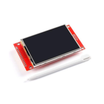
- Add a touch interface (swap ST7735 for a 2.8 inch ILI9341 TFT)
- Hook to Home Assistant for a smart-home temperature dashboard
Expected result: A clear next step for turning this weather station into a broader dashboard project.
Conclusion
This ESP32 weather station combines a local BME280 sensor, OpenWeatherMap cloud data, and an ST7735 color TFT so you can see indoor and outdoor conditions on one always-on screen. Once you have this working, the same approach can power other small dashboards using sensors plus an API plus a display.
Want the exact parts used in this build? Grab them from ShillehTek.com. If you want help customizing this project or building something for your product, check out our IoT consulting services.




.png?v=25000753014097803521791168436)

.png?v=68677308723310773341791168436)


