

Project Overview
Arduino + RC522 RFID reader: In this build, you will wire an MFRC522 (RC522) 13.56 MHz RFID module to an Arduino over SPI and print the UID of any MIFARE card or key fob you tap on the reader.
The RC522 is a common RFID reader for Arduino projects with a typical read range of about 3 cm, plus MIFARE and NTAG support out of the box. Use it for door locks, attendance systems, inventory trackers, or maker-space access control.
- Time: ~20 minutes
- Skill level: Beginner
- What you will build: An Arduino that prints the UID of any card or fob you tap on the reader.

Parts List
From ShillehTek
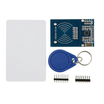
- RC522 RFID Reader Writer Kit - the MFRC522 RFID module used to read 13.56 MHz tags over SPI.
- 13.56 MHz Smart Card - a MIFARE-compatible card to test UID reads.
- 13.56 MHz Key Fob - a compact key fob tag to test UID reads.
- Arduino Nano V3.0 Pre-Soldered - the Arduino board running the RC522 library and printing UIDs to Serial.
- 120 PCS Dupont Jumper Wires - for breadboard wiring between the Arduino and the RC522 pins.
External
- USB cable + Arduino IDE
Note: The RC522 is 3.3 V only on its logic side. The breakout has a level shifter on VCC, but if you are wiring direct to GPIOs ensure your board outputs 6 3.3 V on SPI lines.
Step-by-Step Guide
Step 1 - Identify the Pins
Goal: Confirm the RC522 pin names so you can wire SPI correctly.
What to do: Locate the labeled pins on the RC522 module. The board has 8 pins; in this project we use 7 of them. IRQ is optional and not required for reading UIDs.

Expected result: You can identify VCC, GND, RST, SDA (NSS/CS), MOSI, MISO, and SCK on the RC522.
Step 2 - Wire SPI
Goal: Connect the RC522 to the Arduino using SPI and the correct power pin.
What to do: Wire the RC522 to the Arduino using the mapping below. Make sure VCC goes to 3.3 V (not 5 V).

- VCC 3.3 V (not 5 V)
- GND GND
- RST D9
- SDA (NSS / CS) D10
- MOSI D11
- MISO D12
- SCK D13
Expected result: The RC522 is powered from 3.3 V and connected to Arduino SPI pins with RST on D9 and CS on D10.
Step 3 - Install the Library
Goal: Add the Arduino library needed to communicate with the MFRC522 reader.
What to do: In the Arduino IDE, open Library Manager and install MFRC522 by GithubCommunity.
Expected result: The MFRC522 library is installed and available for your sketch.
Step 4 - Upload the Sketch
Goal: Program the Arduino to detect a tag and print the UID to Serial Monitor.
What to do: Copy the sketch below, select the correct board and port, then upload. After uploading, open Serial Monitor at 9600 baud.
Code:
#include <SPI.h>
#include <MFRC522.h>

const int RST_PIN = 9;
const int SS_PIN  = 10;
MFRC522 rfid(SS_PIN, RST_PIN);

void setup() {
  Serial.begin(9600);
  SPI.begin();
  rfid.PCD_Init();
  Serial.println("Tap a card...");
}

void loop() {
  if (!rfid.PICC_IsNewCardPresent()) return;
  if (!rfid.PICC_ReadCardSerial()) return;

  Serial.print("UID: ");
  for (byte i = 0; i < rfid.uid.size; i++) {
    if (rfid.uid.uidByte[i] < 0x10) Serial.print('0');
    Serial.print(rfid.uid.uidByte[i], HEX);
    if (i < rfid.uid.size - 1) Serial.print(':');
  }
  Serial.println();

  rfid.PICC_HaltA();
  rfid.PCD_StopCrypto1();
}
Expected result: Serial Monitor prints Tap a card... and waits for an RFID tag.
Step 5 - Tap a Card
Goal: Verify the RC522 is reading tags by checking the UID output.
What to do: Hold a MIFARE card or key fob close to the RC522 antenna area. Each time you tap, watch Serial Monitor for a new UID line.


Expected result: Each tap prints a UID in hex (often 4 or 7 bytes) to Serial Monitor.
Step 6 - Where to Take It Next
Goal: Use the UID read as an input to larger projects.
What to do: Extend the sketch logic using the UID string as a key for actions like access control, logging, or display.
- Compare UID against an allow-list and toggle a relay = electronic lock
- Log UIDs to an SD card with a timestamp = attendance system
- Write data to MIFARE blocks for stored balances or names
- Combine with an OLED to show the cardholders name on tap
Expected result: You have clear next steps to turn UID reads into an action, a record, or on-screen feedback.
Conclusion
You built an Arduino project that uses the RC522 (MFRC522) RFID reader over SPI to detect 13.56 MHz tags and print each card or key fob UID to Serial Monitor. Once you can reliably read UIDs, you can use them as IDs for access control, logging, or UI feedback.
Want the exact parts used in this build? Grab them from ShillehTek.com. If you want help customizing this project or building something for your product, check out our IoT consulting services.








.png?v=25000753014097803521791168436)

.png?v=68677308723310773341791168436)


