

Project Overview
NRF24L01 Wireless Communication with Arduino: In this tutorial, you will learn how to use the NRF24L01 2.4 GHz RF transceiver module to establish wireless communication between two Arduino boards. The NRF24L01 is a low-cost, ultra-low-power radio module that can both transmit and receive data, making it perfect for home automation, remote sensing, and wireless control projects without depending on WiFi.
- Time: 45 minutes to 1.5 hours
- Skill level: Intermediate
- What you will build: A wireless link between two Arduinos that can send text, control LEDs remotely, and communicate bidirectionally.

Parts List
From ShillehTek
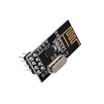
- NRF24L01+ 2.4GHz Wireless Transceiver Module (x2) - compact RF modules with built-in PCB antenna, up to 100 m range
-
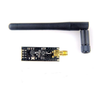
NRF24L01+ PA LNA with External Antenna (optional) - extended range variant with up to 1100 m line-of-sight range
- 120pcs Dupont Jumper Wires - for connecting the SPI bus between the NRF24L01 and the Arduino
External
- 2x USB cables - to connect both Arduinos to computers
- Computer(s) with Arduino IDE installed
- 10 μF to 100 μF decoupling capacitor (x2) - strongly recommended across VCC and GND to stabilize power
- 2x LEDs and 2x push buttons (for the LED control example)
- Resistors (220 to 330 Ω for LEDs, 10 kΩ pull-down for buttons)
- Arduino Uno R3 (x2) - the microcontrollers for transmitter and receiver nodes
Note: The NRF24L01 operates at 3.3 V. Connect VCC to the Arduino’s 3.3 V pin, not 5 V. Applying 5 V to VCC will damage the module. However, all other pins (CE, CSN, SCK, MOSI, MISO) are 5 V tolerant.
Step-by-Step Guide
Step 1 - Understand the NRF24L01 Module
Goal: Learn what the NRF24L01 does and why it is useful for wireless Arduino projects.
What to do: The NRF24L01 is a 2.4 GHz RF transceiver, meaning a single module can both send and receive data. It operates in the ISM band, which is license-free in most countries.
Key features include a data rate of 250 kbps to 2 Mbps, ultra-low power consumption of about 12 mA during transmission (less than a single LED), and standby currents as low as 22 μA. The module supports 125 independent RF channels, and each channel can handle up to 6 data pipes, allowing one receiver to communicate with up to 6 transmitters simultaneously.
Communication is handled over the SPI bus, and the module includes Enhanced ShockBurst for automatic packet handling, acknowledgement, and retransmission.


Expected result: You understand that the NRF24L01 is a low-power, multi-channel wireless transceiver that communicates via SPI and can form networks of up to 6 nodes per receiver.
Step 2 - Learn the Pinout
Goal: Identify each pin on the NRF24L01 module.
What to do: The NRF24L01 has 8 pins in a 2x4 header:
- GND - Ground reference
- VCC - Power supply, 1.9 V to 3.6 V
- CE (Chip Enable) - Controls transmit/receive mode
- CSN (Chip Select Not) - SPI chip select
- SCK - SPI clock
- MOSI - SPI data input
- MISO - SPI data output
- IRQ - Interrupt output (optional)

Expected result: You can identify each pin on the module.
Step 3 - Wire the Circuit
Goal: Connect two NRF24L01 modules to two Arduino boards.
What to do: The wiring is identical on both transmitter and receiver. Do not place the NRF24L01 on a breadboard. Use jumper wires instead. Make the following connections on each Arduino:
- GND -> Arduino GND
- VCC -> Arduino 3.3V
- CE -> Arduino D9
- CSN -> Arduino D8
- SCK -> Arduino D13
- MOSI -> Arduino D11
- MISO -> Arduino D12
Add a 10 to 100 uF decoupling capacitor across VCC and GND on each module.


Expected result: Both Arduino boards have an NRF24L01 module wired identically with decoupling capacitors.
Step 4 - Install the RF24 Library
Goal: Add the TMRh20 RF24 library to the Arduino IDE.
What to do: Open the Arduino IDE and go to Sketch > Include Library > Manage Libraries. Search for "RF24" and install the version by TMRh20.

Expected result: The RF24 library is installed and ready to use.
Step 5 - Example 1: Send Text Wirelessly
Goal: Transmit a text message from one Arduino to another.
What to do: Upload the transmitter code to one Arduino and the receiver code to the other.
Transmitter Code:
#include <SPI.h>
#include <RF24.h>

RF24 radio(9, 8); // CE, CSN
const byte address[6] = "00001";

void setup() {
  radio.begin();
  radio.openWritingPipe(address);
  radio.setPALevel(RF24_PA_MIN);
  radio.stopListening();
}

void loop() {
  const char text[] = "Hello from TX";
  radio.write(&text, sizeof(text));
  delay(1000);
}
Receiver Code:
#include <SPI.h>
#include <RF24.h>

RF24 radio(9, 8); // CE, CSN
const byte address[6] = "00001";

void setup() {
  Serial.begin(9600);
  radio.begin();
  radio.openReadingPipe(0, address);
  radio.setPALevel(RF24_PA_MIN);
  radio.startListening();
}

void loop() {
  if (radio.available()) {
    char text[32] = "";
    radio.read(&text, sizeof(text));
    Serial.println(text);
  }
}

Expected result: The receiver Serial Monitor displays "Hello from TX" every second.
Step 6 - Example 2: Control LEDs Remotely
Goal: Press buttons on the transmitter to light up LEDs on the receiver.
What to do: Add two push buttons to the transmitter and two LEDs to the receiver. When button B1 is pressed, the transmitter sends "B1". When B2 is pressed, it sends "B2". The receiver uses a switch statement to light the corresponding LED.


Expected result: Pressing each button on the transmitter lights the corresponding LED on the receiver.
Step 7 - Example 3: Bidirectional Communication
Goal: Have a single node act as both transmitter and receiver.
What to do: Create two pipe addresses. The sending address of node 1 becomes the receiving address of node 2 and vice versa. Each node alternates between stopListening() (TX mode) and startListening() (RX mode).
const byte addresses[][10] = {"ADDRESS01", "ADDRESS02"};

// Node 1 setup:
radio.openWritingPipe(addresses[0]);
radio.openReadingPipe(1, addresses[1]);

// Node 2 setup (swapped):
radio.openWritingPipe(addresses[1]);
radio.openReadingPipe(1, addresses[0]);

Expected result: Both Serial Monitors show data being sent and received.
Step 8 - Advanced: Multiceiver Networks
Goal: Understand how to scale beyond two nodes.
What to do: The NRF24L01 supports Multiceiver (Multiple Transmitter Single Receiver). Each RF channel is divided into 6 parallel data pipes, allowing one receiver to collect data from up to 6 transmitters simultaneously. For full mesh networking, the RF24Mesh library extends the base RF24 library with automatic address assignment and routing.


Expected result: You understand the Multiceiver concept and know that RF24Mesh enables full mesh networking.
Step 9 - Tips for Reliable Transmission
Goal: Optimize range and reliability.
What to do: Keep these factors in mind:
- Power supply noise is the most common issue. Always use a decoupling capacitor.
- Reduce the data rate to 250 kbps for better range.
- Increase PA level with radio.setPALevel(RF24_PA_MAX) when nodes are far apart.
- Avoid WiFi interference by using upper channels (100 to 125).
- Line of sight matters - walls reduce range significantly.
- External antenna modules (PA+LNA) can extend range to over 1000 m.

Expected result: You know the main factors that affect range and can tune your setup.
Conclusion
You connected two NRF24L01 wireless transceiver modules to Arduino boards over SPI, installed the RF24 library, and built three working examples: one-way text transmission, remote LED control, and bidirectional communication. You also learned about Multiceiver networks for scaling to multiple nodes and practical tips for optimizing range. The NRF24L01 is a versatile, low-power alternative to WiFi for Arduino-to-Arduino communication in home automation, remote sensing, and wireless control projects.
Want the exact parts used in this build? Grab them from ShillehTek.com. If you want help customizing this project or building something for your product, check out our IoT consulting services.
Photo credits: images referenced from Tarantula3 on Instructables.


.png?v=25000753014097803521791168436)

.png?v=68677308723310773341791168436)


